Maintaining and Optimizing Pipelines
What this chapter covers
- Monitor pipeline health, including failure rate, duration, and flaky tests
- Optimize a pipeline for cost, time, performance, and reliability
- Optimize pipeline concurrency for performance and cost
- Design and implement a retention strategy for pipeline artifacts and dependencies
- Migrate a pipeline from classic to YAML in Azure Pipelines
A pipeline is a product with users - developers who wait for it. Slow or flaky pipelines push people to batch changes, retry blindly and ignore red builds, which erodes the whole DevOps feedback loop. This chapter covers how to measure pipeline health, make pipelines faster and cheaper, control concurrency, keep storage under control with retention, and move legacy classic pipelines to YAML.
Monitoring pipeline health
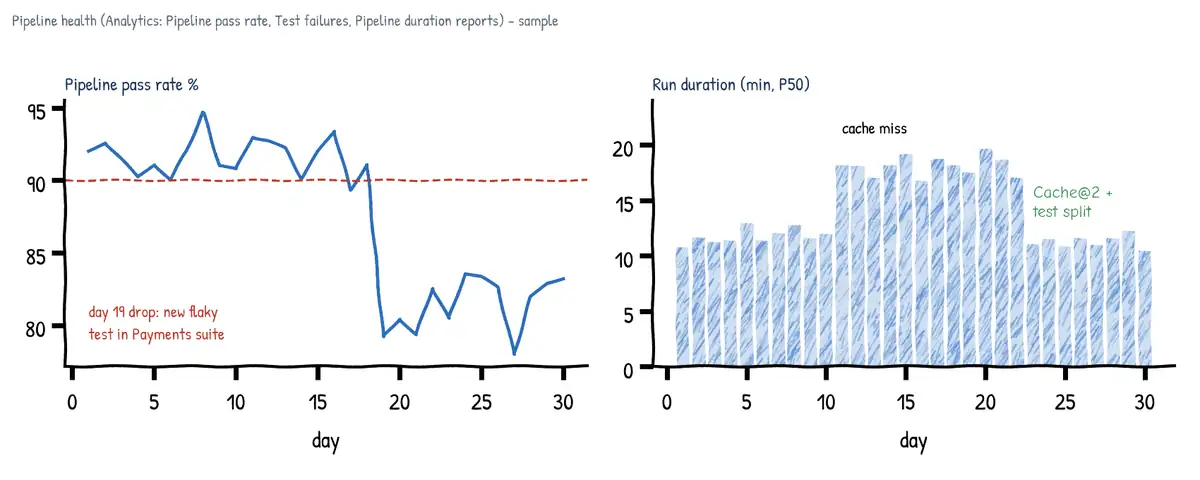
Azure Pipelines includes pipeline analytics (the Analytics tab of a pipeline), powered by the Analytics service. The built-in reports are:
- Pipeline pass rate - percentage of runs that succeed, trend over 7/14/30 days, and the top failing tasks - tells you which step breaks most often.
- Test failures - pass rate of tests, top failing tests, new vs existing failures, linked to the runs where they failed.
- Pipeline duration - average and trend of total run duration and the tasks that take the longest - where to optimise.
- Test analytics / Test runs - per-test history, duration, outcome trend.
For custom views, the Analytics OData endpoint exposes entity sets such as PipelineRuns, PipelineRunActivityResults, TaskAgentRequestSnapshots (pool consumption), TestResultsDaily and TestRuns, which can be consumed in Power BI or dashboards. Dashboard widgets (Build history, Test results trend, Deployment status, Pipeline overview) put the numbers in front of the team. In GitHub, the Actions usage metrics and performance metrics pages (organization Insights) show minutes, job counts, queue time and failure rates per workflow and runner.
https://analytics.dev.azure.com/contoso/shop/_odata/v4.0-preview/PipelineRuns?
  $apply=filter(Pipeline/PipelineName eq 'shop-ci' and CompletedDate ge 2026-09-01Z)
  /groupby((RunOutcome), aggregate($count as Runs, RunDurationSeconds with average as AvgSec))
Flaky tests
A flaky test passes and fails on the same code. Flaky tests waste time, cause re-runs and teach developers to ignore failures. Azure DevOps has flaky test management (Project settings > Test management): enable system detection (a test that fails then passes on a re-run of the same build is marked flaky) or a custom detection where you mark tests flaky via API or the UI. You can choose that flaky test failures do not fail the build and are shown separately in the Tests tab, while the test is tracked as a bug and fixed or quarantined.
- Typical causes: timing/sleep-based waits, shared state between tests, test order dependence, external services, time zones and dates, resource contention on agents.
- Use
rerunFailedTests: truewithrerunMaxAttemptsinVSTest@3(or test framework retry) as a diagnostic aid, not a cure - track tests that only pass on retry. - Quarantine: move confirmed flaky tests to a separate category/test run so they do not block merges, with a work item and owner to fix them.
Optimizing for time, cost, performance and reliability
Caching
The Cache@2 task saves a directory at the end of a successful job and restores it at the start of the next run when the key matches. Keys combine literal strings and file paths (whose content is hashed), so the cache is invalidated when a lock file changes. restoreKeys give prefix fallbacks for a partial hit. Caches are scoped to pipeline and branch (a PR or feature branch can read the main branch cache but not vice versa), are immutable once created, and expire after 7 days without use.
variables:
  NUGET_PACKAGES: $(Pipeline.Workspace)/.nuget/packages
  npm_config_cache: $(Pipeline.Workspace)/.npm

steps:
- task: Cache@2
  displayName: Cache NuGet packages
  inputs:
    key: 'nuget | "$(Agent.OS)" | **/packages.lock.json'
    restoreKeys: |
      nuget | "$(Agent.OS)"
    path: $(NUGET_PACKAGES)
    cacheHitVar: NUGET_CACHE_RESTORED
- script: dotnet restore --locked-mode
  condition: ne(variables.NUGET_CACHE_RESTORED, 'true')
- task: Cache@2
  displayName: Cache npm
  inputs:
    key: 'npm | "$(Agent.OS)" | web/package-lock.json'
    path: $(npm_config_cache)
- script: npm ci --prefix web
In GitHub Actions the equivalent is actions/cache (or the built-in cache: input of setup-node, setup-dotnet, setup-java); entries unused for 7 days are evicted and repository caches have a size limit (10 GB by default). Docker builds benefit from layer caching (--cache-from, BuildKit cache in ACR) and a well-ordered Dockerfile.
Other time savers
| Technique | How | Effect |
|---|---|---|
| Parallel jobs | Independent jobs without dependsOn; matrix strategy | Wall-clock down, needs parallel job capacity |
| Test slicing | VSTest@3 distributionBatchType + parallel: N | Split test suite across agents |
| Shallow fetch | checkout: self with fetchDepth: 1 | Faster clone of big history |
| Sparse checkout | sparseCheckoutDirectories / sparseCheckoutPatterns | Clone only needed folders |
| Skip checkout | checkout: none in deploy jobs | No clone where not needed |
| Path filters | trigger: paths: include/exclude | Do not build unrelated changes |
| Incremental builds | Self-hosted/stateful agents with clean: false, build tools' incremental mode | Rebuild only changed parts |
| Agent choice | Bigger VM SKU, Managed DevOps Pools, self-hosted near resources | CPU/IO bound steps faster; less download |
| Fail fast | Run lint/unit before long stages; condition | Earlier feedback, less waste |
| Batch CI | trigger: batch: true | Fewer runs on busy branches |
| Build once | Promote one artifact across stages | No rebuild per environment |
trigger:
  batch: true
  branches: { include: [ main ] }
  paths: { exclude: [ docs/*, '*.md' ] }

jobs:
- job: Test
  strategy:
    parallel: 4                       # 4 agents; tests sliced between them
  pool: { vmImage: windows-latest }
  steps:
  - checkout: self
    fetchDepth: 1                     # shallow fetch
  - task: VSTest@3
    inputs:
      testAssemblyVer2: '**/*Tests.dll'
      distributionBatchType: basedOnExecutionTime   # balance slices by past duration
      rerunFailedTests: true
      rerunMaxAttempts: 2
- job: Matrix
  strategy:
    matrix:
      linux:   { image: ubuntu-latest }
      windows: { image: windows-latest }
    maxParallel: 2
  pool: { vmImage: $(image) }
  steps:
  - script: dotnet test
Reliability
- Pin tool versions (
UseDotNet@2 version, lock files, container images by digest) so builds are reproducible. - Use
retryCountOnTaskFailurefor steps that hit flaky networks; use timeouts so hung jobs do not hold an agent for the 60-minute (or 360-minute) default. - Keep self-hosted agents clean:
workspace: clean: allor ephemeral agents (Managed DevOps Pools stateless, VM Scale Set agents with recycle after each use). - Use templates (
extends) so fixes to shared steps reach all pipelines.
Concurrency and cost
In Azure DevOps a parallel job is the right to run one job at a time; you need one parallel job per concurrent job across the organization. Microsoft-hosted and self-hosted parallel jobs are counted separately.
| Microsoft-hosted | Self-hosted | |
|---|---|---|
| Public project | Free: up to 10 parallel jobs (on request) | Unlimited, free |
| Private project, free grant | 1 parallel job, 1,800 min/month (60-min job limit), on request | 1 parallel job, unlimited minutes |
| Paid | Per parallel job per month; up to 360-min jobs | Cheaper per parallel job; +1 per VS Enterprise subscriber |
| You pay for | Parallel jobs only | Parallel jobs + your compute + upkeep |
- Check usage in Organization settings > Parallel jobs (view in-progress jobs) and the pool consumption report on agent pools; queueing means you are concurrency bound.
- Buy parallel jobs in Organization settings > Billing (requires an Azure subscription linked for billing).
- Self-hosted agents - pay for VMs, patching and security; win when builds need large caches, private network access, special hardware/licensed tools or long runtimes. VM Scale Set agent pools autoscale self-hosted agents.
- Managed DevOps Pools - Microsoft manages a pool of agents in your Azure subscription's billing (you pay for the Azure VMs) with VNet injection, custom or Azure Pipelines images, stateless or stateful agents (state kept up to 7 days for cache hits), standby agents on a schedule, jobs up to 2 days. Requires a dev center and project and registering
Microsoft.DevOpsInfrastructure. They count as self-hosted agents, so you still need self-hosted parallel jobs. They are the recommended replacement for VMSS agent pools. - GitHub Actions - minutes are included per plan for GitHub-hosted runners (public repos free), larger runners are billed per minute, self-hosted runners are free of GitHub charges; concurrency limits per plan apply.
- Limit concurrency deliberately: environment exclusive lock,
lockBehavior,maxParallelon matrix, GitHubconcurrency:groups withcancel-in-progressto cancel superseded runs.
# GitHub Actions: cancel older runs of the same PR to save minutes
concurrency:
  group: ci-${{ github.workflow }}-${{ github.ref }}
  cancel-in-progress: true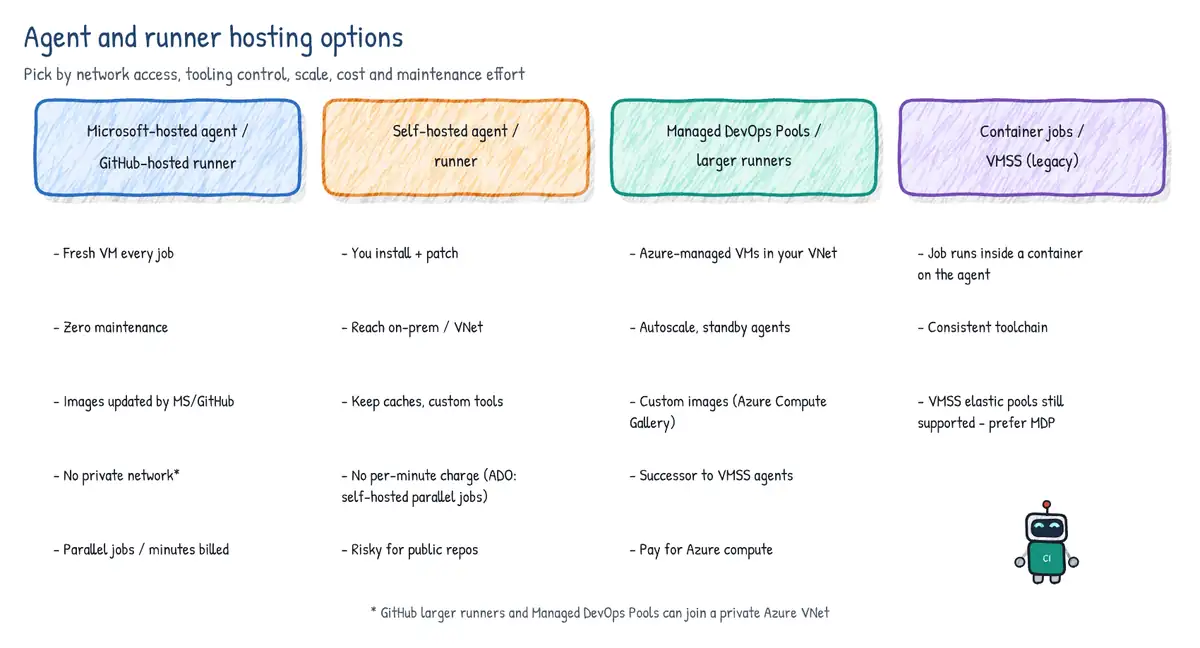
Retention strategy
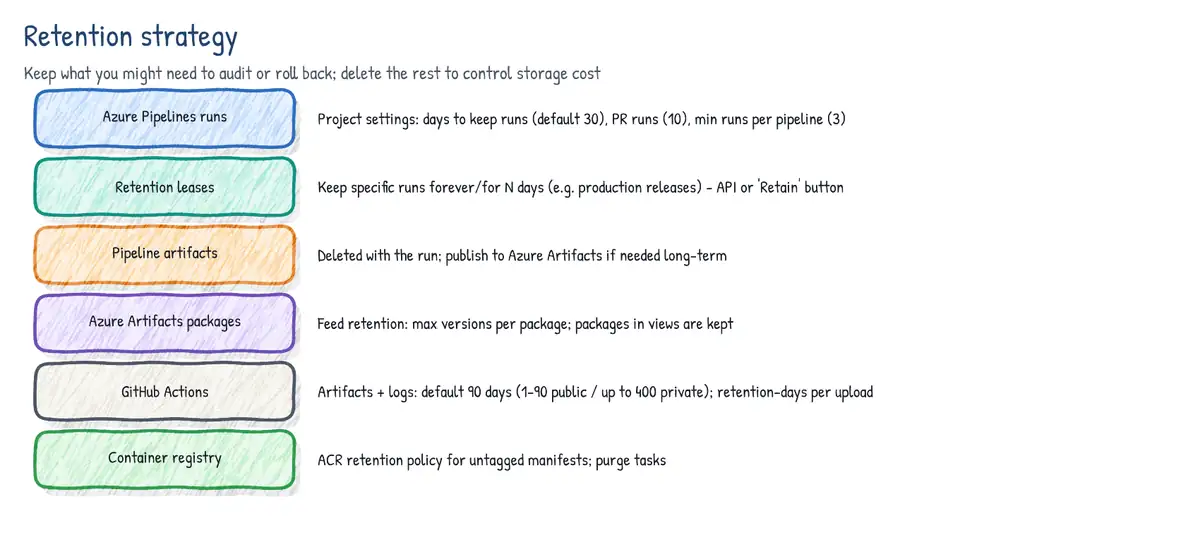
Every run produces logs, test results and artifacts. Retention policies delete old runs so storage stays bounded while keeping what you need for auditing, rollback and debugging.
Azure Pipelines run retention
- Project settings > Pipelines > Settings: Days to keep artifacts, symbols and attachments, Days to keep runs, Days to keep pull request runs, and Number of recent runs to retain per pipeline (defaults 30 / 30 / 10 / 3).
- When a run is deleted, its logs, pipeline/build artifacts, symbols, test results and run metadata go with it. Packages in Azure Artifacts are not governed by pipeline retention.
- Retention leases keep a specific run beyond policy. Add them manually (Retain on the run), via the Leases REST API from a script step using
System.AccessToken, or automatically: runs deployed by classic release pipelines and runs consumed through pipeline resources can be retained. Production releases should hold a lease on the build they deployed so you can redeploy it. - Classic release pipelines have their own per-stage retention (days to retain, minimum releases to keep).
- stage: Prod
  jobs:
  - deployment: Deploy
    environment: prod
    strategy:
      runOnce:
        deploy:
          steps:
          - script: echo deploy
          - pwsh: |
              # keep this run for one year because it is now in production
              $body = ConvertTo-Json @(@{
                daysValid         = 365
                definitionId      = $(System.DefinitionId)
                ownerId           = "User:$(Build.RequestedForId)"
                protectPipeline   = $false
                runId             = $(Build.BuildId)
              })
              $uri = "$(System.CollectionUri)$(System.TeamProject)/_apis/build/" +
                     "retention/leases?api-version=7.1"
              Invoke-RestMethod -Uri $uri -Method POST -Body $body `
                -ContentType application/json `
                -Headers @{ Authorization = "Bearer $(System.AccessToken)" }
displayName: Add retention leaseAzure Artifacts package retention
- Feed settings > Retention policies: Maximum number of versions per package and Days to keep recently downloaded packages. A version is deleted only when the count limit is exceeded and it has not been downloaded within the window.
- Packages promoted to a view (e.g.
@Release) are exempt - promote what you ship. - Deleted packages go to the recycle bin for 30 days (still counting toward storage) and can be restored.
- Upstream-source packages saved into the feed count too; storage beyond the free 2 GB is billed per organization.
GitHub retention
- Artifacts and logs from workflow runs default to 90 days; configurable per repo/org/enterprise (public repos 1-90 days, private/internal up to 400 days).
- Per artifact:
retention-daysinput onactions/upload-artifact(cannot exceed the repo limit). - Caches are evicted after 7 days without access or when the size limit is hit.
- GitHub Packages: delete versions via UI/API or the
actions/delete-package-versionsaction on a schedule.
- uses: actions/upload-artifact@v4
  with:
    name: test-results
    path: TestResults/
retention-days: 7 # short-lived diagnostic artifactMigrating classic pipelines to YAML
Classic build and release pipelines are legacy: new organizations have creation of classic pipelines disabled by default (Organization/Project settings > Pipelines > Disable creation of classic build pipelines / classic release pipelines), and new features (templates with extends, environment checks, pipeline resources, Managed DevOps Pools integration patterns) target YAML. YAML pipelines are versioned with the code, reviewed via PR and reusable through templates.
- Inventory classic pipelines, task groups, variable groups, service connections, deployment groups and release gates.
- For a classic build: open it and use Export to YAML (pipeline menu) or View YAML on the agent job/individual tasks to get a starting point; commit the file to the repo (e.g.
azure-pipelines.yml). - Convert task groups to step or job templates; reference existing variable groups with
variables: - group:; recreate UI-defined variables (they are only listed in comments) and review exportedschedules: cron, which YAML evaluates in UTC instead of the organization time zone. - For a classic release there is no export: map each stage to a YAML stage with a deployment job targeting an environment.
- Move pre-deployment approvals and gates to environment checks (approvals, Azure Monitor alerts, REST/Function, business hours, exclusive lock); move deployment groups to environment VM resources.
- Replace release artifact triggers with build + deploy stages in one pipeline, or with pipeline resources that trigger on completion of the CI pipeline.
- Run old and new side by side on a non-production environment, compare, then disable the classic pipeline (keep it for history) and update branch policies' build validation to the new pipeline.
| Classic concept | YAML equivalent |
|---|---|
| Release stage | stage + deployment job + environment |
| Pre-deployment approval | Approval check on the environment |
| Release gates (Azure Monitor, REST, work item query) | Environment checks |
| Deployment group | Environment with VirtualMachine resources |
| Task group | Step / job template |
| Release artifact + continuous deployment trigger | resources: pipelines: with trigger, or multi-stage pipeline |
| Release variables / variable groups | variables / variable groups (+ Key Vault link) |
| Stage scheduled trigger | schedules: cron |
| Agent job / agentless job | job / job with pool: server |
| Manual intervention task | ManualValidation@1 in an agentless (server) job |
If the target platform is GitHub Actions instead, GitHub Actions Importer (gh actions-importer audit | dry-run | migrate) analyses Azure DevOps pipelines (classic and YAML) and generates workflows plus a report of what needs manual work.
Use case: 'The 45-minute build'
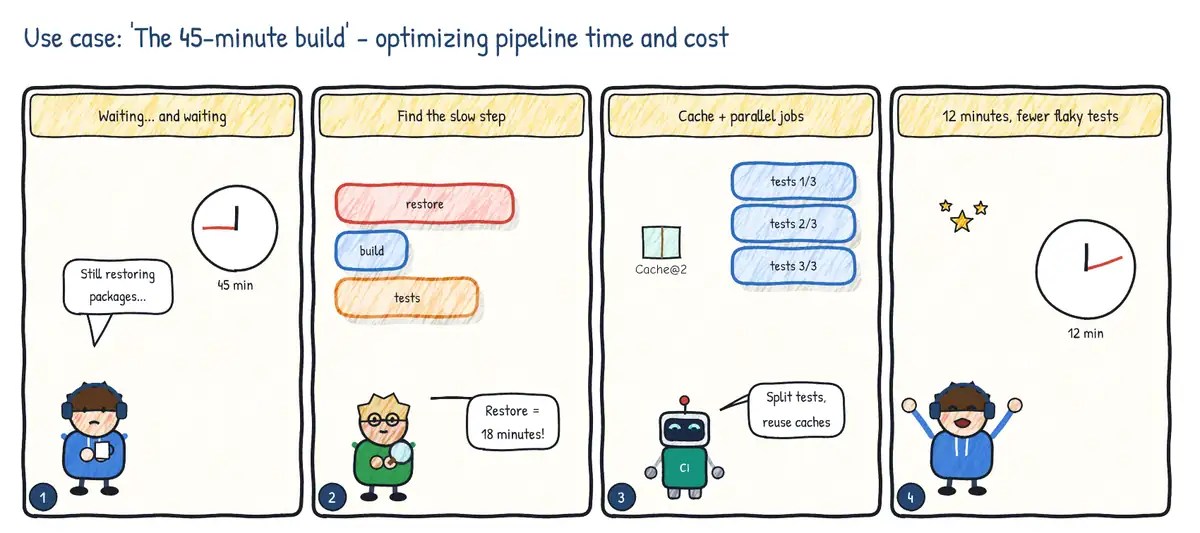
Situation. Developers wait 45 minutes for PR validation, so they batch changes and review quality drops. A few flaky tests fail randomly and are re-run until green.
| Step | Practice | Feature used |
|---|---|---|
| 1 | Measure before optimizing | Pipeline duration and pass-rate analytics, test failure reports |
| 2 | Stop re-downloading dependencies | Cache@2 keyed on the lock file |
| 3 | Do more at once | Parallel jobs / test slicing; extra parallel jobs or agents |
| 4 | Deal with flaky tests | Flaky test detection; quarantine and fix instead of retrying |