Source Control Strategy
What this chapter covers
- Design a branch strategy, including trunk-based development, feature branch, and release branch
- Design and implement a pull request workflow by using branch policies and branch protections
- Implement branch merging restrictions by using branch policies and branch protections
- Design a strategy for managing large files, including Git Large File Storage (LFS) and git-fat
- Design a strategy for scaling and optimizing a Git repository, including Scalar and cross-repository sharing
- Configure permissions in the source control repository
- Configure tags to organize the source control repository
- Recover specific data by using Git commands
- Remove specific data from source control
Domain 2 is worth 10-15% of the exam, but its ideas leak into every other domain: pipeline triggers depend on branch names, release strategies depend on how you branch, and security scanning depends on what is (and was ever) committed. The exam expects you to pick a branching model for a scenario, translate a governance requirement into the exact Azure Repos branch policy or GitHub ruleset setting, size a strategy for large or huge repositories, and recover from (or clean up after) mistakes with plain Git commands.
Git fundamentals refresher
Git is a distributed version control system. Every clone holds the full history (unless you deliberately ask for less with a shallow or partial clone). History is a directed acyclic graph of commits; each commit points to a tree (a directory snapshot) made of blobs (file contents), and to zero or more parent commits. Objects are content-addressed by hash (SHA-1 by default, SHA-256 optional), which is why rewriting any commit changes the ID of every descendant commit.
- Ref - a named pointer to a commit: branches (
refs/heads/*), remote-tracking branches (refs/remotes/origin/*), tags (refs/tags/*), and hosting-specific refs such as GitHubrefs/pull/123/heador Azure Reposrefs/pull/123/merge. - HEAD - the ref (or commit, when 'detached') that is currently checked out.
- Index (staging area) - the snapshot that the next commit will record.
- Working tree - the files on disk.
- Reflog - a local, per-repository journal of where each ref and HEAD pointed over time. It is not pushed and is the first tool for local data recovery.
- Fast-forward - when the target branch has no commits that the source lacks, Git can just move the pointer; no merge commit is required.
git switch -c feature/login        # create and switch to a branch
git add -p && git commit -m "Add login form"
git fetch origin                    # update remote-tracking refs only
git rebase origin/main              # replay my commits on top of latest main
git push -u origin feature/login    # publish and set upstream
git log --oneline --graph --decorate --allBranching strategies
A branching strategy is a team agreement about which long-lived branches exist, where new work starts, how work gets back to the integration branch, and where releases are cut and patched. The right choice depends on release cadence, how many versions you support in production at once, team size, and the maturity of your automated testing and feature-flag practice.
Trunk-based development
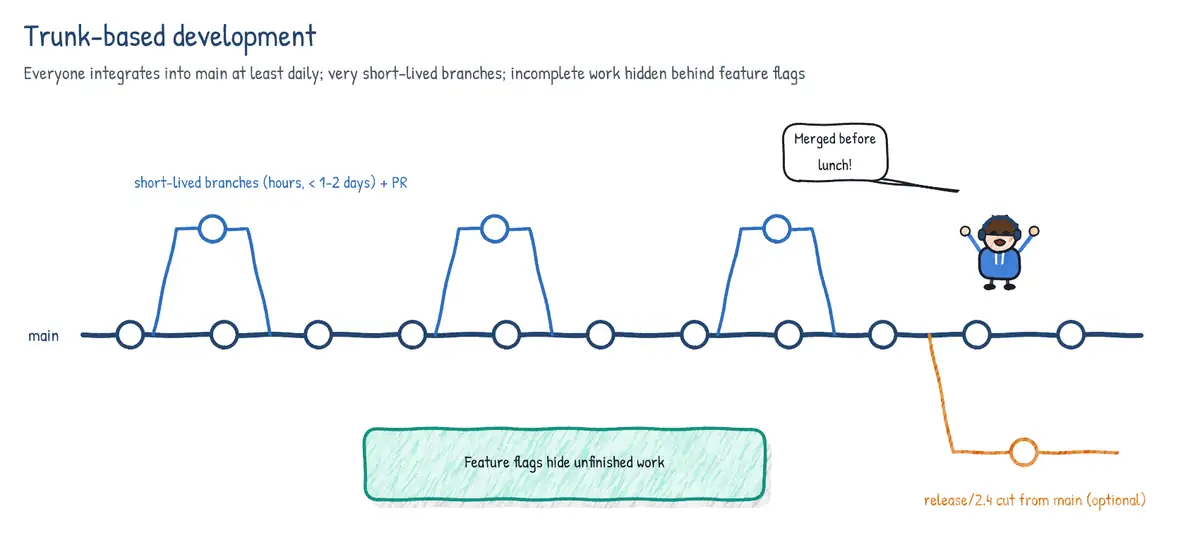
Everyone integrates into a single shared branch (main, the trunk) at least daily. Work happens either directly on trunk (small, very mature teams) or on short-lived topic branches that live hours to a couple of days and merge through a pull request. Unfinished features are hidden behind feature flags rather than kept on long-lived branches. Releases are made from trunk, optionally with a release branch cut just-in-time for stabilisation. Trunk-based development minimises merge conflicts and is the strategy most strongly correlated with high DORA performance, but it requires fast, reliable CI and good test coverage.
Feature branch workflow (and GitHub Flow)
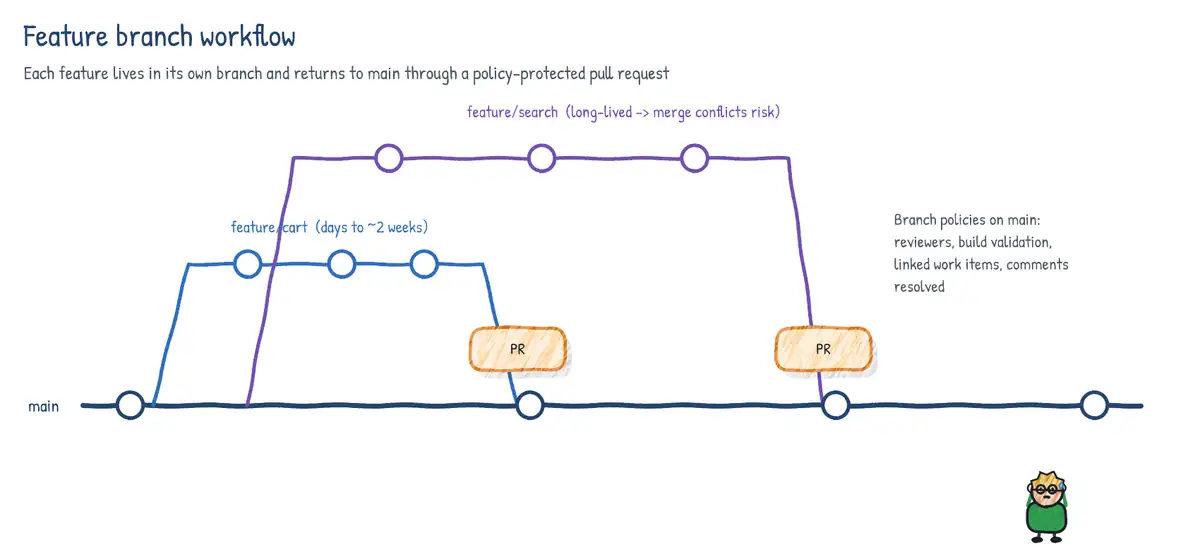
Each feature, bug fix or experiment gets its own branch from main, and is merged back through a pull request once reviewed and validated. GitHub Flow is the lightweight version: one long-lived branch (main), which is always deployable; create a branch, commit, open a PR, discuss, deploy (optionally from the branch), merge. The risk is feature branches that live for weeks: the longer a branch lives, the more painful its integration. Keep branches small and short.
Release branch strategy (Microsoft Release Flow)
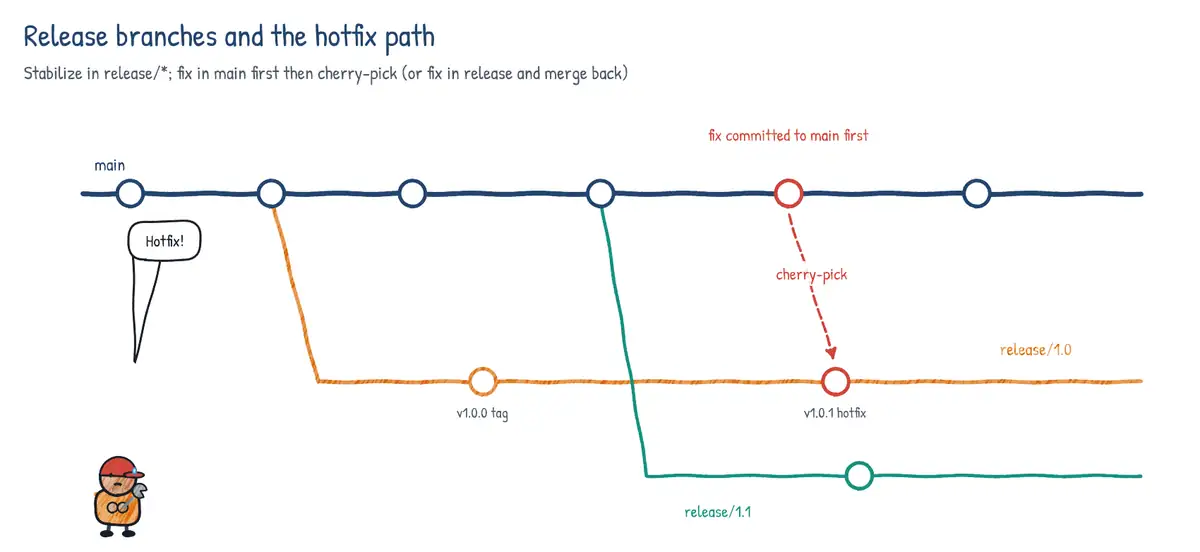
Development happens on main with short-lived topic branches (trunk-based in spirit). At the end of each sprint or release train a releases/M130-style branch is cut from main. That branch is deployed and is never merged back. A production bug is fixed in main first via a normal PR and then cherry-picked into the affected release branch ('upstream first'), which guarantees the fix is not lost in the next release. Release branches suit products that must support several versions at once or that need a stabilisation period.
GitFlow
GitFlow (Vincent Driessen, 2010) uses two long-lived branches - main (production history, tagged releases) and develop (integration) - plus feature/* branches from develop, release/* branches from develop that merge to both main and develop, and hotfix/* branches from main that merge back to both main and develop. It fits boxed or versioned software with scheduled releases, but its many long-lived branches and double merges slow continuous delivery. Even its author now recommends simpler flows for continuously delivered web apps.
| Aspect | Trunk-based | Feature branch / GitHub Flow | Release branch | GitFlow |
|---|---|---|---|---|
| Long-lived branches | main only | main only | main + releases/* | main + develop |
| Branch lifetime | Hours to 1-2 days | Days (keep short) | Release branches: months | Features: days-weeks |
| Unfinished work hidden by | Feature flags | Unmerged branch / flags | Flags on main | Unmerged feature branch |
| Release from | main (or just-in-time cut) | main | releases/* branch | release/* then main + tag |
| Hotfix path | Fix on main, roll forward | Fix branch -> PR -> main | Fix main, cherry-pick | hotfix/* -> main and develop |
| Multiple prod versions | Poor | Poor | Good | Good |
| Merge pain | Lowest | Low-medium | Low (cherry-picks only) | Highest |
| Best for | CI/CD, mature tests | Most web/SaaS teams | Sprint trains, versioned SaaS | Boxed/versioned products |
Merge types
How a pull request is completed changes the shape of history. Both Azure Repos and GitHub offer four equivalent strategies, and both let you restrict which are allowed.
| Azure Repos name | GitHub equivalent | Resulting history |
|---|---|---|
| Merge (no fast-forward) | Create a merge commit | All source commits + a merge commit (non-linear) |
| Squash commit | Squash and merge | One new single-parent commit on target; linear |
| Rebase and fast-forward | Rebase and merge | Source commits replayed onto target; linear, no merge commit |
| Semi-linear merge | (no direct button) | Rebase source onto target, then a merge commit |
- Merge (no fast-forward) preserves exact history and makes it obvious which commits came in with which PR, but history becomes a busy graph.
- Squash gives one clean commit per PR - easy to revert, easy to read release notes from - but loses the intermediate commits, and the source branch's commits are no longer ancestors of the target, so re-using the branch causes duplicate-change conflicts. Delete the branch after squashing.
- Rebase and fast-forward keeps individual commits but rewrites their IDs; linear history.
- Semi-linear (rebase with merge commit) keeps a linear 'spine' while still grouping each PR's commits under a merge commit - a good compromise for teams that want
git log --first-parentto read like a changelog.
Pull request workflow with Azure Repos branch policies
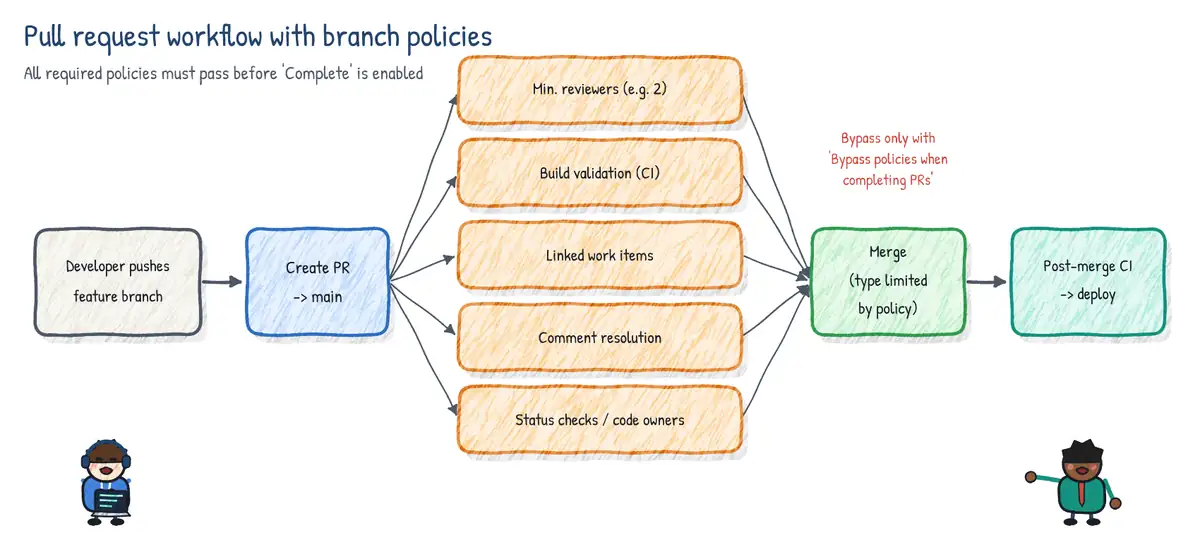
As soon as any required branch policy is configured on a branch, that branch can only be changed through a pull request: direct pushes are rejected for everyone without the 'Bypass policies when pushing' permission. Policies are set per branch (Repos > Branches > ... > Branch policies), per repository for all branches matching a pattern, or across all repositories in the project (Project settings > Repositories > Policies, 'cross-repo policies').
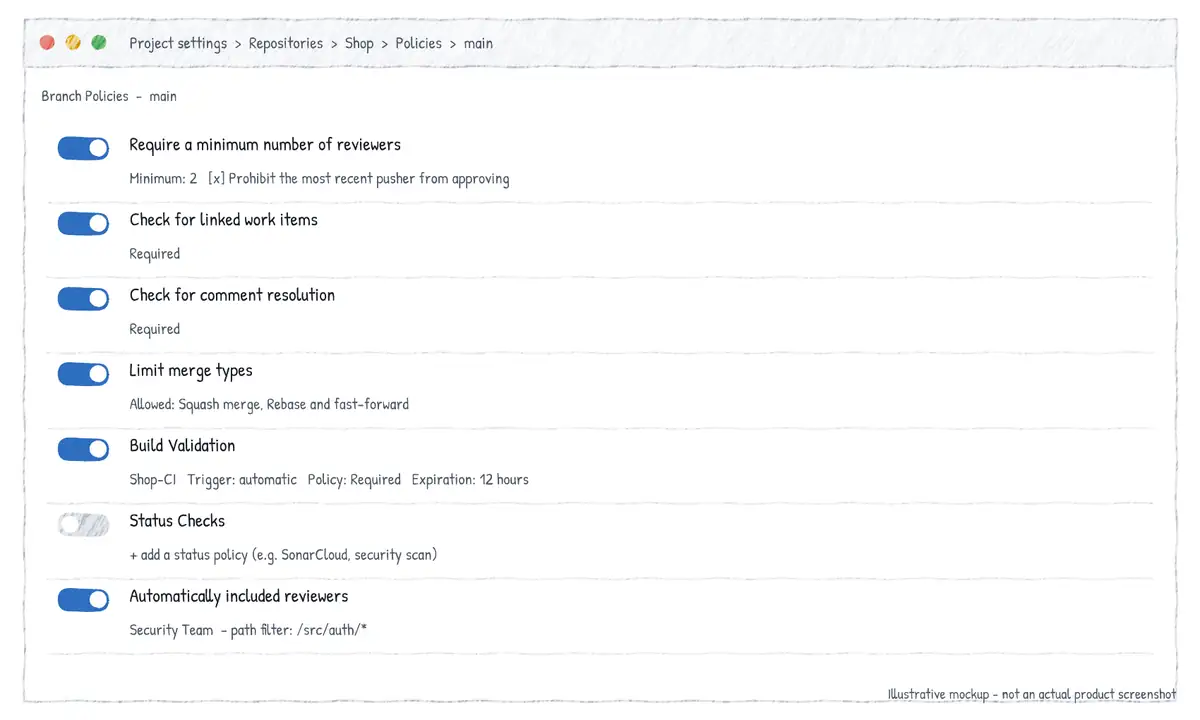
| Policy | What it enforces | Key options |
|---|---|---|
| Require a minimum number of reviewers | N approvals before completion | Allow requestors to approve own; prohibit last pusher; reset votes on push |
| Check for linked work items | PR must link at least one work item | Required or Optional |
| Check for comment resolution | All comments resolved before completion | Required or Optional |
| Limit merge types | Only selected merge strategies allowed | Basic, Squash, Rebase+FF, Rebase with merge commit |
| Build validation | A pipeline run must succeed for the PR | Automatic/manual trigger; expiration; path filter; required/optional |
| Status checks | An external service must post a succeeded status | Genre/name; reset on new changes; applicability; path filter |
| Automatically included reviewers | Adds users/groups as reviewers | Required/optional; path filters; activity feed message |
Minimum number of reviewers
- Allow requestors to approve their own changes - off by default; when off, the author's vote does not count toward the minimum.
- Prohibit the most recent pusher from approving their own changes - stops someone pushing a change into another person's PR and then approving it (segregation of duties).
- Allow completion even if some reviewers vote to wait or reject - otherwise a single Reject or Wait for author blocks completion.
- When new changes are pushed - keep votes, require at least one approval on the last iteration, reset all approval votes (keeps rejects/waits), or reset all code reviewer votes.
Build validation
Build validation queues a pipeline against the PR's merge commit (the result of merging source into target), so it tests what main would look like after completion. Options: Trigger automatic (whenever the source branch is updated) or manual; Policy requirement required or optional; Build expiration - immediately when the target branch is updated, after N hours if the target branch has been updated, or never; a path filter so that, for example, a docs-only change does not run the API build; and a display name. You can add several build validation policies to one branch (for example one per microservice folder).
Status checks
Status checks let an external tool (a security scanner, an Azure Function, a third-party CI system) post a status to the PR through the REST API (genre/name, state such as succeeded or failed). The policy requires that status to be 'succeeded'. You can restrict which identity may post it, reset it when new changes are pushed, and choose whether it applies by default or only once the service has posted a status (conditional).
Automatically included reviewers and path filters
Add specific people or groups as required or optional reviewers when files in certain paths change - the Azure Repos equivalent of CODEOWNERS. Path filters use /-rooted paths, * wildcards, ; to separate multiple paths and ! to exclude, for example /src/payments/*;!/src/payments/docs/*. Path filters are also available on build validation and status check policies.
# Azure CLI (azure-devops extension) - protect main
REPO=$(az repos show -r web-app --query id -o tsv)
az repos policy approver-count create --repository-id $REPO --branch main \
  --blocking true --enabled true --minimum-approver-count 2 \
  --creator-vote-counts false --allow-downvotes false --reset-on-source-push true
az repos policy work-item-linking create --repository-id $REPO --branch main \
  --blocking true --enabled true
az repos policy comment-required create --repository-id $REPO --branch main \
  --blocking true --enabled true
az repos policy merge-strategy create --repository-id $REPO --branch main \
  --blocking true --enabled true --allow-squash true --allow-no-fast-forward false
az repos policy build create --repository-id $REPO --branch main \
  --blocking true --enabled true --build-definition-id 42 --display-name "PR CI" \
  --manual-queue-only false --queue-on-source-update-only true --valid-duration 720 \
  --path-filter "/src/*"
az repos policy required-reviewer create --repository-id $REPO --branch main \
  --blocking true --enabled true --required-reviewer-ids "dba-team@contoso.com" \
  --message "DB schema change" --path-filter "/db/*"
Repository-level policies (not branch policies)
Under Repository settings > Policies, Azure Repos also offers push-time guards that apply to every branch: commit author email validation, file path validation (block pushes that add paths matching a pattern, such as *.pfx), case enforcement, reserved names, maximum path length and maximum file size (block blobs above a size - a natural partner to a Git LFS strategy). Secret push protection comes from GitHub Secret Protection for Azure DevOps (formerly part of GitHub Advanced Security for Azure DevOps).
Pull request features that support the workflow
- Draft PRs - signal work in progress; reviewers are not asked to vote and build validation policies can be set to skip drafts until the PR is published.
- Auto-complete - the PR completes itself (with the chosen merge type, delete-source-branch and work-item transition options) as soon as all policies pass.
- Cherry-pick and Revert buttons on a completed PR create a new branch and a new PR, so the fix or rollback also goes through policies.
- Override (bypass) - users with 'Bypass policies when completing pull requests' can complete a PR with failing policies; they must enter a reason, which is audited.
GitHub branch protection rules and rulesets
GitHub offers two mechanisms. Classic branch protection rules target one branch-name pattern each; only one rule applies to a given branch. Repository rulesets (and organisation rulesets on GitHub Team/Enterprise plans) are named, layerable collections of rules that can target branches or tags, have an enforcement status (Active, Disabled, and Evaluate on GitHub Enterprise for dry-run insights), a bypass list (roles, teams, GitHub Apps, deploy keys), and are visible to anyone with read access. When several rulesets match, all of their rules are aggregated and the most restrictive version applies. Rulesets are the recommended approach for new configuration; tag protection rules were retired in favour of tag rulesets.
| Rule | Effect |
|---|---|
| Require a pull request before merging | No direct pushes; set required approvals (1-10) |
| Dismiss stale approvals on new commits | New pushes invalidate earlier approvals |
| Require review from Code Owners | An owner from CODEOWNERS must approve changed paths |
| Require approval of the most recent push | Last pusher cannot be the only approver |
| Require conversation resolution | All review threads resolved before merge |
| Require status checks to pass | Named checks (Actions jobs, apps) must succeed |
| Require branches to be up to date | Head must include latest base before merge (strict) |
| Require signed commits | Every commit must have a verified GPG/SSH/S/MIME signature |
| Require linear history | Blocks merge commits; only squash or rebase merges |
| Require merge queue | PRs merge via a queue that re-tests against the latest base |
| Require deployments to succeed | Named environments must have a successful deployment |
| Block force pushes / restrict deletions | Protects the ref from rewrite and removal |
| Restrict who can push / Lock branch | Limit pushers to people/teams/apps; read-only branch |
CODEOWNERS
A CODEOWNERS file in .github/, the repository root or docs/ (first found in that order) maps path patterns to users or teams. Owners are automatically requested for review when a PR touches their paths; with 'Require review from Code Owners' their approval becomes mandatory. The last matching pattern wins, the file is read from the PR's base branch, and owners must have write access to the repository.
# .github/CODEOWNERS
*                      @contoso/platform-leads
/src/payments/         @contoso/payments-team
*.bicep                @contoso/cloud-infra
/db/migrations/        @contoso/dba @alice
/docs/                 # no owner: anyone may approve docs
Required status checks and merge queue
A required status check is matched by its check name (for GitHub Actions, the job name, or the name: you gave it) and optionally the app expected to supply it. The 'strict' setting (require branches to be up to date) forces authors to rebase/merge main before merging, which serialises busy repos. A merge queue solves that: approved PRs join a queue, GitHub creates temporary gh-readonly-queue/main/... branches containing the base plus queued PRs, runs the required checks on them and merges in order. Workflows that provide required checks must also trigger on the merge_group event or the queue waits forever.
name: ci
on:
  pull_request:
    branches: [ main ]
  merge_group:            # required when the branch uses a merge queue
jobs:
  build:                  # 'build' is the status check name to require
    runs-on: ubuntu-latest
    steps:
      - uses: actions/checkout@v4
- run: dotnet test --configuration Release# Create a branch ruleset with the GitHub CLI (REST API)
gh api -X POST repos/contoso/web-app/rulesets --input - <<'EOF'
{
"name": "protect-main",
"target": "branch",
"enforcement": "active",
"conditions": { "ref_name": { "include": ["~DEFAULT_BRANCH"], "exclude": [] } },
"bypass_actors": [ { "actor_id": 5, "actor_type": "RepositoryRole",
"bypass_mode": "pull_request" } ],
"rules": [
{ "type": "deletion" },
{ "type": "non_fast_forward" },
{ "type": "required_linear_history" },
{ "type": "required_signatures" },
{ "type": "pull_request", "parameters": {
"required_approving_review_count": 2,
"dismiss_stale_reviews_on_push": true,
"require_code_owner_review": true,
"require_last_push_approval": true,
"required_review_thread_resolution": true } },
{ "type": "required_status_checks", "parameters": {
"strict_required_status_checks_policy": false,
"required_status_checks": [ { "context": "build" } ] } }
]
}
EOFRulesets also support push rulesets (block pushes containing given file paths, extensions or files above a size, across the whole fork network) and, on Enterprise, metadata restrictions such as commit message or author email patterns. Repository settings independently control which merge buttons appear (allow merge commits / squash / rebase), auto-merge, and automatically deleting head branches.
| Requirement | Azure Repos | GitHub |
|---|---|---|
| No direct pushes | Any required branch policy | Require a pull request |
| N approvals | Minimum number of reviewers | Required approvals |
| Approvals reset on push | Reset votes on new changes | Dismiss stale approvals |
| Last pusher cannot approve | Prohibit most recent pusher | Require approval of most recent push |
| Path-based owners | Automatically included reviewers | CODEOWNERS + require code owner review |
| CI must pass | Build validation / status checks | Required status checks |
| Comments resolved | Check for comment resolution | Require conversation resolution |
| Work item linked | Check for linked work items | (no native rule; use Actions/app check) |
| Restrict merge strategies | Limit merge types | Repo merge settings / linear history |
| Emergency override | Bypass policies permissions | Ruleset bypass list / admins |
Branch security and repository permissions
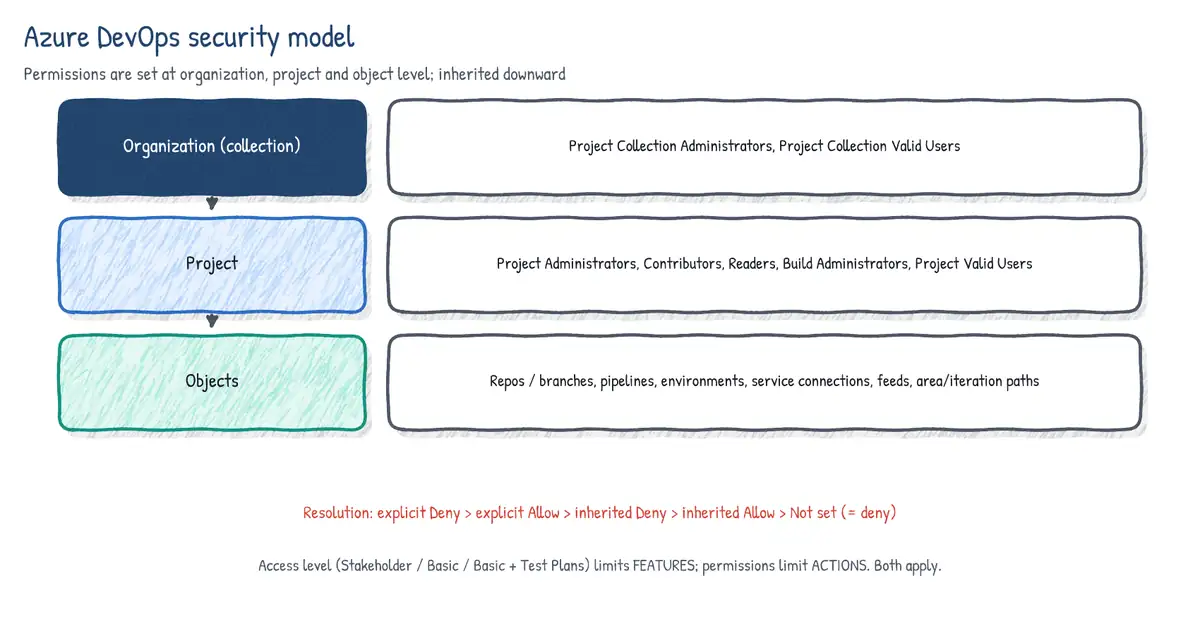
Azure Repos
Git permissions in Azure Repos are set at three levels and inherit downward: all repositories in the project, a single repository, and an individual branch (or a branch folder such as releases/*). Permissions are Allow, Deny, Not set (effectively deny unless inherited), with explicit Deny generally winning over Allow. Default groups: Readers (Read), Contributors (Read, Contribute, Create branch, Create tag, Manage notes, Contribute to PRs), Project Administrators (everything), and the build identities {Project} Build Service ({Org}) and Project Collection Build Service that pipelines use.
| Permission | Allows | Typical use |
|---|---|---|
| Read | Clone, fetch, browse | Readers |
| Contribute | Push to branches, create/update PRs | Developers; build service to push tags |
| Contribute to pull requests | Comment and vote on PRs | Reviewers without push rights |
| Create branch | Create new branches (repo level) | Restrict to force folder naming |
| Create tag | Push new tags | Release managers / build service |
| Force push (rewrite history...) | Force push, delete branches/tags | Rarely granted; history fixes |
| Bypass policies when completing PRs | Override failing policies on a PR | Emergency release mgrs |
| Bypass policies when pushing | Push straight to protected branch | Automation accounts only |
| Edit policies | Change branch policies | Repo admins |
| Manage permissions | Change security on repo/branch | Repo admins |
| Remove others' locks | Unlock branches locked by others | Admins |
| Create / Delete / Rename repository | Repository lifecycle | Project admins |
A common governance pattern is branch folders: deny 'Create branch' at the repository level for Contributors, then allow it on feature/*, bugfix/* and users/* folders, so all branches follow the naming convention. Note that the repository root permission is the parent of all branches, so the deny/allow ordering matters. Cross-repo policies (Project settings > Repositories > Policies > Branch policies) let a project administrator protect the default branch of every repository, or every branch matching a pattern, including repositories created in the future.
# Deny 'Create branch' at repo root for Contributors, then allow under feature/
# Branch tokens are hex-encoded UTF-16 per path segment; tf.exe / REST handle that.
tf git permission /deny:CreateBranch /group:"[Fabrikam]\Contributors" \
   /collection:https://dev.azure.com/contoso/ /teamproject:Fabrikam /repository:web-app
tf git permission /allow:CreateBranch /group:"[Fabrikam]\Contributors" \
   /collection:https://dev.azure.com/contoso/ /teamproject:Fabrikam /repository:web-app \
/branch:featureGitHub
GitHub repository access comes from organisation base permissions, team membership, direct collaborator grants and outside collaborators. Built-in repository roles, from least to most privileged:
| Role | Can do | Typical holder |
|---|---|---|
| Read | Clone, open issues, comment | Non-code contributors, auditors |
| Triage | Manage issues/PRs (labels, assign, close) without write | Community managers |
| Write | Push to non-protected branches, merge PRs | Developers |
| Maintain | Manage repo settings except destructive/sensitive ones | Project managers |
| Admin | Full control incl. security, deletion, branch protections | Repo owners |
Enterprise Cloud organisations can define custom repository roles that inherit a base role and add fine-grained permissions. Outside collaborators get access to specific repositories only and are not organisation members. Deploy keys give a single repository read or read/write access for automation; prefer GitHub Apps for org-wide automation.
Large files: Git LFS and git-fat
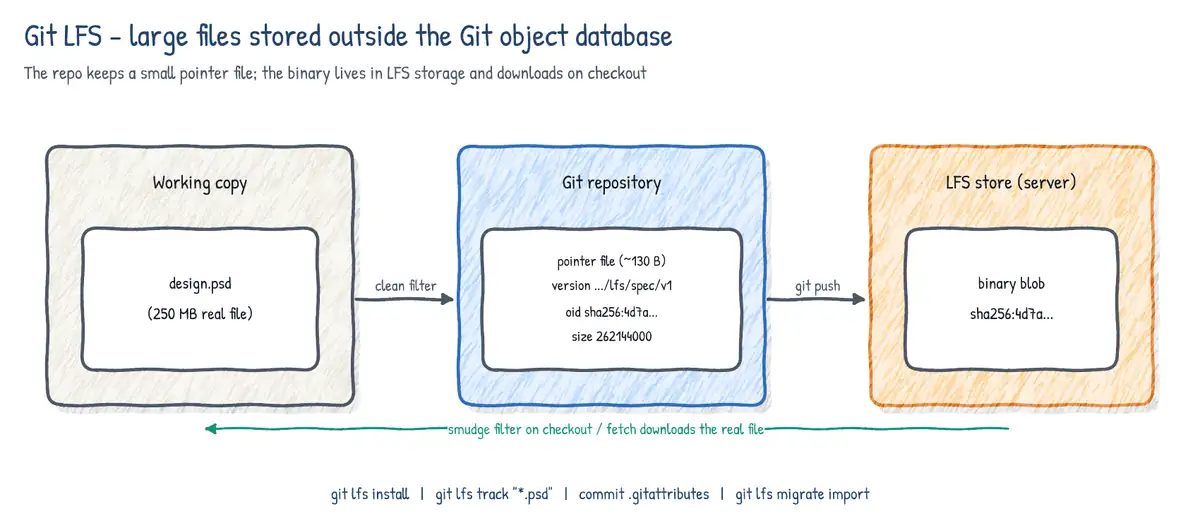
Git stores every version of every file in full (compressed and delta-packed), and every clone downloads all of it. Large binaries that change often (design assets, game textures, ML models, video, installers) make clones slow and repositories huge, and binary diffs/merges are meaningless. GitHub warns on files over 50 MB and blocks files over 100 MB in normal Git.
Git LFS replaces the large file in the commit with a small text pointer (oid sha256 and size) and stores the real content on an LFS server that the hosting provider runs. Clean/smudge filters swap pointer and content transparently on add and checkout, and only the versions needed for the checked-out commit are downloaded. Both Azure Repos and GitHub support LFS natively (GitHub meters LFS storage and bandwidth). LFS also adds file locking (git lfs lock) for unmergeable binaries.
git lfs install                          # once per machine: installs hooks/filters
git lfs track "*.psd" "*.onnx" "assets/video/**"
git add .gitattributes                   # tracking rules live here - commit them!
git add design/logo.psd && git commit -m "Add logo source"
git lfs ls-files                         # what is stored in LFS
# Convert existing history (rewrites commits -> force push, everyone re-clones)
git lfs migrate import --include="*.psd,*.onnx" --everything
git push --force-with-lease --all# .gitattributes produced by git lfs track
*.psd filter=lfs diff=lfs merge=lfs -text
*.onnx filter=lfs diff=lfs merge=lfs -text lockable- Azure Pipelines:
- checkout: selfwithlfs: true. GitHub Actions:actions/checkoutwithlfs: true. Without it, the build sees pointer files, not binaries. git lfs trackonly affects future commits; files already in history stay in Git objects until you rungit lfs migrate import(a history rewrite).- Developers who have not installed Git LFS will commit/see pointer files - make
git lfs installpart of onboarding.
git-fat is an older, Python-based alternative. It also uses clean/smudge filters declared in .gitattributes (*.bin filter=fat -crlf), but stores the binaries in any rsync destination you configure in a .gitfat file, and you move content explicitly with git fat init, git fat push and git fat pull. It needs no LFS-aware server, which made it attractive for self-hosted storage, but it is far less maintained and not integrated with Azure Repos/GitHub UIs. On the exam, choose Git LFS unless the scenario specifically wants your own rsync-reachable storage or names git-fat.
| Git LFS | git-fat | |
|---|---|---|
| Storage | LFS server of the Git host (or custom LFS server) | Any rsync target (.gitfat config) |
| Hosting integration | Native in Azure Repos and GitHub | None; transparent to host |
| Commands | git lfs track / push / pull / lock / migrate | git fat init / push / pull |
| File locking | Yes | No |
| Maturity | Actively maintained, widely used | Legacy, minimal maintenance |
Scaling and optimising repositories
Clone-reduction techniques
| Technique | Command | What you skip | Trade-off |
|---|---|---|---|
| Shallow clone | git clone --depth 1 | Old commits | No full history; blame/log limited |
| Blobless partial clone | git clone --filter=blob:none | Old file contents | Blobs fetched on demand (needs server) |
| Treeless partial clone | git clone --filter=tree:0 | Old trees and blobs | Fast for CI; slow for history ops |
| Sparse checkout | git sparse-checkout set src/api | Files outside chosen dirs | Working tree only; objects may still download |
| Single branch | git clone --single-branch | Other branches | Fetch others explicitly |
# Azure Pipelines checkout tuned for a large repo
steps:
- checkout: self
  fetchDepth: 1          # shallow (default for new pipelines)
  fetchTags: false
  lfs: true
  submodules: false
  sparseCheckoutDirectories: src/api build
  clean: true

# GitHub Actions equivalent
- uses: actions/checkout@v4
  with:
    fetch-depth: 1        # 0 = full history (needed by GitVersion, changelog tools)
    filter: blob:none
    sparse-checkout: |
      src/api
      build
lfs: trueScalar
Scalar started at Microsoft as the successor to VFS for Git (GVFS, used for the Windows monorepo) and has shipped inside Git since 2.38. Instead of virtualising the file system, it turns on Git's own large-repo features with one command and registers the repo for background maintenance.
scalar clone https://dev.azure.com/contoso/Big/_git/monorepo   # new clone, optimised
cd monorepo/src && git sparse-checkout add services/billing
scalar register ~/repos/existing-repo   # opt an existing clone in
scalar list
scalar unregister ~/repos/existing-repo- Partial clone (blobless) and sparse-checkout in cone mode - a
scalar clonestarts with only top-level files checked out under asrc/directory. - Background maintenance - hourly prefetch of remote objects, commit-graph, loose-object cleanup and incremental repack (via
git maintenance). - File system monitor (built-in fsmonitor) and multi-pack-index for fast
git status. - Recommended Git config for large repos applied automatically.
Monorepo vs multi-repo
| Factor | Monorepo | Multi-repo (polyrepo) |
|---|---|---|
| Atomic cross-project change | One commit / PR | Coordinated PRs in several repos |
| Code sharing | Direct source reference | Packages (Azure Artifacts, GitHub Packages) |
| Permissions | Coarse (repo-wide; path policies help) | Fine-grained per repo |
| CI | Needs path filters / affected-project builds | Simple per-repo pipelines |
| Scale issues | Clone size - needs Scalar, sparse, partial | Dependency/version drift |
| Tooling consistency | Easy to standardise | Templates repo, org rulesets |
Cross-repository sharing options: publish shared code as packages with SemVer (the most decoupled), reference pipeline templates from another repo (resources: repositories + template: x.yml@templates), check out multiple repositories in one job, use Git submodules or subtrees, and use cross-repo branch policies or organisation rulesets to keep governance consistent.
Submodules vs subtrees
| Submodule | Subtree | |
|---|---|---|
| Stored as | Pointer (gitlink) to a commit in another repo + .gitmodules | Full copy of the other repo's files in a sub-folder |
| Clone | Needs --recurse-submodules / submodule update | Nothing extra |
| Updating | Commit the new pointer | git subtree pull --prefix ... --squash |
| Pushing back upstream | Commit inside the submodule repo | git subtree push (awkward) |
| Pipeline | checkout submodules: true | recursive (needs access) | No special handling |
git submodule add https://github.com/contoso/shared-lib libs/shared
git clone --recurse-submodules https://github.com/contoso/app
git submodule update --init --recursive
git subtree add --prefix vendor/shared https://github.com/contoso/shared-lib main --squash
git subtree pull --prefix vendor/shared https://github.com/contoso/shared-lib main --squashTags
Tags are refs under refs/tags/ that point at a commit and, by convention, never move. Lightweight tags are just a name for a commit. Annotated tags are full Git objects with tagger, date and message and can be signed (-s). Use annotated (ideally signed) tags for releases; git describe considers only annotated tags by default, and git push --follow-tags pushes only annotated tags reachable from the pushed commits.
git tag v1.4.0-rc.1                       # lightweight
git tag -a v1.4.0 -m "Release 1.4.0"      # annotated
git tag -s v1.4.0 -m "Release 1.4.0"      # annotated + signed
git push origin v1.4.0                    # tags are NOT pushed by plain 'git push'
git push --follow-tags                    # push annotated tags with commits
git tag -l "v1.*" && git show v1.4.0
git describe --tags                       # e.g. v1.4.0-3-g9fceb02
git tag -d v1.4.0 && git push origin --delete v1.4.0   # remove (avoid for releases)
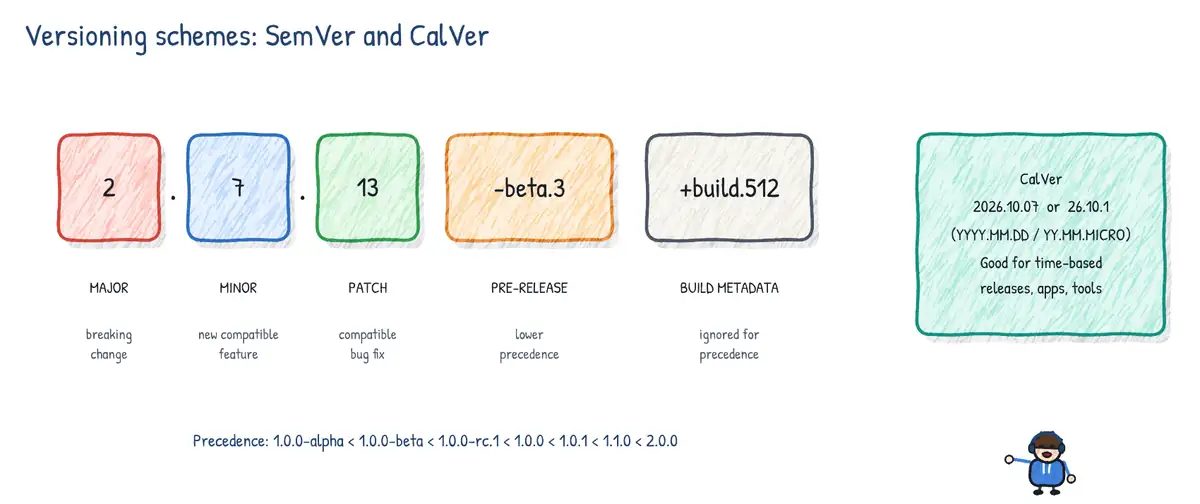
Semantic versioning tags follow vMAJOR.MINOR.PATCH[-prerelease][+build]: MAJOR for breaking changes, MINOR for backwards-compatible features, PATCH for fixes. Pre-release labels (-beta.2) sort before the release; build metadata (+sha.9fceb02) is ignored for precedence. Pipelines can trigger on tags (trigger: tags: include: [ 'v*' ] in Azure Pipelines, on: push: tags: [ 'v*.*.*' ] in GitHub Actions) to build and publish release artifacts.
- Azure Repos: 'Create tag' permission controls who can push tags; tags can be created and deleted from the Tags page or a commit; classic build definitions can 'tag sources' on success.
- GitHub: tag rulesets restrict who can create, update or delete tags matching
v*(the older tag protection rules were replaced by rulesets). GitHub Releases are built on tags.
Recovering data with Git
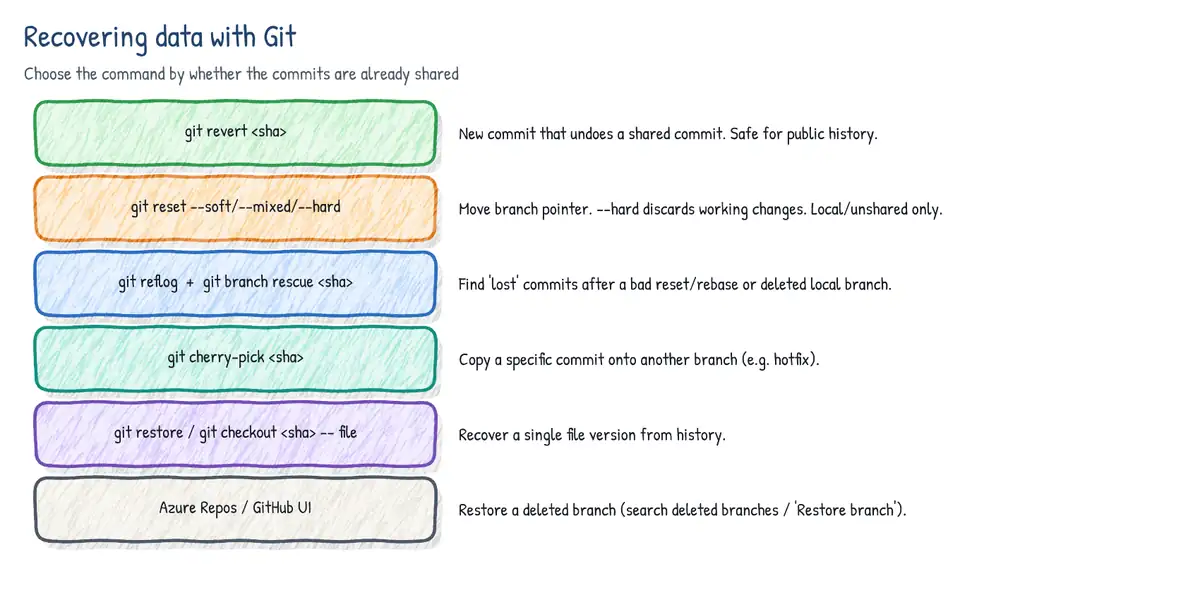
| Situation | Command | Notes |
|---|---|---|
| Undo a pushed commit safely | git revert <sha> | New inverse commit; history intact |
| Revert a merge commit | git revert -m 1 <merge-sha> | -m picks the mainline parent |
| Un-commit, keep changes staged | git reset --soft HEAD~1 | Moves branch only |
| Un-commit and unstage | git reset --mixed HEAD~1 (default) | Resets index too |
| Throw away commits and changes | git reset --hard <sha> | Resets working tree - destructive |
| Find 'lost' commits | git reflog / git reflog show <branch> | Local only; ~90 days default |
| Recover a deleted local branch | git branch <name> <sha-from-reflog> | Or git switch -c |
| Copy a fix to another branch | git cherry-pick <sha> | -x records the source commit id |
| Restore one file | git restore --source=<sha> path/file | Or git checkout <sha> -- path |
| Unreachable objects | git fsck --lost-found | Finds dangling commits/blobs |
# Oops: git reset --hard HEAD~3 on the wrong branch
git reflog
#  a1b2c3d HEAD@{0}: reset: moving to HEAD~3
#  9f8e7d6 HEAD@{1}: commit: Add invoice export
git reset --hard HEAD@{1}         # or: git branch rescue 9f8e7d6

# Hotfix made on main, needed on the release branch (Release Flow)
git switch releases/2026.10
git cherry-pick -x 4c5d6e7
git push origin releases/2026.10Restoring deleted branches and repositories on the server
- Azure Repos branch - Repos > Branches, search for the exact branch name, open 'Deleted branches' result and choose Restore branch. It is recreated at its last commit. Branch policies that were on it are not restored automatically.
- GitHub branch - on the closed/merged PR, click Restore branch; or use the repository's Activity view to find the deletion (and force pushes) and restore it. Any clone with the commit can also push it back.
- Azure Repos repository - a deleted repo stays in a recycle bin for 30 days and can be restored through the REST API (Repositories - Restore Repository From Recycle Bin).
- GitHub repository - organisation owners (or the owner of a personal repo) can restore a deleted repository within 90 days from Settings > Deleted repositories, unless it was part of a fork network that prevents restoration.
Removing data from source control
Deleting a file in a new commit removes it from the tip, not from history. To purge a file (a leaked secret, a large binary, personal data) you must rewrite history so that no commit references it, then force-push and make every clone discard the old history.
git filter-repo
git filter-repo is the tool recommended by the Git project (it replaces the slow and error-prone git filter-branch). It runs on a fresh clone, rewrites all refs, removes the origin remote as a safety measure, and can delete paths, replace text, or strip blobs over a size.
git clone --mirror https://dev.azure.com/contoso/Web/_git/web-app
cd web-app.git
git filter-repo --invert-paths --path config/appsettings.Production.json
git filter-repo --replace-text ../expressions.txt    # lines like: Pa55w0rd!==>***REMOVED***
git filter-repo --strip-blobs-bigger-than 50M
git remote add origin https://dev.azure.com/contoso/Web/_git/web-app
git push origin --force --all && git push origin --force --tags
BFG Repo-Cleaner
BFG is a fast Java tool focused on two jobs: deleting files (--delete-files id_rsa, --strip-blobs-bigger-than 100M) and replacing text (--replace-text passwords.txt). By default it protects the current HEAD commit, so you must first remove the secret from the latest commit with a normal commit. Afterwards expire the reflog and garbage collect.
java -jar bfg.jar --replace-text passwords.txt web-app.git
cd web-app.git
git reflog expire --expire=now --all && git gc --prune=now --aggressive
git push --force
Why rewriting history is not enough
- Rotate/revoke the secret first. Once pushed, assume it is compromised - it may already be in forks, clones, CI logs, caches, package artifacts or a scraper's database. Rotation is the only real fix; history cleanup is hygiene.
- Check logs and audit trails for use of the credential.
- Rewrite history with git filter-repo or BFG and force-push all branches and tags (needs 'Force push' in Azure Repos, or temporarily relaxed protection/ruleset on GitHub).
- Clean server-side leftovers: open PR refs and cached views still reference old commits. On GitHub, contact GitHub Support to remove cached views and dereference sensitive data in PRs; forks keep their own copies. In Azure Repos, abandoned/completed PRs still reference old commits until cleaned up.
- Every collaborator must re-clone (or hard reset carefully); an old clone pushed again reintroduces the data.
- Prevent recurrence: push protection (GitHub Secret Protection on GitHub or for Azure DevOps), pre-commit hooks,
.gitignore, Key Vault references and workload identity federation instead of stored secrets.
Chapter summary
- Trunk-based + feature flags for continuous delivery; release branches (cherry-pick from main) or GitFlow when multiple versions must be supported.
- Azure Repos branch policies: reviewers, linked work items, comment resolution, merge type limits, build validation (merge commit, expiration, path filters), status checks, auto-included reviewers; cross-repo policies for project-wide coverage; bypass permissions for exceptions.
- GitHub: rulesets (layered, bypass lists, tag targets, push rules) or classic protection; CODEOWNERS; required checks; signed commits; linear history; merge queue with
merge_group. - Large files: Git LFS (pointers + LFS server, locking, migrate import); git-fat as an rsync-based legacy alternative. Large repos: Scalar, partial clone, sparse checkout, shallow fetch.
- Annotated (signed) SemVer tags for releases; tags must be pushed explicitly.
- Recover with reflog, revert, reset modes, cherry-pick, server-side branch restore; remove with git filter-repo/BFG - but rotate the secret first.
Use case: 'Merge Monday'
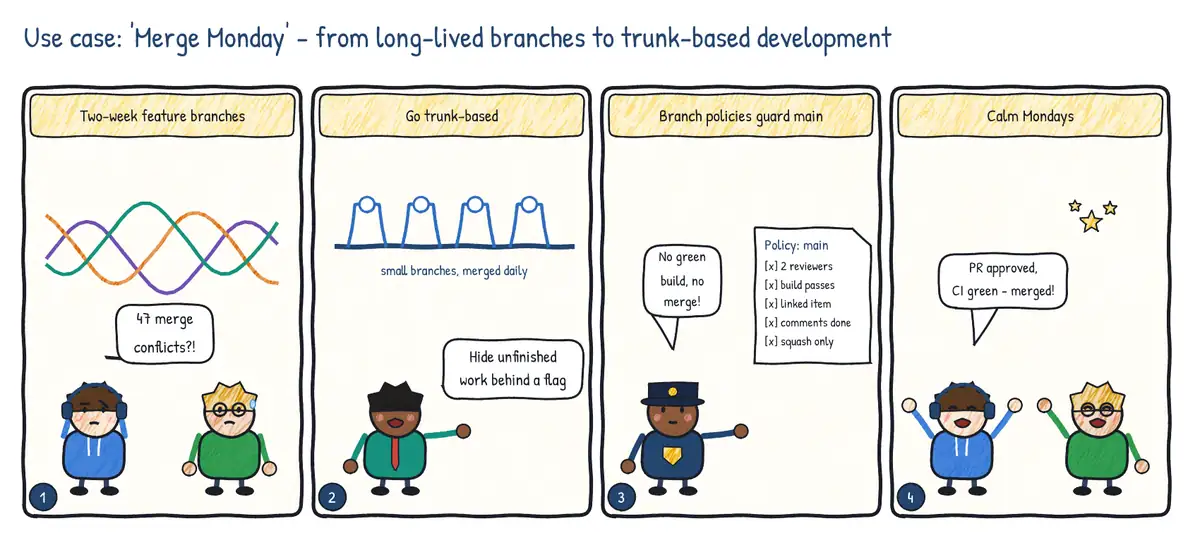
Situation. Every developer works for two weeks on a private feature branch. On Monday everything is merged at once and the team spends a day resolving conflicts and fixing broken builds.
| Problem | Practice | Feature used |
|---|---|---|
| Huge, late merges | Trunk-based development with short-lived branches | Small PRs, merged daily |
| Unfinished features on main | Hide work behind feature flags | Azure App Configuration feature flags |
| Broken main | Required checks before merge | Branch policies: reviewers, build validation, linked items, comment resolution |
| Messy history | One commit per PR | Limit merge types to squash |