Designing and Implementing Pipelines
What this chapter covers
- Select a deployment automation solution, including GitHub Actions and Azure Pipelines
- Design and implement a GitHub runner or Azure DevOps agent infrastructure, including cost, tool selection, licenses, connectivity, and maintainability
- Design and implement integration between GitHub repositories and Azure Pipelines
- Develop and implement pipeline trigger rules
- Develop pipelines by using YAML
- Design and implement a strategy for job execution order, including parallelism and multi-stage pipelines
- Develop and implement complex pipeline scenarios, such as hybrid pipelines, VM templates, and self-hosted runners or agents
- Create reusable pipeline elements, including YAML templates, task groups, variables, and variable groups
- Design and implement checks and approvals by using YAML-based environments
This is the largest single topic on AZ-400. You must be able to read and write Azure Pipelines YAML and GitHub Actions workflows fluently, pick the right execution infrastructure, wire repositories and triggers together, reuse logic safely with templates, and protect deployments with environments, checks and approvals.
GitHub Actions vs Azure Pipelines
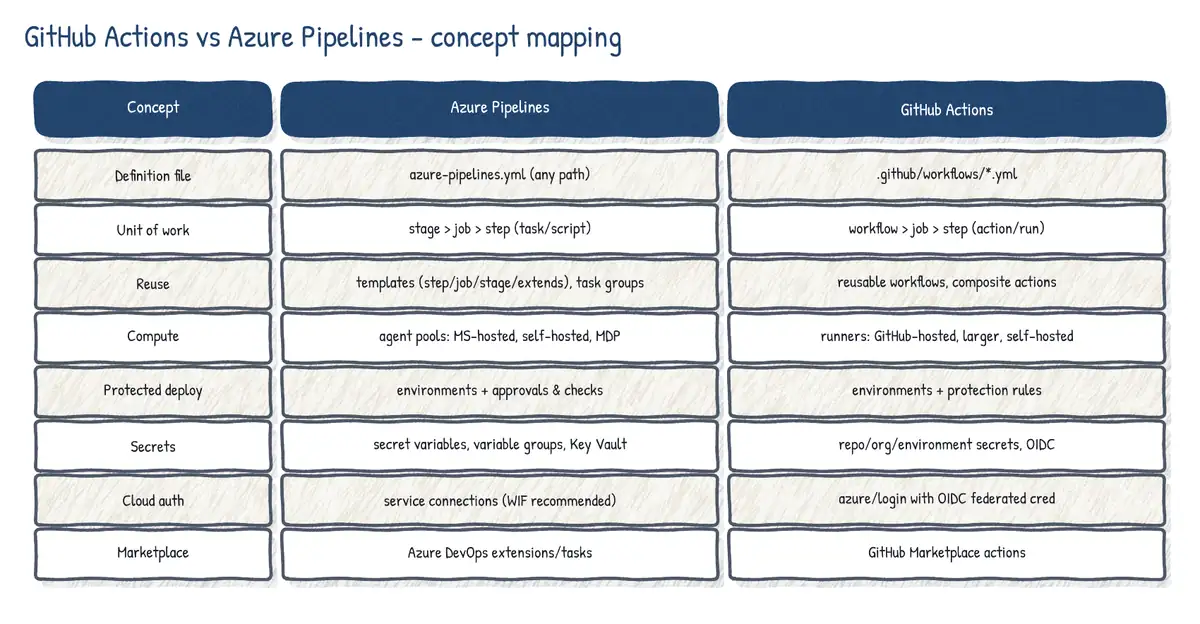
Both are mature YAML-based CI/CD engines from Microsoft, and both can build and deploy any language to any cloud. The choice is usually driven by where the code and the people already are, and by governance features.
| Aspect | Azure Pipelines | GitHub Actions |
|---|---|---|
| Definition | azure-pipelines.yml, any path; classic UI (legacy) | .github/workflows/*.yml |
| Hierarchy | Stages > jobs > steps (tasks/scripts) | Workflow > jobs > steps (actions/run) |
| Repos | Azure Repos, GitHub, GHES, Bitbucket Cloud, other Git | GitHub only |
| Reuse | Templates (step/job/stage/var), extends, task groups | Reusable workflows, composite actions |
| Marketplace | Tasks via Azure DevOps extensions | Actions from GitHub Marketplace |
| Compute | MS-hosted, self-hosted, Managed DevOps Pools, VMSS | GitHub-hosted, larger, self-hosted runners |
| Deploy governance | Environments + rich checks, exclusive lock, required template | Environments + reviewers, wait timer, branch rules, custom rules |
| Artifacts / packages | Pipeline artifacts, Azure Artifacts | Workflow artifacts, GitHub Packages |
| Work tracking | Azure Boards native | GitHub Issues/Projects; Boards via app |
| Secrets | Variable groups, Key Vault link, secure files | Repo/org/environment secrets |
| Azure auth | Service connections (WIF recommended) | azure/login with OIDC (federated) |
- Choose GitHub Actions when code lives in GitHub, teams want marketplace actions, tight PR/Advanced Security integration, and simple per-repo automation. GitHub is Microsoft's strategic investment area for new features.
- Choose Azure Pipelines when you need Azure Repos/Bitbucket/other Git sources, Azure Boards and Test Plans integration, enterprise checks (exclusive lock, required template, business hours, Azure Monitor gate) or must keep existing classic/YAML investments.
- Mixing is fine: GitHub repos built by Azure Pipelines (common), or GitHub Actions that trigger Azure Pipelines (
Azure/pipelinesaction). GitHub Actions Importer helps migrate Azure Pipelines, Jenkins, GitLab and others to Actions. - Classic release pipelines are legacy: build new pipelines as multi-stage YAML.
Agent and runner infrastructure
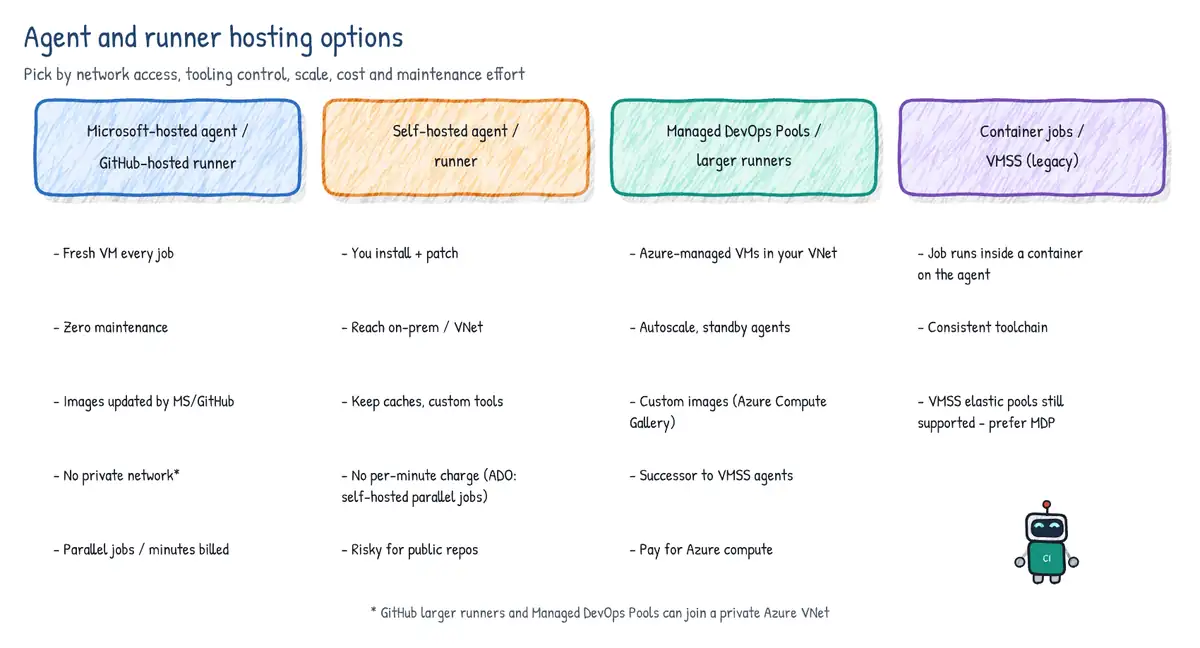
Azure Pipelines agent options
| Option | Who runs it | Strengths | Trade-offs |
|---|---|---|---|
| Microsoft-hosted | Microsoft | Zero maintenance, fresh VM per job, many tools | No private network, fixed sizes, 1 free/1,800 min |
| Self-hosted | You (VM, physical, container) | Any tools/licences, private network, cache | Patch, scale and secure it yourself |
| VM scale set agents | You (VMSS in your sub.) | Autoscale, custom image, private VNet | Older approach; you manage the VMSS |
| Managed DevOps Pools | Microsoft-managed in Azure | Custom/marketplace images, VNet, standby, stateful | Azure cost; Azure DevOps only |
- Microsoft-hosted agents: images such as
ubuntu-latest,ubuntu-24.04,windows-latest,windows-2025,macos-latest. Each job gets a fresh VM that is discarded afterwards, so nothing persists between jobs (no incremental builds, docker layer cache only via Cache task). Outbound internet only; they cannot reach resources on a private VNet unless those are exposed publicly. - Self-hosted agents: install the agent on Windows, Linux, macOS or in Docker; register with a PAT (or device code / service principal) to an agent pool; run as a service or interactively. The agent only needs outbound HTTPS (443) to Azure DevOps - no inbound ports. Good for on-premises targets, licensed tools, big caches, special hardware.
- Azure Virtual Machine Scale Set agents: Azure DevOps scales a VMSS you own up and down, optionally tearing down VMs after each job. Superseded for new designs by Managed DevOps Pools.
- Managed DevOps Pools (MDP): an Azure resource (
Microsoft.DevOpsInfrastructure/pools) where Microsoft manages the agent VMs for you: choose Azure Pipelines images, marketplace or Azure Compute Gallery images, SKU, maximum agents, standby agents to cut queue time, stateful agents (reuse for up to 7 days) or stateless, and VNet injection for private access. Billing is Azure compute plus self-hosted parallel jobs. It is the evolution of VMSS agents.
Parallel jobs and licensing (Azure Pipelines)
- One parallel job = the ability to run one job at a time. Two kinds: Microsoft-hosted and self-hosted, counted separately at organization level.
- Free grant (private projects): 1 Microsoft-hosted parallel job with up to 60 minutes per job and 1,800 minutes per month (new organizations may have to request or enable this grant), and 1 self-hosted parallel job with unlimited minutes.
- Paid Microsoft-hosted parallel jobs remove the monthly cap and allow jobs up to 360 minutes. Buying the first one replaces the free one (you still have 1). Self-hosted parallel jobs are cheaper; each Visual Studio Enterprise subscriber in the org adds one free self-hosted parallel job.
- Agentless (server) jobs do not consume parallel jobs; agent jobs that find no free parallel job or agent simply wait in the queue.
- Rule of thumb: about one parallel job per four to five users.
- Note: Azure DevOps public projects are retired (no new ones since April 2026; existing ones become private in 2027), so their unlimited free minutes disappear.
Agent pools, capabilities and demands
Agents are grouped into agent pools (organization level) that projects consume through project-level pool references. Each agent advertises capabilities - system capabilities discovered automatically (OS, installed tools, environment variables) and user-defined ones. A pipeline uses demands to choose an agent whose capabilities satisfy them. Pools are protected resources: you can grant pipeline permissions and add checks.
pool:
  name: OnPrem-Build          # self-hosted pool
  demands:
  - Agent.OS -equals Windows_NT
  - msbuild                      # capability must exist
  - SignTool -equals installed   # user-defined capability

# Microsoft-hosted: choose an image instead of demands
# pool:
# vmImage: ubuntu-24.04GitHub-hosted, larger and self-hosted runners
| Runner | Notes |
|---|---|
| GitHub-hosted standard | ubuntu/windows/macos-latest; fresh VM per job; free for public repos |
| Larger runners | More CPU/RAM, GPU, ARM, static IPs, Azure VNet; Team/Enterprise; billed |
| Self-hosted | Your machines; any network; org/repo/enterprise level; groups and labels |
| ARC (Actions Runner Controller) | Kubernetes operator that autoscales ephemeral self-hosted runners |
- Target runners with
runs-on: ubuntu-latest, labelsruns-on: [self-hosted, linux, x64, gpu], or a groupruns-on: { group: prod-runners, labels: [linux] }. - Runner groups (organization/enterprise) control which repositories and workflows may use which self-hosted or larger runners.
- Never use self-hosted runners for public repositories: a fork PR could run arbitrary code on your machine. Prefer ephemeral (
--ephemeral, JIT) runners so each job gets a clean machine. - Self-hosted runners need outbound HTTPS to GitHub; no inbound ports. Pricing: GitHub-hosted minute rates differ by OS and size; GitHub announced (then postponed) a per-minute platform fee for self-hosted runner usage - always check current pricing.
- Azure private networking for GitHub-hosted runners lets hosted (larger) runners join an Azure VNet, similar to MDP VNet injection.
Infrastructure decision factors
| Factor | Questions to ask |
|---|---|
| Cost | Hosted minutes vs VM cost + admin time; parallelism needed; idle capacity |
| Tools | Are needed SDKs on hosted images? Licensed or GUI tools? GPUs, macOS signing? |
| Licenses | Parallel jobs purchased; VS Enterprise benefit; GitHub plan minutes |
| Connectivity | Private endpoints, on-prem targets, firewall allow-lists, static egress IP |
| Maintainability | Who patches OS and tools? Image pipelines (Packer)? Ephemeral vs stateful? |
| Security | Isolation between jobs, untrusted PR code, credential exposure on agents |
| Performance | Warm caches, incremental builds, standby agents, larger SKUs |
Integrating GitHub repositories with Azure Pipelines
Azure Pipelines can build GitHub (and GitHub Enterprise Server) repositories. Three ways to authenticate, in order of preference:
| Method | Identity used | Notes |
|---|---|---|
| Azure Pipelines GitHub App (recommended) | The app installation | Checks API (rich status), per-repo install, builds show app as author |
| OAuth | A user's GitHub identity | Statuses API; runs under that user's account |
| Personal access token (PAT) | The PAT owner | Scopes repo, admin:repo_hook, read:user, user:email |
- The GitHub App posts results via the Checks API (annotations, re-run from GitHub), can be installed for all or selected repositories, and is not tied to a person who might leave.
- Creating a pipeline from a GitHub repo creates a GitHub service connection; triggers are delivered by webhooks (OAuth/PAT) or the app.
- Fork PR builds: by default secrets are not made available and the PR cannot use protected resources unless you opt in; you can require a team member's comment (
/azp run) before building PRs from forks or outside contributors. - Azure Boards app links commits/PRs to work items with
AB#123; status badges show build state in README. - From GitHub Actions you can queue an Azure Pipeline with the
Azure/pipelinesaction.
Trigger rules
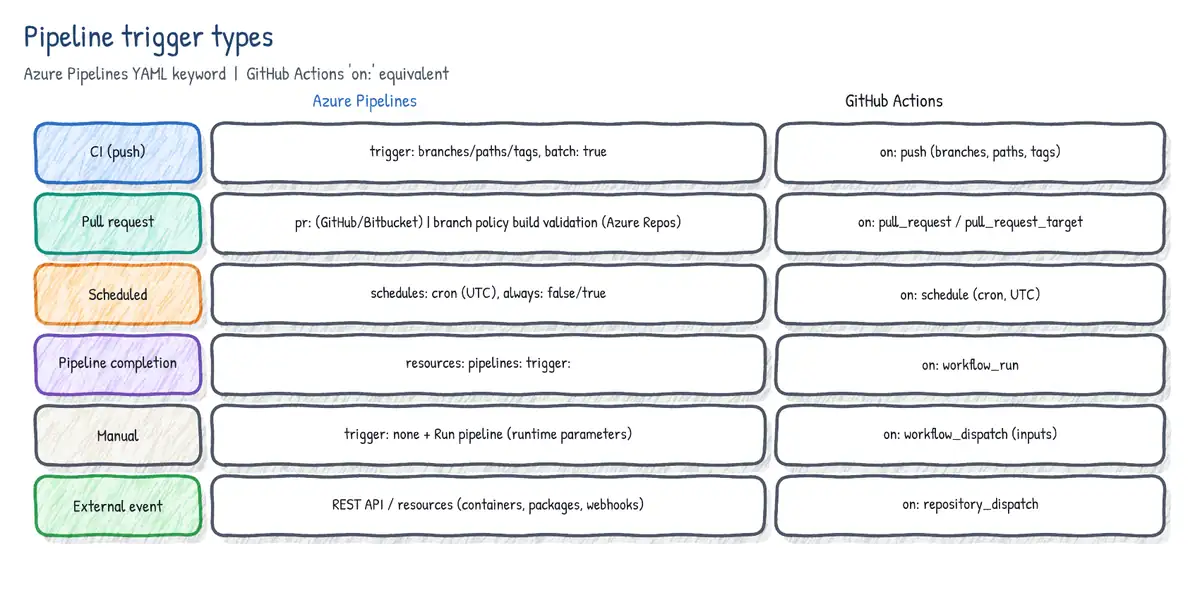
CI triggers (Azure Pipelines)
Without a trigger: section, YAML pipelines run for pushes to every branch (for Azure Repos, GitHub and Bitbucket). trigger: none disables CI. Filters include branches, paths and tags; batch: true makes the system wait until the running build finishes and then build all changes accumulated since in one run.
trigger:
  batch: true
  branches:
    include:
    - main
    - releases/*
    exclude:
    - releases/old*
  paths:
    include:
    - src/orders/*
    exclude:
    - docs/*
    - '**/*.md'
  tags:
    include:
- v*- Branch filters accept wildcards and
include/excludecan be combined. Tag pushes do not trigger unless you add atagsfilter; with both branch and tag filters, satisfying either one triggers the run. - Path filters are case-sensitive and cannot use variables; wildcards are supported.
- Skip CI for a push by including
[skip ci](or***NO_CI***,[ci skip],[skip azurepipelines]) in the commit message. - Triggers are read from the YAML in the branch being pushed, so each branch can have its own.
PR triggers
pr: triggers apply to GitHub and Bitbucket Cloud repositories. For Azure Repos, the pr: keyword is ignored: PR validation is configured with a Build validation branch policy instead. Without pr: a GitHub-hosted repo builds PRs targeting any branch.
pr:
  autoCancel: true          # cancel older runs when the PR is updated
  drafts: false             # do not build draft PRs
  branches:
    include: [main, releases/*]
  paths:
    exclude: [docs/*]
# pr: none -> disable PR buildsScheduled triggers
schedules:
- cron: '0 2 * * Mon-Fri'     # 02:00 UTC weekdays
  displayName: Nightly build
  branches:
    include: [main]
  always: false               # default: only run if code changed since last success
- cron: '30 22 * * Sun'
  displayName: Weekly full regression
  branches:
    include: [main, releases/*]
  always: true                # run even if nothing changed
batch: false- Cron uses UTC (no time zone setting in YAML schedules). Format: minutes hours days months days-of-week.
always: false(default) runs only when there were changes since the last successful scheduled run. Usealways: truefor nightly security scans or regression runs that must run regardless.- Schedules are evaluated from the YAML on the included branches; scheduled runs can be viewed under 'Scheduled runs'. UI-defined schedules override YAML schedules if present.
- If CI is disabled (
trigger: none) schedules still work.
Pipeline completion triggers (pipeline resources)
resources:
  pipelines:
  - pipeline: app-ci             # alias used in this pipeline
    source: Orders-CI            # name of the upstream pipeline
    project: Commerce            # if in another project
    trigger:
      branches:
        include: [main]
      tags: [release-candidate]  # all listed tags must be present on the run
      stages: [Build]            # trigger when these stages complete
trigger: none
steps:
- download: app-ci
  artifact: web
- script: echo $(resources.pipeline.app-ci.runName)
This replaces the classic 'build completion trigger'. Other resource types can trigger too: repositories (with trigger: for Azure Repos), containers (ACR image push) and packages (GitHub Packages). Pipeline resource triggers fire only on successful completion of the upstream run (or of the listed stages).
GitHub Actions events (on:)
on:
  push:
    branches: [main, 'release/**']
    tags: ['v*']
    paths-ignore: ['docs/**']
  pull_request:
    types: [opened, synchronize, reopened]
    branches: [main]
  schedule:
    - cron: '17 3 * * 1'          # UTC by default, runs on the default branch
  workflow_dispatch:                 # manual run with inputs
    inputs:
      environment:
        type: choice
        options: [dev, test, prod]
        default: dev
  workflow_run:                      # after another workflow
    workflows: [CI]
    types: [completed]
    branches: [main]
  repository_dispatch:               # external system via REST API
    types: [deploy-request]
  workflow_call:                     # makes this a reusable workflow

concurrency:
  group: ${{ github.workflow }}-${{ github.ref }}
cancel-in-progress: true| Event | Use it for |
|---|---|
| push / pull_request | CI on commits and PRs; filters: branches, tags, paths (+ -ignore) |
| pull_request_target | PR from forks with base-repo context and secrets - use with great care |
| schedule | Cron (UTC unless an IANA timezone is set) on the default branch; may be delayed under load; shortest interval 5 minutes |
| workflow_dispatch | Manual runs (UI, CLI, API) with typed inputs |
| workflow_run | Chain workflows: run after workflow X completes/requested |
| repository_dispatch | External trigger via POST /repos/{owner}/{repo}/dispatches |
| workflow_call | Declares a reusable workflow callable by other workflows |
| release, issues, issue_comment... | React to GitHub activity |
YAML pipelines in depth
Structure: stages, jobs, steps
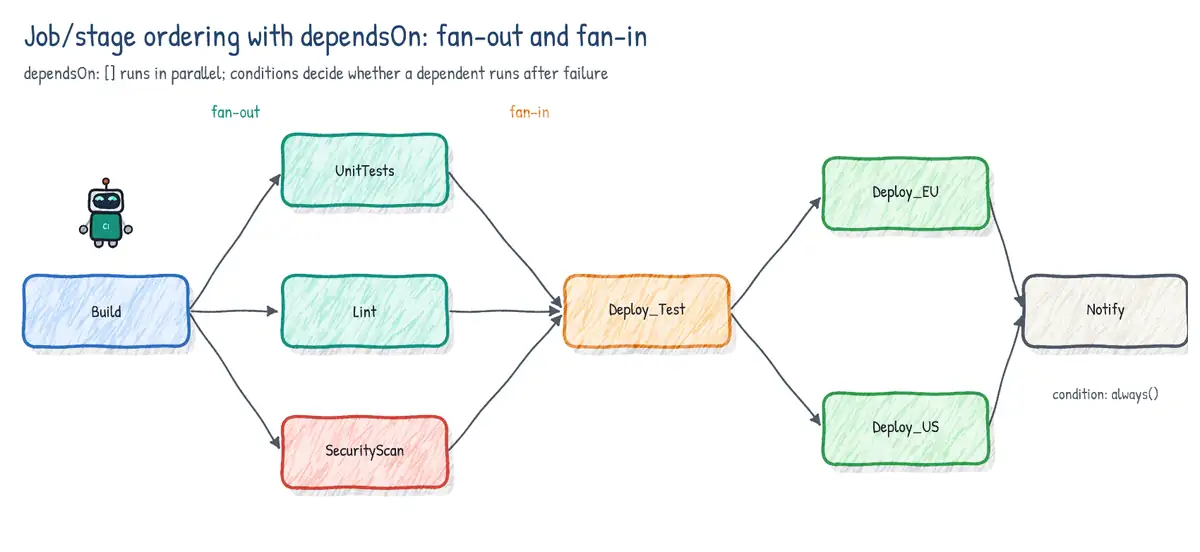
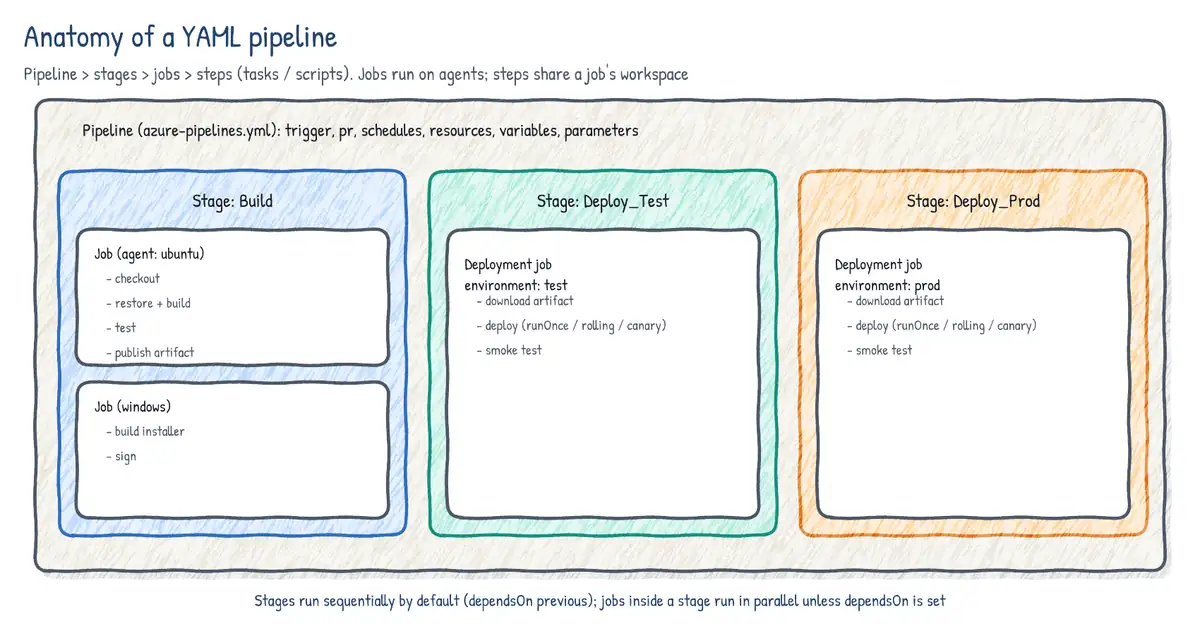
- Stage: a logical boundary (Build, Test, Deploy-Prod). Stages run sequentially by default (each depends on the previous). Checks and approvals apply at stage start.
- Job: a unit that runs on one agent (or agentless on the server with
pool: server). Jobs in a stage run in parallel by default (subject to available parallel jobs) unlessdependsOnis set. Steps in a job share the agent's file system. - Step: a
task,script,bash,pwsh,powershell,checkout,download,publish,templateorgetPackagereference. Steps run sequentially. - Single-stage or single-job pipelines can omit
stages:/jobs:.
trigger:
  branches:
    include: [main]

variables:
  buildConfiguration: Release

stages:
- stage: Build
  jobs:
  - job: Compile
    pool:
      vmImage: ubuntu-latest
    steps:
    - script: dotnet build -c $(buildConfiguration)
  - job: Lint                   # runs in parallel with Compile
    pool:
      vmImage: ubuntu-latest
    steps:
    - script: npm ci && npm run lint

- stage: Test
  dependsOn: Build
  jobs:
  - job: Integration
    steps:
    - script: ./run-integration-tests.sh

- stage: Security
  dependsOn: Build             # fan-out: Test and Security run in parallel
  jobs:
  - job: Scan
    steps:
    - script: ./scan.sh

- stage: DeployProd
  dependsOn: [Test, Security]  # fan-in
  condition: and(succeeded(), eq(variables['Build.SourceBranch'], 'refs/heads/main'))
  jobs:
  - deployment: Web
    environment: prod
    strategy:
      runOnce:
        deploy:
          steps:
          - script: echo deploying
Conditions and dependencies
| Condition | Runs when |
|---|---|
| succeeded() (default) | All dependencies (or previous steps) succeeded |
| succeededOrFailed() | Regardless of success/failure, unless the run was canceled |
| always() | Always, even if canceled |
| failed() | A previous dependency failed (e.g. rollback, notification) |
| canceled() | The run was canceled |
| Custom | e.g. and(succeeded(), eq(variables['Build.Reason'], 'PullRequest')) |
dependsOn: [](empty list) on a stage or job removes the implicit dependency so it runs in parallel from the start.- A custom condition replaces the default
succeeded(): writeand(succeeded(), ...)if you still want the dependency to have succeeded. - If a stage/job is skipped, dependents that use the default condition are skipped too; use
in(dependencies.X.result, 'Succeeded', 'Skipped')to tolerate skips. continueOnError: trueon a step makes failures yieldSucceededWithIssues;timeoutInMinutesandcancelTimeoutInMinutesbound jobs;retryCountOnTaskFailureretries a task.
Expressions: ${{ }} vs $[ ] vs $( )
| Syntax | Name | Evaluated | Typical use |
|---|---|---|---|
| ${{ variables.x }} | Template expression | Compile time (YAML expansion) | Parameters, conditional insertion, loops |
| $[ variables.x ] | Runtime expression | Runtime, before job/stage | Conditions, counter(), output variables |
| $(x) | Macro syntax | Runtime, just before a task runs | Task inputs, scripts |
- Template expressions can read
parametersand statically defined variables but not variables set at runtime by scripts. They can insert or remove YAML (${{ if }},${{ each }}). - Runtime expressions must make up the whole right side of a key:
x: $[ ... ]. They are the only way to read output variables from other jobs/stages in variable definitions. - Macro
$(var)is replaced just before the step executes; if the variable does not exist the text$(var)is left unchanged (template expressions become empty). - In scripts, variables are also environment variables:
$(Build.SourceBranch)->BUILD_SOURCEBRANCH. Secret variables are not mapped to env automatically - pass them explicitly withenv:.
Output variables between steps, jobs and stages
stages:
- stage: Build
  jobs:
  - job: A
    steps:
    - bash: echo "##vso[task.setvariable variable=imageTag;isOutput=true]$(Build.BuildId)"
      name: setTag                 # step name is required to reference the output
    - script: echo $(setTag.imageTag)        # same job: stepName.var
  - job: B
    dependsOn: A
    variables:
      tag: $[ dependencies.A.outputs['setTag.imageTag'] ]     # other job, same stage
    steps:
    - script: echo $(tag)
- stage: Deploy
  dependsOn: Build
  jobs:
  - job: C
    variables:                     # other stage: read it in job variables
      tag: $[ stageDependencies.Build.A.outputs['setTag.imageTag'] ]
    steps:
- script: echo $(tag)- Same job:
$(stepName.var). Other job, same stage:dependencies.<job>.outputs['<step>.<var>']. Other stage:stageDependencies.<stage>.<job>.outputs['<step>.<var>']. - From a deployment job the key includes the lifecycle hook and resource:
dependencies.<job>.outputs['<job>.<step>.<var>']for runOnce, or['<lifecycle>_<resource>.<step>.<var>']style keys for rolling/canary. - Stage conditions read outputs with
dependencies.<stage>.outputs['<job>.<step>.<var>']. - GitHub Actions: write
echo "tag=v1" >> "$GITHUB_OUTPUT"in a step with anid, expose it injobs.<id>.outputs, and readneeds.<job>.outputs.tagin a dependent job.
# GitHub Actions job outputs
jobs:
  build:
    runs-on: ubuntu-latest
    outputs:
      tag: ${{ steps.meta.outputs.tag }}
    steps:
      - id: meta
        run: echo "tag=${GITHUB_SHA::7}" >> "$GITHUB_OUTPUT"
  deploy:
    needs: build
    if: github.ref == 'refs/heads/main'
    runs-on: ubuntu-latest
    steps:
      - run: echo "Deploying ${{ needs.build.outputs.tag }}"
Parallelism: matrix, parallel and maxParallel
jobs:
- job: Test
  strategy:
    matrix:
      linux_py311:
        imageName: ubuntu-latest
        pythonVersion: '3.11'
      linux_py312:
        imageName: ubuntu-latest
        pythonVersion: '3.12'
      windows_py312:
        imageName: windows-latest
        pythonVersion: '3.12'
    maxParallel: 2               # at most 2 legs at a time
  pool:
    vmImage: $(imageName)
  steps:
  - task: UsePythonVersion@0
    inputs:
      versionSpec: $(pythonVersion)
- script: pytestmatrixgenerates one job copy per entry, each with its own variables.parallel: Nduplicates the job N times for test slicing (System.JobPositionInPhase).maxParallelthrottles concurrency within the strategy; actual concurrency is also bounded by purchased parallel jobs and available agents.- GitHub Actions:
strategy.matrixwithinclude/exclude,max-parallel,fail-fast(default true cancels other legs when one fails); a matrix can generate at most 256 jobs. - Matrices can be generated dynamically: Azure Pipelines via a runtime expression reading a JSON output variable (
matrix: $[ dependencies.gen.outputs['m.legs'] ]); Actions viafromJSON(needs.gen.outputs.matrix).
Deployment jobs and strategies
A deployment job (- deployment:) targets an environment, records deployment history (which run and commits went where), automatically downloads pipeline artifacts and supports lifecycle hooks: preDeploy, deploy, routeTraffic, postRouteTraffic, and on: failure / on: success. Three strategies:
| Strategy | Behaviour | Typical target |
|---|---|---|
| runOnce | Each hook runs once | App Service, AKS manifests, Functions |
| rolling | Updates VMs in batches (maxParallel: count or %) | VM resources in environment |
| canary | Deploys to increments (e.g. 10%, 25%) then the rest | AKS with SMI, VMs |
jobs:
- deployment: VMDeploy
  displayName: Rolling deploy to web VMs
  environment:
    name: prod
    resourceType: VirtualMachine
    tags: web                     # only VMs tagged 'web'
  strategy:
    rolling:
      maxParallel: 25%            # or an absolute number
      preDeploy:
        steps:
        - script: ./drain-node.sh
      deploy:
        steps:
        - script: ./install.sh $(Pipeline.Workspace)/drop
      routeTraffic:
        steps:
        - script: ./enable-node.sh
      postRouteTraffic:
        steps:
        - script: ./smoke.sh
      on:
        failure:
          steps:
          - script: ./rollback.sh
        success:
          steps:
- script: echo done strategy:
canary:
increments: [10, 20] # 10%, then 20%, then 100%
deploy:
steps:
- task: KubernetesManifest@1
inputs:
action: deploy
strategy: canary
percentage: $(strategy.increment)
manifests: k8s/*.yml
postRouteTraffic:
pool: server
steps:
- task: Delay@1
inputs:
delayForMinutes: '10'
on:
failure:
steps:
- task: KubernetesManifest@1
inputs:
action: reject
strategy: canary
manifests: k8s/*.ymlContainer jobs and service containers
resources:
  containers:
  - container: build
    image: mcr.microsoft.com/dotnet/sdk:8.0
  - container: redis
    image: redis:7
  - container: sql
    image: mcr.microsoft.com/mssql/server:2022-latest
    env:
      ACCEPT_EULA: Y
      MSSQL_SA_PASSWORD: $(saPassword)

jobs:
- job: IntegrationTests
  pool:
    vmImage: ubuntu-latest
  container: build                  # steps run INSIDE this container
  services:
    cache: redis                     # reachable by hostname 'cache'
    db: sql                          # reachable by hostname 'db'
  steps:
  - script: dotnet test tests/Integration
    env:
      REDIS__HOST: cache
SQL__HOST: db- Container job: steps run inside the specified image on a Linux or Windows agent with Docker; gives a reproducible toolchain. Not supported on macOS agents.
- Service containers: sidecar containers started for the job (databases, caches, queues) and torn down afterwards. When the job runs in a container they are reachable by service name on a shared network; when the job runs on the host, map
portsand uselocalhost. - Private registry images use
endpoint:(a Docker registry service connection). - GitHub Actions equivalents:
jobs.<id>.containerandjobs.<id>.services.
Complex scenarios: hybrid pipelines, VM templates, self-hosted
- Hybrid pipelines span cloud and on-premises: build on Microsoft-hosted agents, then deploy on-premises with a self-hosted agent pool or an environment with VM resources (the registration script installs an agent on each target VM, which pulls work over outbound 443).
- Combine pools per job:
pool: { vmImage: ubuntu-latest }for build,pool: OnPremDeployfor deploy. Use deployment groups only in classic releases (legacy). - Reach Azure private resources from Microsoft-hosted agents? You cannot directly - use MDP/VMSS with VNet injection, self-hosted agents, or deployment via Azure control plane (ARM) which does not need network line-of-sight.
VM templates and image pipelines (Packer)
To keep self-hosted/MDP/VMSS agents and application VMs consistent, build golden images in a pipeline. HashiCorp Packer builds images from a template (HCL), runs provisioners (shell, PowerShell, Ansible), and publishes to an Azure Compute Gallery with versioning and regional replication. Azure VM Image Builder (built on Packer) is the managed alternative driven by an image template resource (Bicep/ARM). The runner-images repo that Microsoft uses for hosted agents is Packer-based and can be used to build your own matching images.
source "azure-arm" "agent" {
  use_azure_cli_auth                 = true
  os_type                            = "Linux"
  image_publisher                    = "Canonical"
  image_offer                        = "ubuntu-24_04-lts"
  image_sku                          = "server"
  vm_size                            = "Standard_D4s_v5"
  location                           = "westeurope"
  managed_image_resource_group_name  = "rg-images"
  managed_image_name                 = "build-agent-${var.version}"
  shared_image_gallery_destination {
    resource_group       = "rg-images"
    gallery_name         = "gal_agents"
    image_name           = "build-agent"
    image_version        = var.version
    replication_regions  = ["westeurope", "northeurope"]
  }
}
build {
  sources = ["source.azure-arm.agent"]
  provisioner "shell" {
    scripts = ["install-dotnet.sh", "install-node.sh", "harden.sh"]
  }
}# Scheduled pipeline that bakes a new agent image weekly
schedules:
- cron: '0 4 * * Sun'
branches: { include: [main] }
always: true
trigger: none
pool:
vmImage: ubuntu-latest
steps:
- task: AzureCLI@2
inputs:
azureSubscription: sc-images-wif # workload identity federation
scriptType: bash
scriptLocation: inlineScript
inlineScript: |
packer init .
packer build -var "version=1.0.$(Build.BuildId)" agent.pkr.hclReusable pipeline elements
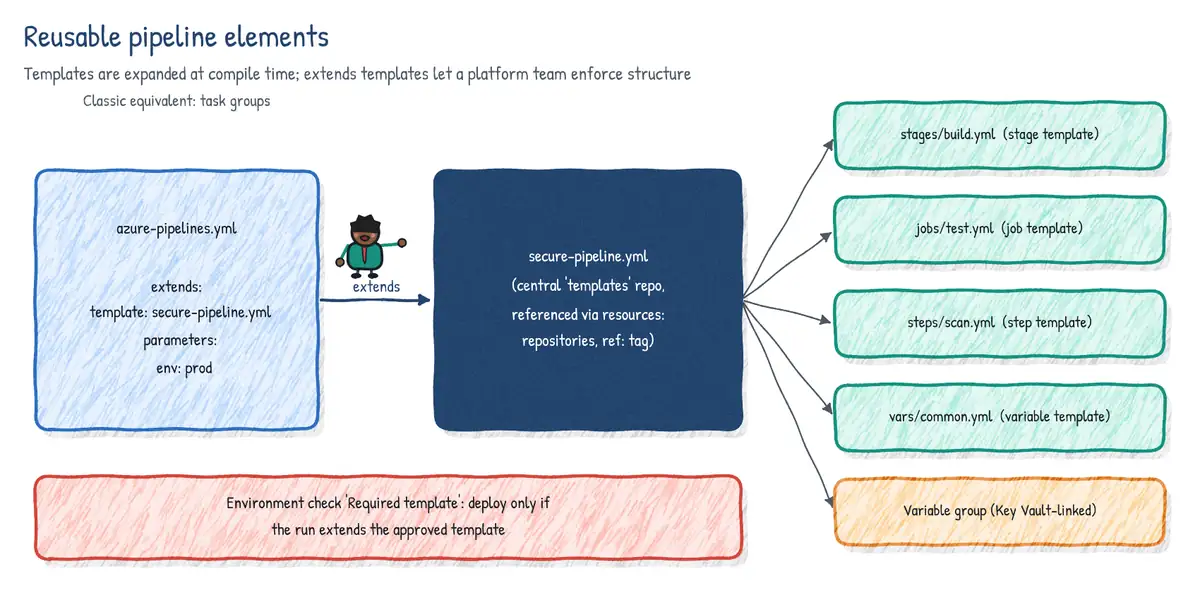
Templates: includes vs extends
| Template type | Inserted at | Example use |
|---|---|---|
| Step template | steps: | Standard build-and-test steps |
| Job template | jobs: | Build job for each microservice |
| Stage template | stages: | Deploy stage reused for dev/test/prod |
| Variable template | variables: | Shared names, SKUs, regions |
| Extends template | Top-level extends: | Security/governance: pipeline must derive from it |
# templates/deploy-stage.yml
parameters:
- name: environment
  type: string
  values: [dev, test, prod]
- name: serviceConnection
  type: string
- name: runSmokeTests
  type: boolean
  default: true
- name: regions
  type: object
  default: [westeurope]

stages:
- stage: Deploy_${{ parameters.environment }}
  jobs:
  - ${{ each region in parameters.regions }}:
    - deployment: web_${{ region }}
      environment: ${{ parameters.environment }}
      strategy:
        runOnce:
          deploy:
            steps:
            - task: AzureWebApp@1
              inputs:
                azureSubscription: ${{ parameters.serviceConnection }}
                appName: orders-${{ parameters.environment }}-${{ region }}
                package: $(Pipeline.Workspace)/web/**/*.zip
            - ${{ if parameters.runSmokeTests }}:
- script: ./smoke.sh ${{ region }}# azure-pipelines.yml consuming templates from another repo
resources:
repositories:
- repository: templates
type: git # Azure Repos; 'github' needs an endpoint
name: Platform/pipeline-templates
ref: refs/tags/v2.1.0 # pin a version
variables:
- template: vars/common.yml@templates
- group: orders-secrets # variable group
stages:
- template: stages/build.yml@templates
- template: stages/deploy-stage.yml@templates
parameters:
environment: test
serviceConnection: sc-test-wif
- template: stages/deploy-stage.yml@templates
parameters:
environment: prod
serviceConnection: sc-prod-wif
regions: [westeurope, northeurope]- Parameter types:
string,number,boolean,object,step,stepList,job,jobList,deployment,deploymentList,stage,stageList.values:restricts allowed values. Parameters are compile-time and type-checked; variables are strings. - Templates are expanded at compile time; limits are 100 separate template files, 100 levels of nesting and 20 MB of expanded YAML.
- Pin template repositories to a tag or commit for stability; templates from other repos are read using the pipeline's identity (protect the repo with checks if needed).
- Use
${{ each }}to loop over objects and${{ if }}/${{ elseif }}/${{ else }}for conditional insertion.
Extends templates for governance
An extends template wraps the entire pipeline: the consuming pipeline provides only parameters (for example its build steps), and the template decides the structure, injecting mandatory steps (credential scanning, SBOM, signing) and rejecting disallowed content. Combined with the Required template check on a production environment or service connection, it guarantees that only pipelines extending the approved template can deploy.
# secure-pipeline.yml (in the governed templates repo)
parameters:
- name: buildSteps
  type: stepList
  default: []
stages:
- stage: Build
  jobs:
  - job: build
    steps:
    - task: CredScan@3                   # mandated pre-step (example)
    - ${{ each step in parameters.buildSteps }}:
      - ${{ each pair in step }}:
          ${{ if eq(pair.key, 'script') }}:   # block inline scripts
            '${{ pair.value }}': error
          ${{ else }}:
            ${{ pair.key }}: ${{ pair.value }}
    - task: AdvancedSecurity-Dependency-Scanning@1   # mandated post-step

# azure-pipelines.yml in an application repo
resources:
  repositories:
  - repository: gov
    type: git
    name: Platform/governed-templates
extends:
  template: secure-pipeline.yml@gov
  parameters:
    buildSteps:
    - task: DotNetCoreCLI@2
      inputs:
command: buildTask groups (classic)
Task groups encapsulate a sequence of tasks into a reusable, versioned task for classic build and release pipelines, with parameters extracted from the variables used. They are not supported in YAML; the YAML equivalent is a step template. When migrating classic to YAML, convert task groups to step templates.
Variables, variable groups and Key Vault
- Scopes: pipeline (root), stage, job; also queue-time (settable at run time if marked so). More specific scopes override broader ones. Predefined variables:
Build.SourceBranch,Build.Reason,System.TeamProject,Pipeline.Workspace,Agent.TempDirectoryand more. - Secret variables are masked in logs, not passed to forked PR builds by default, not available as environment variables unless mapped with
env:, and cannot be read by template expressions. - Variable groups (Library) share variables across pipelines; reference with
- group: name. They are protected resources (pipeline permissions, approvals and checks). - Key Vault-linked variable groups map selected Key Vault secrets as secret variables, fetched at run time (latest version); the service connection needs Get and List secret permissions (or Key Vault Secrets User role with RBAC). Alternatively use the
AzureKeyVault@2task to fetch secrets in a specific job only. - Variables set at runtime:
##vso[task.setvariable variable=x;issecret=true]value. - Secure files (Library) store certificates, provisioning profiles, SSH keys; download with
DownloadSecureFile@1(file removed at job end). - GitHub Actions:
env:at workflow/job/step, configuration variables (vars.NAME) and secrets (secrets.NAME) at repo, environment and organization levels.
variables:
- name: appName
  value: orders
- group: orders-kv              # Key Vault-linked group
- template: vars/${{ parameters.env }}.yml

steps:
- task: AzureKeyVault@2         # alternative: fetch only in this job
  inputs:
    azureSubscription: sc-prod-wif
    KeyVaultName: kv-orders-prod
    SecretsFilter: 'SqlPassword,ApiKey'
    RunAsPreJob: false
- script: ./migrate.sh
  env:
    SQL_PASSWORD: $(SqlPassword)   # secrets must be mapped explicitly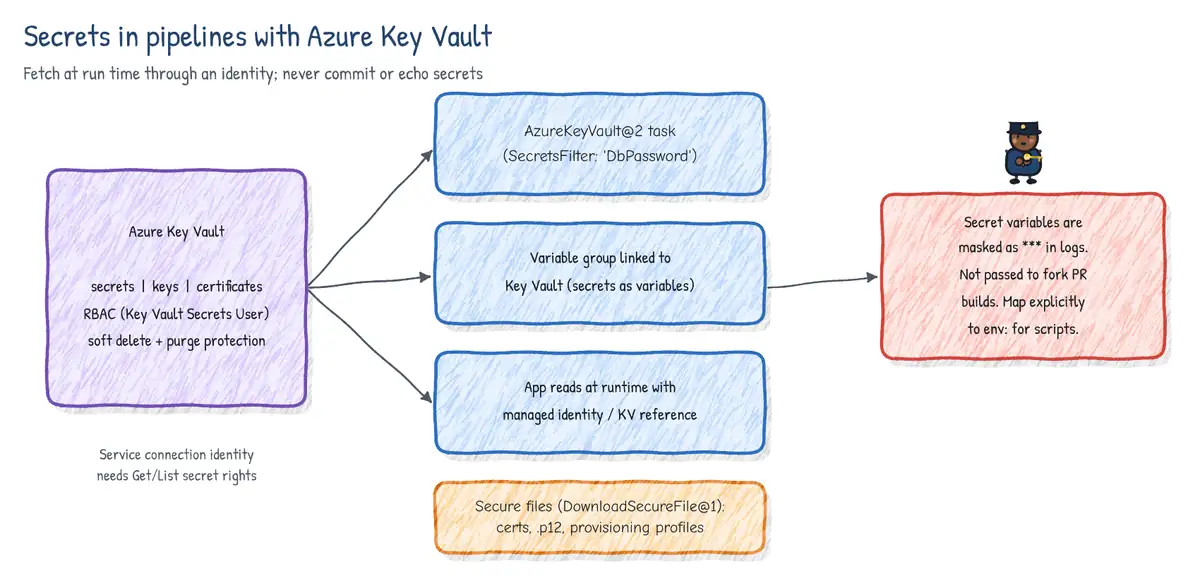
Runtime parameters
Top-level parameters: in a pipeline become runtime parameters: users pick values in the Run pipeline dialog (typed, with allowed values and defaults). They are evaluated at compile time, so they can control structure (which stages exist), unlike queue-time variables.
parameters:
- name: targetEnv
  displayName: Target environment
  type: string
  default: test
  values: [test, staging, prod]
- name: skipTests
  type: boolean
  default: false

stages:
- ${{ if not(parameters.skipTests) }}:
  - stage: Test
    jobs:
    - job: t
      steps:
      - script: npm test
- stage: Deploy
  jobs:
  - deployment: d
    environment: ${{ parameters.targetEnv }}
    strategy:
      runOnce:
        deploy:
          steps:
          - script: echo Deploying to ${{ parameters.targetEnv }}
Environments, checks and approvals
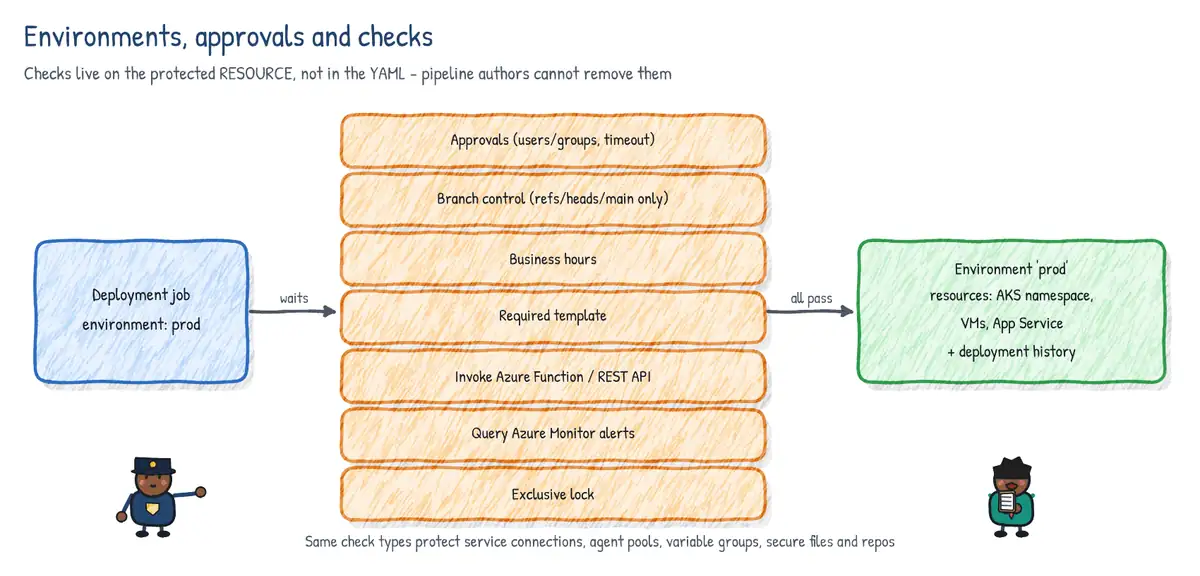
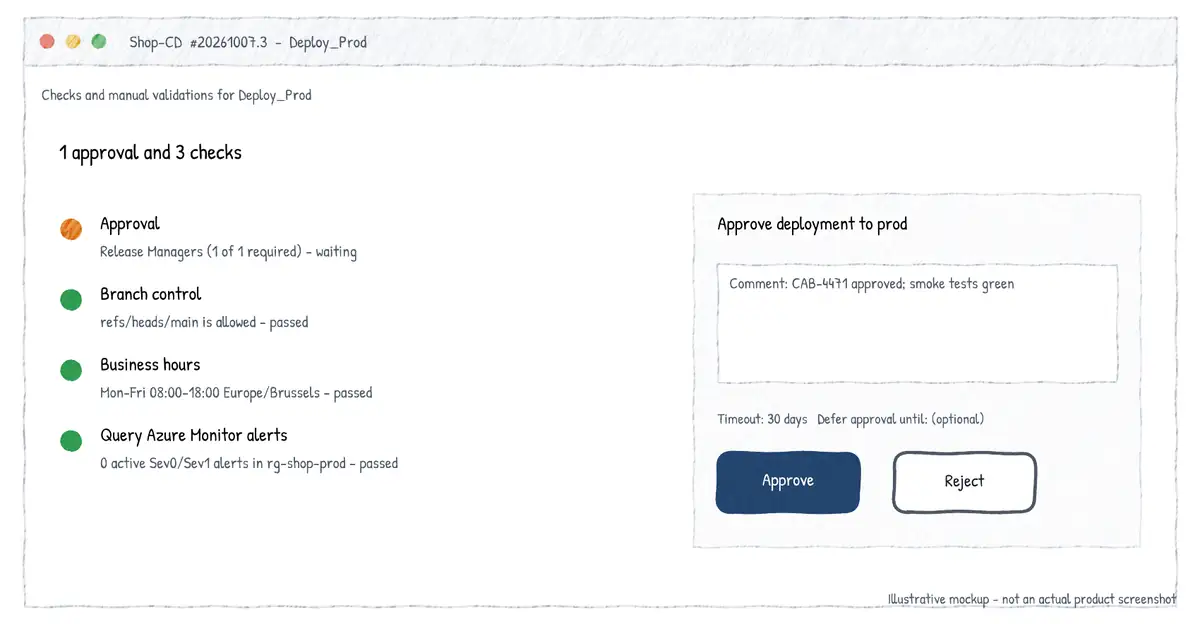
An environment is a named deployment target (dev, test, prod) with optional resources (Kubernetes namespaces, VMs). It records deployment history and traceability (commits and work items per deployment) and is a protected resource on which you configure approvals and checks. Checks are evaluated when a stage that targets the environment is about to start; all checks on all resources used by the stage must pass.
| Check | What it does |
|---|---|
| Approvals | Named users/groups approve; min approvers, timeout, 'approver cannot be requester' |
| Branch control | Only runs from allowed branches (e.g. refs/heads/main), optionally protected |
| Business hours | Stage can start only within a time window and days |
| Exclusive lock | Only one run uses the resource at a time; lockBehavior sequential/runLatest |
| Required template | Pipeline must extend/include approved template(s) |
| Invoke Azure Function | Custom logic; sync or callback; can re-evaluate periodically |
| Invoke REST API | Call external system (change management, ITSM) |
| Query Azure Monitor alerts | Pass only if no active alerts for the rules/resources |
| Evaluate artifact | Policy evaluation of container image artifacts |
| ServiceNow change (extension) | Change request must be approved |
- Check order: static checks (branch control, required template, evaluate artifact) -> pre-check approvals -> dynamic checks (approvals, Azure Function, REST, business hours, Azure Monitor) -> post-check approvals -> exclusive lock.
- Checks can be added to environments, service connections, agent pools, variable groups, secure files and repositories.
- If approvals are not completed within the configured timeout (30 days by default in the UI), the stage is marked as skipped.
- Checks and approvals are configured in the web UI, not in YAML - so pipeline authors cannot remove them by editing the YAML.
lockBehavior: sequentialprocesses all queued runs in order;runLatest(the default) cancels older queued runs waiting for the lock and runs only the newest.- Re-evaluated checks (Function, REST, Azure Monitor) use 'time between evaluations' and a timeout, similar to classic gates.
stages:
- stage: Prod
  lockBehavior: sequential       # with exclusive lock check on 'prod'
  jobs:
  - deployment: aks
    environment: prod.orders-ns  # environment.resource (Kubernetes namespace)
    strategy:
      runOnce:
        deploy:
          steps:
          - task: KubernetesManifest@1
            inputs:
              action: deploy
              manifests: $(Pipeline.Workspace)/manifests/*.yml
containers: contoso.azurecr.io/orders:$(Build.BuildId)GitHub Actions environments and protection rules
- Reference with
environment: production(optionallyurl:) on a job. Environment secrets and variables are available only to jobs that reference that environment, and only after protection rules pass. - Required reviewers: up to 6 users/teams; one approval is enough; optionally prevent self-review.
- Wait timer: 1 to 43,200 minutes (30 days) delay before the job starts.
- Deployment branches and tags: all, protected branches only, or selected name patterns.
- Custom deployment protection rules: GitHub Apps (e.g. Datadog, ServiceNow, Azure Monitor based) that approve or reject; max 6 per environment.
- Plan availability: on Free/Pro/Team, required reviewers, wait timers and custom rules are available for public repos only; private/internal repos need GitHub Enterprise (branch restrictions also available on Pro/Team private repos).
concurrency:groups provide exclusive-lock-like behaviour (one deployment at a time, cancel or queue the rest).
jobs:
  deploy-prod:
    needs: build
    runs-on: ubuntu-latest
    environment:
      name: production
      url: https://orders.contoso.com
    concurrency:
      group: prod-deploy
      cancel-in-progress: false
    permissions:
      id-token: write             # OIDC to Azure
      contents: read
    steps:
      - uses: azure/login@v2
        with:
          client-id: ${{ vars.AZURE_CLIENT_ID }}
          tenant-id: ${{ vars.AZURE_TENANT_ID }}
          subscription-id: ${{ vars.AZURE_SUBSCRIPTION_ID }}
      - uses: azure/webapps-deploy@v3
        with:
          app-name: orders-prod
          package: ./web
Reusable workflows and composite actions
| Aspect | Reusable workflow | Composite action |
|---|---|---|
| Defined in | .github/workflows/x.yml with on: workflow_call | action.yml with runs.using: composite |
| Called as | A job: jobs.x.uses: org/repo/.github/workflows/x.yml@v1 | A step: uses: org/action@v1 |
| Contains | One or more jobs, each with its own runner | Steps only, runs in caller's job |
| Secrets | secrets: (explicit) or secrets: inherit | Passed as inputs; no secrets context |
| Environments | Can use environment: with protection rules | No |
| Logs | Each job and step logged separately | Appears as one step (expandable) |
| Nesting | Up to 10 levels; max 50 unique per run | Can nest composite actions |
# .github/workflows/deploy.yml  (reusable)
on:
  workflow_call:
    inputs:
      environment:
        type: string
        required: true
    secrets:
      SLACK_WEBHOOK:
        required: false
    outputs:
      url:
        value: ${{ jobs.deploy.outputs.url }}
jobs:
  deploy:
    runs-on: ubuntu-latest
    environment: ${{ inputs.environment }}
    outputs:
      url: ${{ steps.d.outputs.url }}
    steps:
      - id: d
        run: echo "url=https://${{ inputs.environment }}.contoso.com" >> "$GITHUB_OUTPUT"

# caller
jobs:
  to-test:
    uses: contoso/platform/.github/workflows/deploy.yml@v3
    with:
      environment: test
    secrets: inherit
  to-prod:
    needs: to-test
    uses: contoso/platform/.github/workflows/deploy.yml@v3
    with:
      environment: production
secrets: inherit# .github/actions/setup-dotnet-cache/action.yml (composite action)
name: Setup .NET with cache
inputs:
dotnet-version:
default: '8.0.x'
runs:
using: composite
steps:
- uses: actions/setup-dotnet@v4
with:
dotnet-version: ${{ inputs.dotnet-version }}
- uses: actions/cache@v4
with:
path: ~/.nuget/packages
key: nuget-${{ runner.os }}-${{ hashFiles('**/packages.lock.json') }}
- run: dotnet restore --locked-mode
shell: bash # 'shell' is required for run steps in composites- Workflow-level
envof the caller is not propagated to a reusable workflow; pass values asinputs. - A reusable workflow cannot raise
GITHUB_TOKENpermissions beyond what the caller grants. - Organizations can enforce required workflows via repository rulesets ('Require workflows to pass before merging') - the GitHub analogue of required templates.
- Starter workflows (workflow templates) in an org's
.githubrepo give teams a governed starting point.
Classic vs YAML at a glance
| Classic concept | YAML equivalent |
|---|---|
| Build definition + release definition | Multi-stage YAML pipeline |
| Task group | Step template |
| Release stage pre-deployment approval | Approval check on an environment |
| Release gates | Checks (Azure Monitor, REST, Function, business hours) |
| Deployment group | Environment with VM resources |
| Build completion trigger | Pipeline resource trigger |
| Variable group | Variable group (same; - group:) |
Use case: 'From click-ops to YAML'
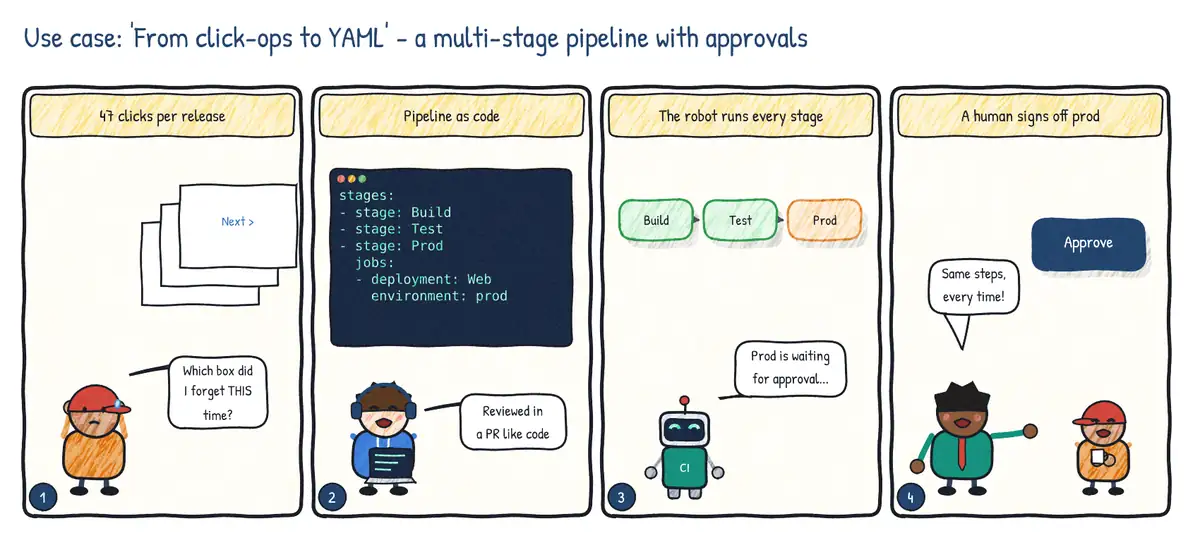
Situation. Releases are done by an engineer clicking through classic release screens. Steps get skipped, nobody reviews changes to the process, and production approvals happen in chat.
| Step | Practice | Feature used |
|---|---|---|
| 1 | Store the pipeline with the code | Multi-stage YAML (azure-pipelines.yml) |
| 2 | Review pipeline changes like code | Pull requests + branch policies on the YAML |
| 3 | One run from build to production | Stages with dependsOn and deployment jobs |
| 4 | Formal sign-off for production | Environment prod with approvals and branch control checks |