Deployment Strategies
What this chapter covers
- Design a deployment strategy, including blue-green, canary, ring, progressive exposure, feature flags, and A/B testing
- Design a pipeline to ensure that dependency deployments are reliably ordered
- Plan for minimizing downtime during deployments by using virtual IP address (VIP) swap, load balancing, rolling deployments, and deployment slot usage and swap
- Design a hotfix path plan for responding to high-priority code fixes
- Design and implement a resiliency strategy for deployment
- Implement feature flags by using Azure App Configuration Feature Manager
- Implement application deployment by using containers, binaries, and scripts
- Implement a deployment that includes database tasks
Deployment is where software meets users, and it is where most outages are born. The AZ-400 exam spends a large share of Domain 3 on how you release: which strategy limits the blast radius, how you keep the site up during a switch-over, how you get an urgent fix out without bypassing every control, and how you deal with the hardest part of any release - state, meaning databases and configuration. A key idea runs through the whole chapter: deployment (installing bits on infrastructure) and release (exposing a capability to users) are two different events, and modern strategies deliberately separate them.
Deployment versus release, and the vocabulary of exposure
- Deployment - moving a build artifact to an environment and starting it. Can happen many times a day with no user-visible change.
- Release - making the new behaviour available to some or all users. Can be done by routing (traffic switch) or by configuration (feature flag).
- Blast radius - the share of users or systems affected if the change is bad. Canary, rings and flags all exist to keep it small.
- Progressive exposure - the umbrella term for widening the audience in controlled steps while watching health signals; canary, rings and percentage flags are all implementations of it.
- Rollback vs roll-forward - reverting to the previous version versus shipping a new fix. Strategies that keep the old version running (blue-green, slots) make rollback near-instant.
Blue-green deployment
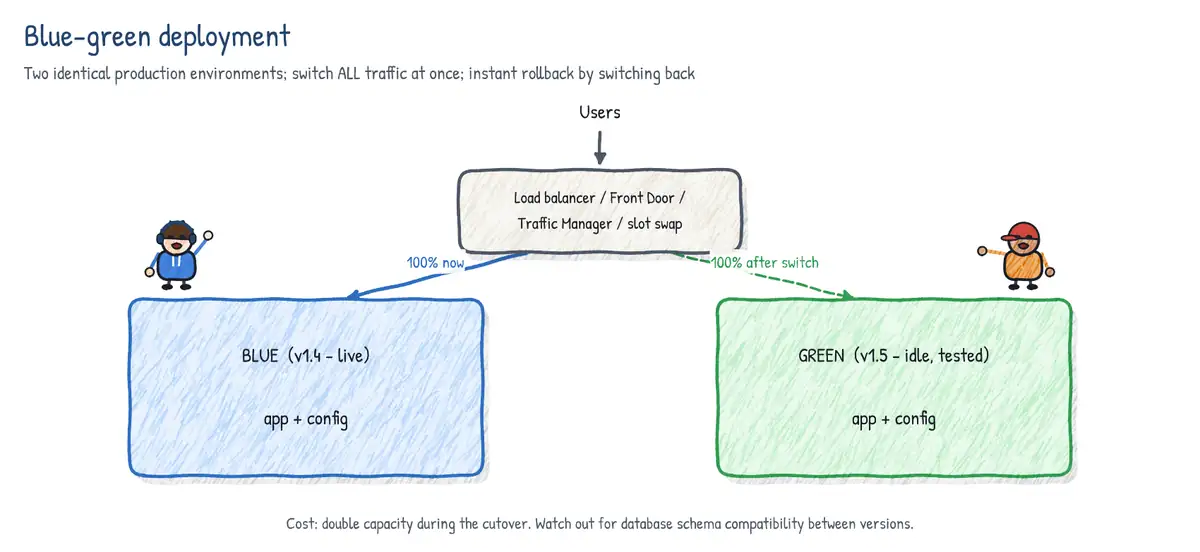
Blue-green keeps two identical production environments. Blue serves live traffic; green receives the new version, is smoke-tested in place with production configuration, and then the router (load balancer, Traffic Manager, Front Door, DNS or an App Service slot swap) moves all traffic to green in one step. Blue stays warm so rollback is just flipping the router back. After a soak period blue becomes the staging target for the next release.
- Strengths - near-zero downtime, instant rollback, full production-like testing before cut-over, simple mental model.
- Costs - double infrastructure during the release (cheap with slots, expensive with full VM fleets); shared state such as a single database must work with BOTH versions.
- Database rule - schema changes must be backward compatible (see expand/contract later), otherwise rolling back the code leaves it talking to a schema it cannot use.
- Sessions - in-memory session state is lost at the switch; use a distributed cache or stateless tokens.
Canary releases
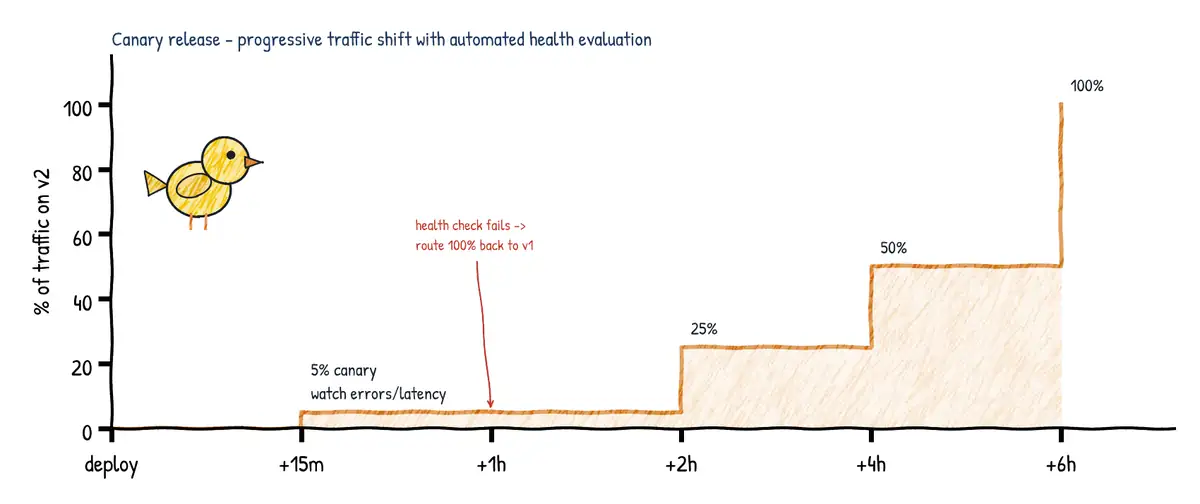
A canary release sends a small percentage of real production traffic (for example 5 percent) to the new version while the rest stays on the old one. You compare health metrics - error rate, latency, saturation, business KPIs - between the canary and the baseline. If the canary is healthy you increase the percentage in steps (5, 25, 50, 100); if not, you route the traffic back. The key difference from blue-green is that both versions serve users at the same time, and selection is usually random or by percentage rather than by named user groups.
In Azure Pipelines, a deployment job against a Kubernetes environment can use the canary strategy with increments, and the KubernetesManifest@1 task can create a baseline and canary workload side by side and later promote or reject it. Azure Container Apps does the same at platform level with revision traffic weights; Front Door and Traffic Manager do it with weighted routing; App Service does it with Traffic % routing to a slot.
stages:
- stage: Canary
  jobs:
  - deployment: DeployCanary
    environment: prod-aks.shop            # environment + Kubernetes resource (namespace)
    strategy:
      canary:
        increments: [10, 25]              # 10% then 25%, then the full rollout
        preDeploy:
          steps:
          - script: echo "validate cluster and image signature"
        deploy:
          steps:
          - task: KubernetesManifest@1
            inputs:
              action: deploy
              strategy: canary
              percentage: $(strategy.increment)
              manifests: manifests/deployment.yml
              containers: myacr.azurecr.io/shop:$(Build.BuildId)
        postRouteTraffic:
          steps:
          - script: ./scripts/check-slo.sh --max-error-rate 1   # health gate
        on:
          failure:
            steps:
            - task: KubernetesManifest@1
              inputs:
                action: reject
                strategy: canary
                manifests: manifests/deployment.yml
          success:
            steps:
            - task: KubernetesManifest@1
              inputs:
                action: promote
                strategy: canary
                manifests: manifests/deployment.yml
Deployment jobs support three strategies: runOnce (every hook runs once - the default and most common), rolling (replaces instances in batches; supported only for virtual machine environment resources) and canary (increments of traffic). Lifecycle hooks are preDeploy, deploy, routeTraffic, postRouteTraffic and on: failure / success.
Ring-based deployment
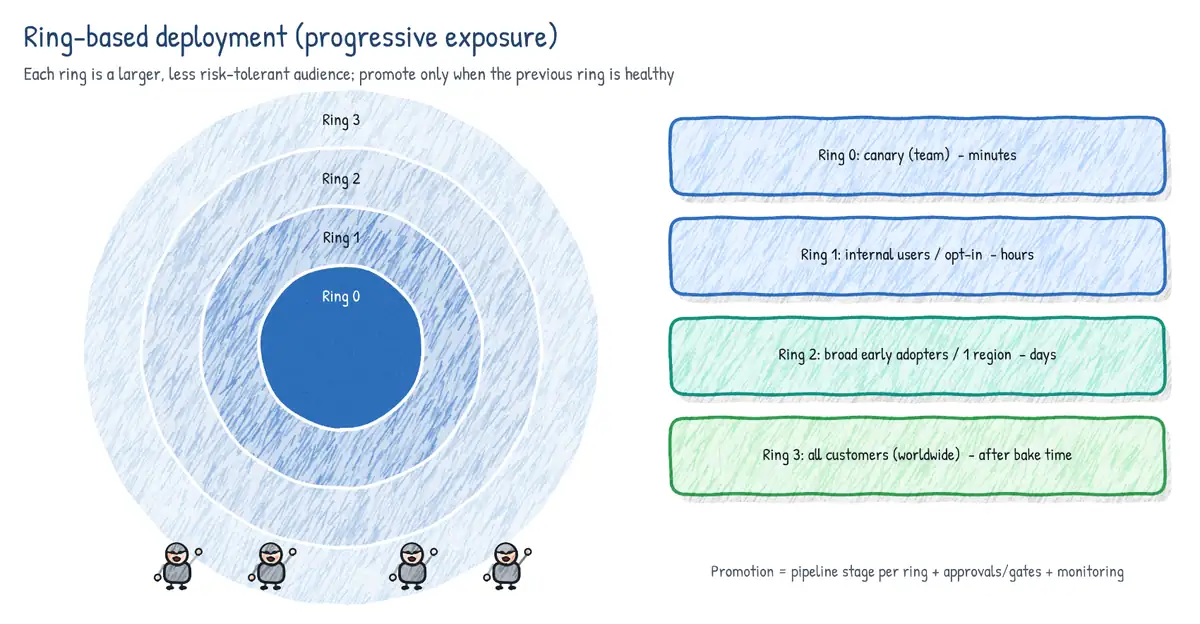
Ring deployment generalises canary from percent of traffic to named audiences. Each ring is a set of users or scale units with a known risk tolerance, and a release must prove itself in an inner ring before it moves outward. Rings are usually separate stages in the pipeline, each with its own environment, approvals and a bake time (a wait or a monitoring gate) before the next ring starts.
| Ring | Typical audience (Microsoft-style model) | Purpose |
|---|---|---|
| Ring 0 (canary) | The team that builds the product | Catch obvious breakage, dogfood |
| Ring 1 | Wider internal users (whole company) | Real usage, still friendly users |
| Ring 2 | Early adopters / preview customers | Diverse real-world configurations |
| Ring 3+ | All users, often region by region or scale unit by scale unit | General availability |
Azure DevOps itself is shipped this way: changes go first to a single internal scale unit (ring 0), then to a small public scale unit, then to progressively larger groups of scale units around the world, with health monitoring between rings. Windows Insider (Canary, Dev, Beta, Release Preview channels) is the consumer-facing version of the same idea.
Feature flags and dark launching
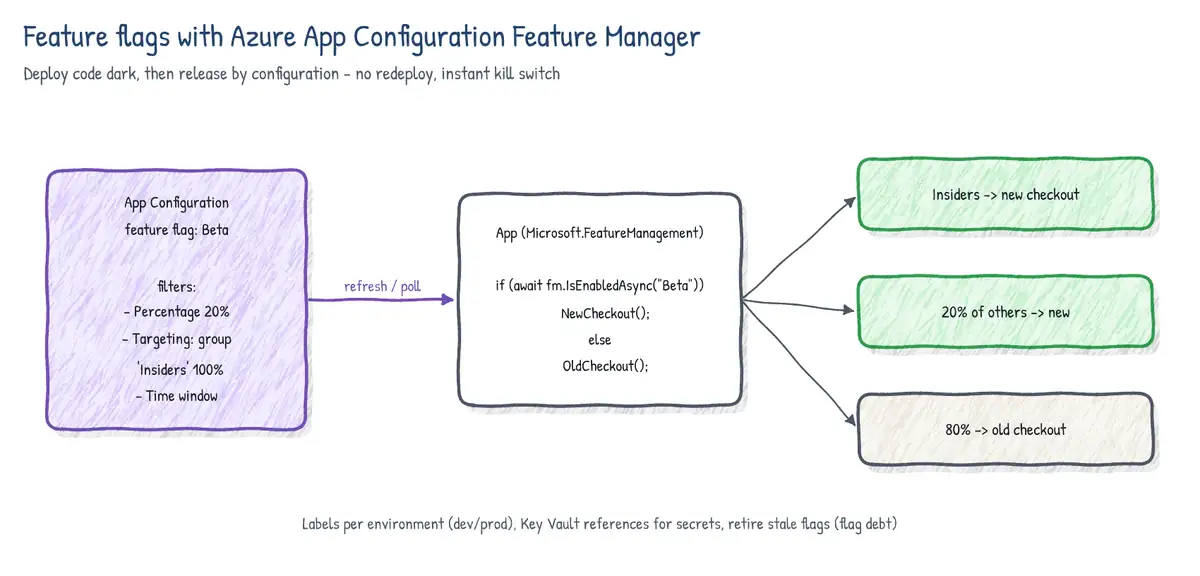
A feature flag (feature toggle) wraps new code paths in a runtime check. The code is deployed to everyone but the behaviour is only switched on for the users, percentage or time window you choose - without a redeploy. That decouples deployment from release and enables trunk-based development, because unfinished work can be merged to main behind an off flag.
- Release flags - hide incomplete features; short lived, delete when done.
- Experiment flags - drive A/B tests; live for the duration of the experiment.
- Ops flags / kill switches - turn off an expensive or failing feature under load; can be long lived.
- Permission flags - premium or beta-program features for specific users.
- Dark launching - deploying a feature to production and exercising it with real traffic without users seeing it (for example calling the new recommendation service in the background and discarding the result) to measure performance and correctness before the reveal.
A/B testing
A/B testing (split testing) shows two or more variants to statistically comparable user groups and measures a business outcome - conversion, click-through, retention. It is an experiment answering which variant is better, while canary answers is the new version safe. A/B tests are normally implemented with experiment flags or variant feature flags plus telemetry (Application Insights, Azure App Configuration experimentation with Azure Monitor / Split.io-style analysis), and need enough traffic and time to reach statistical significance.
| Strategy | Unit of exposure | Main goal | Rollback | Extra infra |
|---|---|---|---|---|
| Blue-green | All traffic, one switch | Zero-downtime cut-over | Flip router | Second full env (or slot) |
| Canary | % of random traffic | Validate safety with real traffic | Route traffic back | Side-by-side versions |
| Rings | Named user groups / scale units | Staged blast radius | Halt before next ring | Multiple stages/envs |
| Feature flags | Users/segments via config | Decouple deploy from release | Turn flag off | Flag service (App Config) |
| Dark launch | Hidden real traffic | Test load/correctness invisibly | Disable call path | Usually a flag |
| A/B testing | Statistically split users | Measure business impact | End experiment | Flags + analytics |
| Rolling | Instances in batches | Upgrade without spare capacity | Roll back batches (slow) | None extra |
Reliably ordering dependent deployments
Real systems have dependencies: the database schema must be migrated before the API that uses it, the API before the front end, shared infrastructure before workloads. Azure Pipelines models this with a directed acyclic graph of stages and jobs.
dependsOnon stages and jobs defines order. Without it, stages run sequentially in file order; jobs within a stage run in parallel by default.dependsOn: []makes a stage start immediately (fan-out).conditioncontrols whether a dependent runs - e.g.condition: succeeded('DeployDb')orand(succeeded(), eq(variables['Build.SourceBranch'], 'refs/heads/main')).- Output variables pass data between jobs and stages:
stageDependencies.DeployInfra.Bicep.outputs['out.appName']. - Environments add checks (approvals, business hours, Azure Monitor alerts, invoke REST/Azure Function, required template, exclusive lock). The exclusive lock ensures only one run deploys to an environment at a time, so two pipelines cannot interleave half-finished deployments.
- Pipeline resources (
resources: pipelines:) let one pipeline be triggered by and consume artifacts from another - e.g. the app pipeline runs only after the infrastructure pipeline completes on main. lockBehavior: sequential | runLatest(pipeline or stage level) decides whether queued runs waiting on an exclusive lock all run in order or only the latest runs.
resources:
  pipelines:
  - pipeline: infra                 # alias
    source: platform-infra-ci       # name of the upstream pipeline
    trigger:
      branches: { include: [ main ] }

stages:
- stage: DeployDb
  jobs:
  - deployment: Db
    environment: prod-db
    strategy:
      runOnce:
        deploy:
          steps:
          - download: infra
          - script: echo "apply backward-compatible migration"
- stage: DeployApi
  dependsOn: DeployDb
  condition: succeeded('DeployDb')
  jobs:
  - deployment: Api
    environment: prod-api
    strategy: { runOnce: { deploy: { steps: [ script: echo deploy api ] } } }
- stage: DeployWeb
  dependsOn: [ DeployApi ]
  jobs:
  - deployment: Web
    environment: prod-web
    strategy: { runOnce: { deploy: { steps: [ script: echo deploy web ] } } }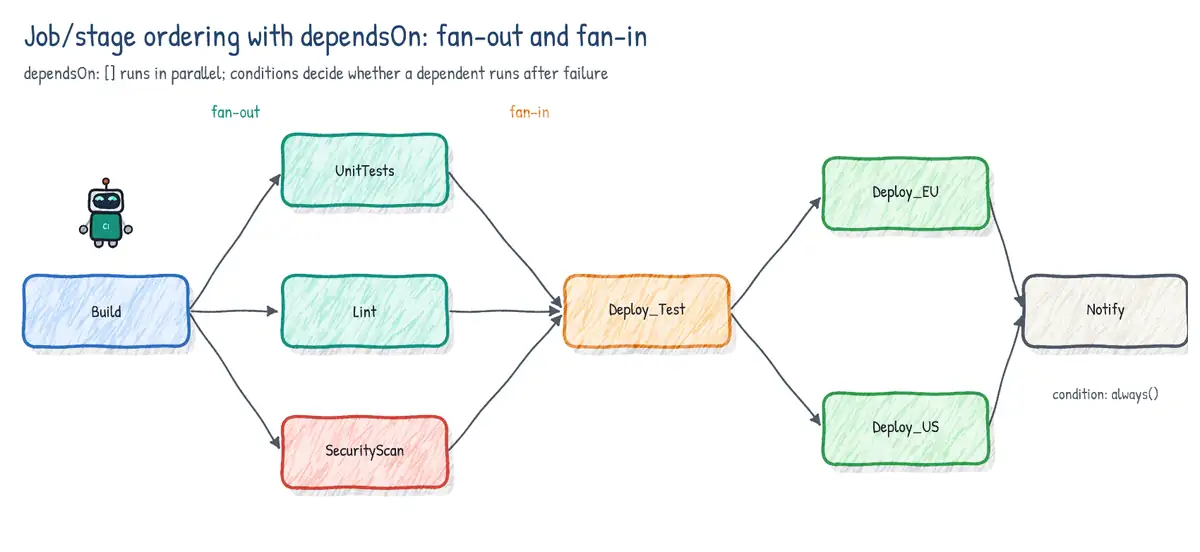
Minimizing downtime
Load balancers, VIP swap and global routing
Every zero-downtime technique relies on something in front of the instances that can stop sending traffic to an instance before it is changed. The exam lists VIP swap: historically Azure Cloud Services swapped the virtual IP between staging and production deployments; today the same pattern is achieved with App Service slot swap, load balancer backend pool changes, or global routers.
| Service | Layer / scope | Deployment use |
|---|---|---|
| Azure Load Balancer | L4, regional | Drain/remove VMs from backend pool; health probes |
| Application Gateway | L7, regional (WAF) | Path routing, backend pools, connection draining |
| Traffic Manager | DNS-based, global | Weighted/priority endpoints; DNS TTL delays switch |
| Azure Front Door | L7 anycast, global (CDN, WAF) | Weighted origins, instant switch, health probes |
| App Service slots | Platform, per app | Swap with warm-up, traffic % routing |
Rolling deployments
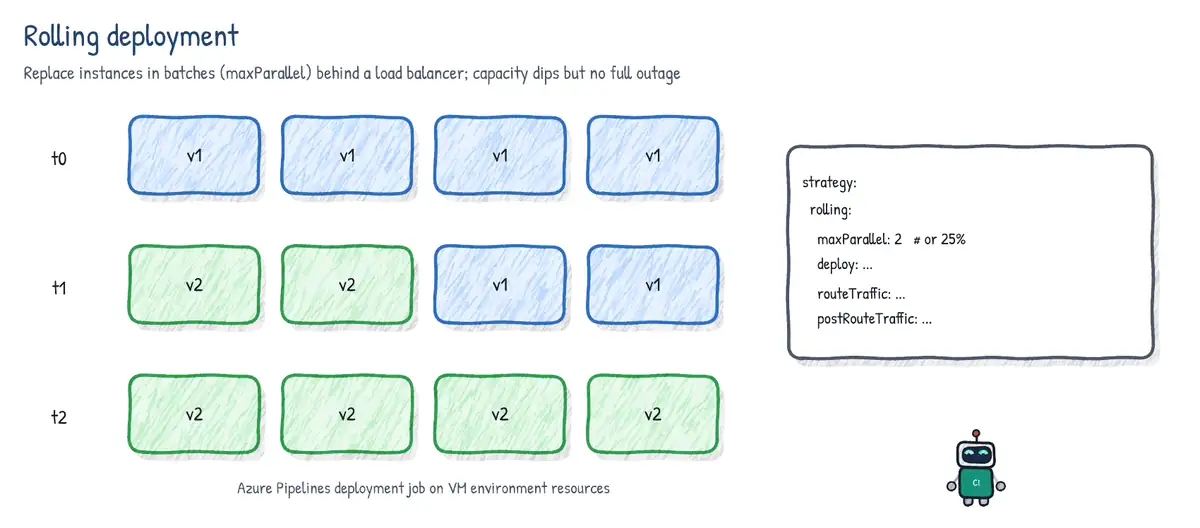
A rolling deployment updates instances in batches: take N instances out of the load balancer, upgrade them, health-check them, put them back, and continue. It needs no spare environment, but during the roll both versions serve traffic and rollback means rolling again. Virtual Machine Scale Sets offer rolling upgrade policy (maxBatchInstancePercent, pauseTimeBetweenBatches, health probe or Application Health extension); Kubernetes Deployments roll by default; Azure Pipelines deployment jobs offer rolling with maxParallel for VM environment resources.
jobs:
- deployment: WebVMs
  environment:
    name: prod
    resourceType: VirtualMachine
    tags: web                      # only VMs tagged 'web'
  strategy:
    rolling:
      maxParallel: 25%             # or an absolute number, e.g. 2
      preDeploy:
        steps:
        - script: ./lb-drain.sh $(Agent.MachineName)
      deploy:
        steps:
        - script: ./install.sh
      routeTraffic:
        steps:
        - script: ./lb-enable.sh $(Agent.MachineName)
      postRouteTraffic:
        steps:
        - script: curl --fail http://localhost/health
      on:
        failure:
          steps:
          - script: ./rollback.sh
App Service deployment slots
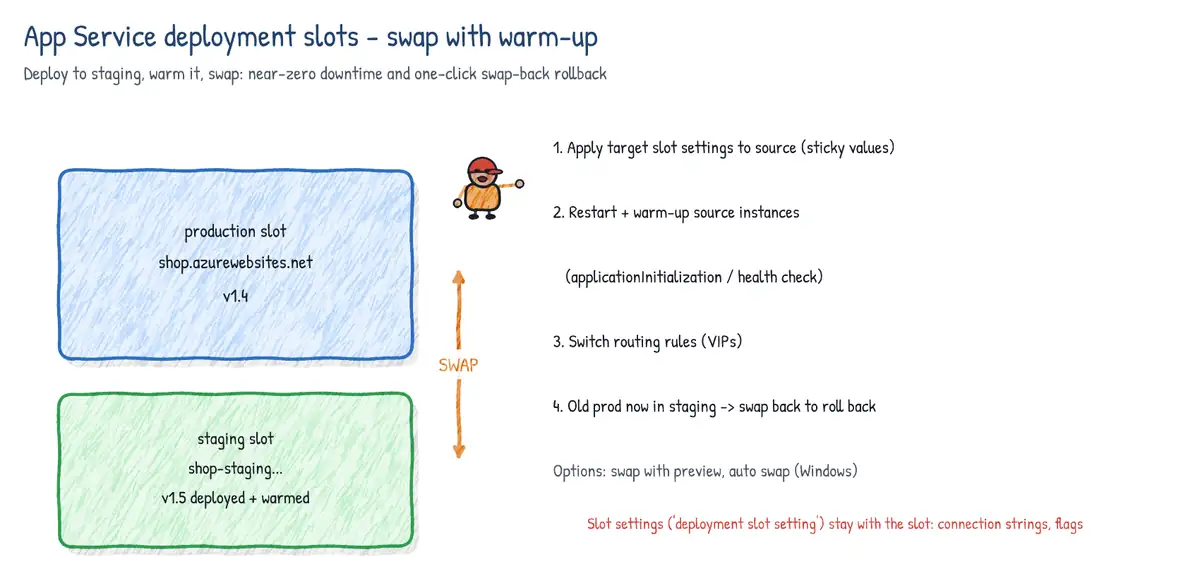
Deployment slots are live apps with their own hostname (myapp-staging.azurewebsites.net) that share the App Service plan. They need the Standard, Premium or Isolated tier (Standard allows 5 slots, Premium and Isolated more). You deploy to a non-production slot, warm it up and then swap. The swap is a routing change, so no requests are dropped, and swapping again is the rollback.
- Target-slot (production) slot-specific settings are applied to the source slot instances, which restarts them.
- The platform waits for every source instance to restart and warm up (local cache initialized, custom warm-up path hit -
applicationInitializationorWEBSITE_SWAP_WARMUP_PING_PATH/WEBSITE_SWAP_WARMUP_PING_STATUSES). - If all instances are healthy, routing rules are switched: the source slot becomes production.
- The old production content now sits in the source slot and gets the source slot's settings, so you can swap back if needed.
- Swap with preview (multi-phase swap) - phase 1 applies production settings to the staging slot and pauses; you validate the staging slot with production config, then Complete swap or Cancel swap. Useful when settings such as connection strings differ per slot.
- Auto swap - every deployment to a slot automatically swaps into the target after warm-up. Ideal for CI/CD with no manual step. Not supported on Linux App Service or Web App for Containers - use an explicit swap task there.
- Slot settings (sticky / deployment slot setting) - app settings and connection strings marked Deployment slot setting stay with the slot and do not move during the swap. Use them for per-environment values (staging database, feature flag label, App Insights key for staging).
- Not swapped by design: custom domains, TLS/SSL bindings and protocol settings, scale settings, IP restrictions, Always On, CORS, VNet integration, diagnostic settings, managed identities and settings ending in
_EXTENSION_VERSION. - Traffic % routing - send e.g. 10 percent of production traffic to a slot (canary on App Service); users can opt in or out with the
x-ms-routing-namequery parameter/cookie.
- task: AzureWebApp@1
  inputs:
    azureSubscription: sc-prod-wif         # workload identity federation service connection
    appType: webAppLinux
    appName: shop-web
    deployToSlotOrASE: true
    resourceGroupName: rg-shop-prod
    slotName: staging
    package: $(Pipeline.Workspace)/drop/*.zip
- script: curl --fail --retry 5 https://shop-web-staging.azurewebsites.net/health
  displayName: Smoke test staging slot
- task: AzureAppServiceManage@0
  inputs:
    azureSubscription: sc-prod-wif
    Action: Swap Slots
    WebAppName: shop-web
    ResourceGroupName: rg-shop-prod
    SourceSlot: staging                    # swap staging -> production
PreserveVnet: true# swap with preview from the CLI
az webapp deployment slot swap -g rg-shop-prod -n shop-web --slot staging \
--target-slot production --action preview
# ...validate https://shop-web-staging.azurewebsites.net with production settings...
az webapp deployment slot swap -g rg-shop-prod -n shop-web --slot staging --action swap
# or abandon it
az webapp deployment slot swap -g rg-shop-prod -n shop-web --slot staging --action reset
# route 10% of production traffic to the staging slot
az webapp traffic-routing set -g rg-shop-prod -n shop-web --distribution staging=10Designing a hotfix path
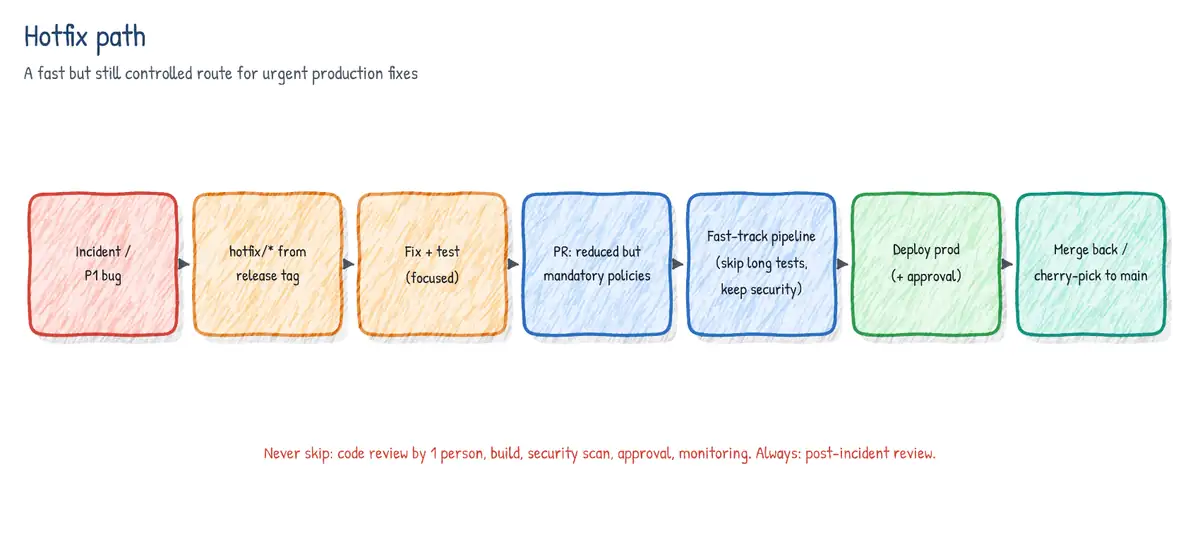
A hotfix path is a pre-agreed, pre-built route for urgent fixes. It should be faster than the normal path but must not bypass the controls that protect production - unreviewed, untested changes in an emergency are how a P2 becomes a P1.
- Create a hotfix branch from the code that is actually in production - the release tag or release branch (e.g.
git switch -c hotfix/1.4.1 v1.4.0), not from main which may contain unreleased work. - Make the minimal fix with a regression test; open a pull request with a reduced but real policy (one expedited reviewer, build validation still required).
- Run a fast-track pipeline: build once, unit tests, key security scans (secret scanning, critical SAST/SCA), deploy to a staging slot or pre-prod, smoke tests. Skip long-running suites (full load or regression) or run them after release.
- Deploy to production through the same environment, with an emergency approval group (on-call lead) rather than the full CAB. Use the same artifact that was tested.
- Tag the release (
v1.4.1) and merge or cherry-pick the fix back to main (and to any other active release branches) so the bug does not reappear in the next release. - Hold a post-incident review and add tests/monitoring that would have caught the issue.
git fetch --tags
git switch -c hotfix/1.4.1 v1.4.0          # branch from what is in production
# ...fix + test...
git commit -am "Fix null reference in checkout total (AB#4711)"
git tag -a v1.4.1 -m "Hotfix 1.4.1"
git push origin hotfix/1.4.1 --tags
# bring the fix back to main
git switch main
git cherry-pick <commit-sha>                # or merge the hotfix branch via PR
In YAML, a fast-track path can be the same pipeline with conditions keyed on the branch (startsWith(variables['Build.SourceBranch'], 'refs/heads/hotfix/')) that skip optional stages, or a separate pipeline that extends the same required template so that security steps cannot be removed. Environment checks still apply because they are attached to the environment, not the pipeline.
Resiliency strategy for deployments
- Health checks - every service exposes liveness/readiness endpoints; App Service Health check removes unhealthy instances from the load balancer; Kubernetes readiness probes keep pods out of Service endpoints until ready.
- Automated gates - environment checks such as Query Azure Monitor alerts and Invoke REST API evaluate health before and after deployment; deployment jobs run smoke tests in
postRouteTraffic. - Automatic rollback -
on: failurehooks, re-swapping slots, Container Apps traffic back to the previous revision,kubectl rollout undo, or redeploying the last good artifact. Rollback must be scripted and rehearsed, not invented during an incident. - Retries - transient failures in deployment steps are retried:
retryCountOnTaskFailureon a task, retry loops with exponential backoff in scripts. - Idempotency - deployment scripts and IaC must produce the same result when run again (create-if-not-exists, declarative templates, idempotent SQL migration scripts), so a retry or rerun after partial failure is safe.
- Timeouts and cancellation -
timeoutInMinuteson jobs,cancelTimeoutInMinutes. - Redundancy - availability zones, multiple regions with Front Door, so deploying one region at a time does not take the service down.
- task: AzureCLI@2
  displayName: Deploy infra (retried on transient failure)
  retryCountOnTaskFailure: 3          # 0-10 retries; waits increase between attempts
  timeoutInMinutes: 20
  inputs:
    azureSubscription: sc-prod-wif
    scriptType: bash
    scriptLocation: inlineScript
    inlineScript: az deployment group create -g rg-shop-prod -f main.bicep -p @prod.bicepparam
Feature flags with Azure App Configuration Feature Manager
Azure App Configuration is a managed store for application settings and feature flags. Its Feature manager blade lets you create flags, enable or disable them and attach feature filters. Applications read the flags through the Microsoft.FeatureManagement libraries (.NET, also available for Java Spring, Python, JavaScript and Go), which evaluate filters locally and refresh from the store on an interval (30 seconds by default for flags).
| Built-in filter | Name in config | What it does |
|---|---|---|
| Percentage | Microsoft.Percentage | On for a random % of evaluations |
| Time window | Microsoft.TimeWindow | On between Start and End (UTC), optional recurrence |
| Targeting | Microsoft.Targeting | On for named users/groups + default rollout %, with exclusions |
| Custom | Your class (IFeatureFilter) | Any logic, e.g. browser, region, tenant |
Labels let one store hold different values for the same key - for example a flag Beta with label dev enabled and label prod disabled. The application selects the label for its environment, which is a clean alternative to separate stores per environment. Variant feature flags return a variant (e.g. Small, Large button) instead of on/off, and are the basis for A/B experiments with telemetry sent to Application Insights.
// Program.cs (.NET 8+, packages: Microsoft.Azure.AppConfiguration.AspNetCore,
//              Microsoft.FeatureManagement.AspNetCore, Azure.Identity)
using Azure.Identity;
using Microsoft.FeatureManagement;

var builder = WebApplication.CreateBuilder(args);
var envLabel = builder.Environment.EnvironmentName;     // e.g. "prod"

builder.Configuration.AddAzureAppConfiguration(options =>
{
    options.Connect(new Uri(builder.Configuration["AppConfig:Endpoint"]!),
                    new DefaultAzureCredential())       // managed identity, no secrets
           .UseFeatureFlags(ff =>
           {
               ff.Select("*", envLabel);                // flags with this label
               ff.SetRefreshInterval(TimeSpan.FromSeconds(30));
           });
});
builder.Services.AddAzureAppConfiguration();
builder.Services.AddFeatureManagement()
                .WithTargeting();                       // enables Microsoft.Targeting

var app = builder.Build();
app.UseAzureAppConfiguration();                         // refresh middleware

app.MapGet("/checkout", async (IFeatureManager fm) =>
    await fm.IsEnabledAsync("NewCheckout") ? "new checkout" : "classic checkout");
app.Run();{
"id": "NewCheckout",
"enabled": true,
"conditions": {
"client_filters": [
{
"name": "Microsoft.Targeting",
"parameters": {
"Audience": {
"Users": [ "pilot@contoso.com" ],
"Groups": [ { "Name": "BetaTesters", "RolloutPercentage": 100 } ],
"DefaultRolloutPercentage": 10,
"Exclusion": { "Users": [ "ceo@contoso.com" ] }
}
}
}
]
}
}- In MVC you can gate a controller or action with
[FeatureGate("NewCheckout")]and in Razor with the<feature name="NewCheckout">tag helper. - Flags are stored as key-values with the prefix
.appconfig.featureflag/and content typeapplication/vnd.microsoft.appconfig.ff+json. - Change flags from a pipeline with
az appconfig feature enable --name <store> --feature NewCheckout --label prodor import a JSON file withaz appconfig kv import. - Use snapshots in App Configuration to freeze a set of keys for a release, and managed identity + RBAC role App Configuration Data Reader rather than connection strings.
Deploying containers, binaries and scripts
Containers
- Build and push to Azure Container Registry with
Docker@2(buildAndPush) oraz acr build(cloud build, no local Docker daemon). Tag with an immutable version (build id or git SHA) - never deploylatest. - AKS -
KubernetesManifest@1(deploy, bake from Helm/kustomize, promote/reject canary,imagePullSecretscreation) orHelmDeploy@0; attach ACR to AKS (az aks update --attach-acr) so kubelet pulls with managed identity. GitOps with Flux (AKS extension) is the pull-based alternative. - Azure Container Apps - each change to the template creates a revision. In single revision mode the new revision replaces the old one automatically; in multiple revision mode you split traffic by weight between revisions (canary / blue-green) and use revision labels for stable test URLs.
- App Service / Web App for Containers - point the app at the new image tag, usually via a slot and swap. Azure Container Instances for simple, short-lived containers.
# Container Apps blue-green / canary with multiple revision mode
az containerapp revision set-mode -g rg-shop -n shop-api --mode multiple
az containerapp update -g rg-shop -n shop-api \
   --image myacr.azurecr.io/shop-api:1.5.0 --revision-suffix v150
az containerapp revision label add -g rg-shop -n shop-api --label green \
   --revision shop-api--v150                      # stable URL for testing the new revision
az containerapp ingress traffic set -g rg-shop -n shop-api \
   --revision-weight shop-api--v140=90 shop-api--v150=10
# promote fully (or set v140 back to 100 to roll back)
az containerapp ingress traffic set -g rg-shop -n shop-api --revision-weight shop-api--v150=100
Binaries and scripts
- Build once, deploy many: publish one artifact (
PublishPipelineArtifact@1,publish:keyword) and promote the same bits through every stage; inject environment differences through configuration, not rebuilds. - App Service:
AzureWebApp@1/AzureRmWebAppDeployment@4with zip deploy or run-from-package (WEBSITE_RUN_FROM_PACKAGE=1, atomic and read-only). Functions:AzureFunctionApp@2. - VMs: deployment groups (classic) or environment VM resources (YAML) with an agent on each machine; or push with
AzureCLI@2+az vm run-command, or with configuration management (Ansible, Machine Configuration). - Scripts:
AzureCLI@2,AzurePowerShell@5,PowerShell@2,Bash@3; keep them in source control, make them idempotent, and useset -euo pipefail/$ErrorActionPreference = 'Stop'so failures fail the job. - Packages: publish binaries to Azure Artifacts / GitHub Packages (NuGet, npm, Maven, Universal Packages) when other teams consume them.
Deployments that include database tasks
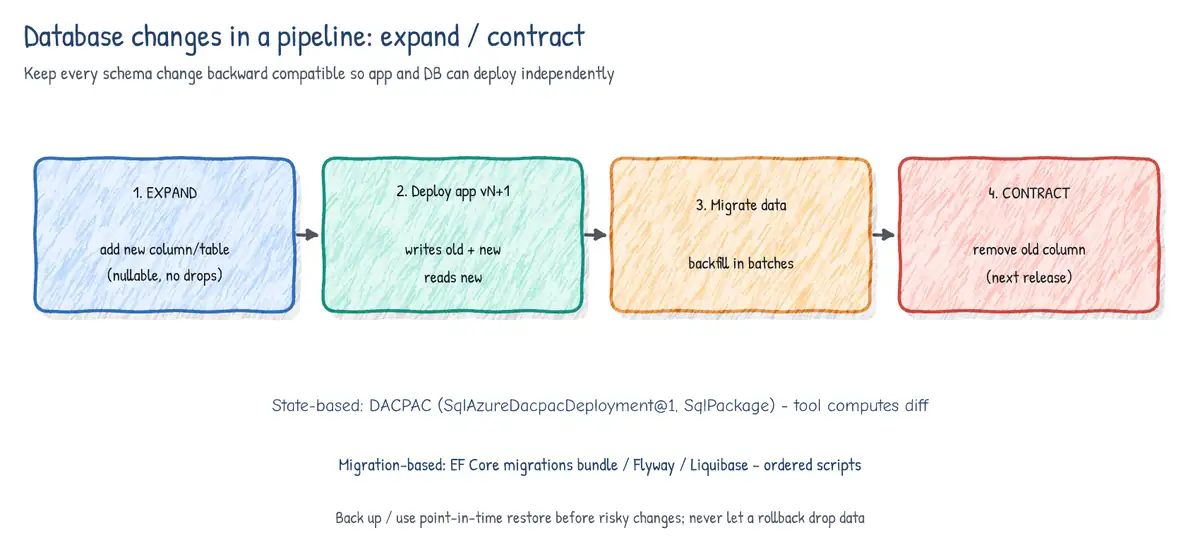
Code can be rolled back in seconds; data cannot. Database deployment is therefore the part of a release that most needs automation, review and a backward-compatible design. There are two families of approach.
| Aspect | State-based (declarative) | Migration-based (imperative) |
|---|---|---|
| Source of truth | Desired schema model (SSDT project -> DACPAC) | Ordered change scripts (EF Core, Flyway, DbUp) |
| How it deploys | Tool diffs model vs target, generates script | Runs scripts not yet recorded in a history table |
| Strengths | Easy to see full schema, drift detection | Exact control of data moves and order |
| Risks | Generated script may drop/rebuild (data loss) | Script history grows; drift if edited by hand |
| Azure DevOps task | SqlAzureDacpacDeployment@1, SqlPackage | script step: dotnet ef / migration bundle |
- task: SqlAzureDacpacDeployment@1
  displayName: Deploy schema (DACPAC)
  inputs:
    azureSubscription: sc-prod-wif
    AuthenticationType: servicePrincipal        # uses the service connection identity
    ServerName: sql-shop-prod.database.windows.net
    DatabaseName: shopdb
    deployType: DacpacTask
    DeploymentAction: Publish                   # also Script, DeployReport, Extract
    DacpacFile: $(Pipeline.Workspace)/db/Shop.Database.dacpac
AdditionalArguments: /p:BlockOnPossibleDataLoss=true /p:DropObjectsNotInSource=false# EF Core: generate an idempotent script in CI (reviewable artifact)...
dotnet ef migrations script --idempotent --output $(Build.ArtifactStagingDirectory)/db.sql
# ...or build a self-contained migration bundle and run it in the deploy stage
dotnet ef migrations bundle --self-contained -r linux-x64 -o efbundle
./efbundle --connection "$SHOP_DB_CONNECTION"
Backward-compatible schema changes: expand and contract
- Expand - add new structures without removing old ones: new nullable column, new table, new view; keep old column. Deploy schema first.
- Migrate - deploy code that writes to both old and new structures (or use a trigger) and backfill existing data in batches.
- Switch reads - deploy code that reads from the new structure. Both versions of the app still work, so blue-green, canary and rollback remain safe.
- Contract - once no deployed version uses the old structure, remove it in a later release.
- Never rename or drop a column in the same release as the code that stops using it.
- Run
DeployReport/Scriptor--idempotentscript generation in CI and require review of the generated SQL (an approval on the database environment). - Take a backup or rely on point-in-time restore before risky migrations; prefer roll-forward fixes for data issues.
- Use Microsoft Entra authentication (managed identity / service connection with workload identity federation) instead of SQL logins in pipelines.
Use case: 'Black Friday release'
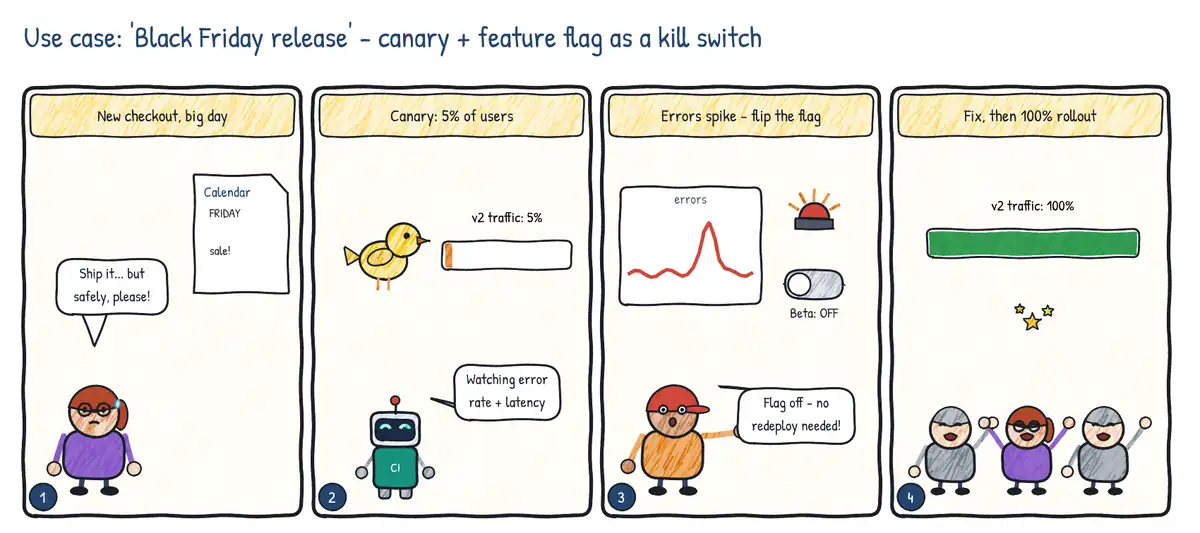
Situation. A redesigned checkout must go live before the biggest sales day of the year. Rolling back a full deployment takes 20 minutes, which the business cannot afford.
| Step | Practice | Feature used |
|---|---|---|
| 1 | Expose a small slice first | Canary deployment (5% of traffic) with health evaluation |
| 2 | Separate deploy from release | Feature flag in Azure App Configuration (targeting / percentage) |
| 3 | React in seconds | Turn the flag off as a kill switch; no redeploy |
| 4 | Widen gradually | Increase traffic / rings once metrics stay healthy |