Package Management
What this chapter covers
- Recommend package management tools including GitHub Packages registry and Azure Artifacts
- Design and implement package feeds and views for local and upstream packages
- Design and implement a dependency versioning strategy for code assets and packages, including Semantic Versioning (SemVer) and date-based (CalVer)
- Design and implement a versioning strategy for pipeline artifacts
Almost every build both consumes packages (third-party and internal dependencies) and produces them (libraries, containers, deployable bundles). A package management strategy answers four questions: where do packages live, who can read and publish them, how do consumers get only trustworthy versions, and how are versions numbered so that consumers can reason about compatibility. AZ-400 tests all four, with most questions centred on Azure Artifacts feeds, views and upstream sources.
Why a private package manager?
- Share code as binaries, not as copy-paste. Internal libraries are versioned, published once and consumed by many teams instead of being duplicated across repositories.
- Single, governed entry point for open source. Upstream sources proxy public registries so every build resolves packages through one feed that you can audit, cache and restrict.
- Resilience. Once an upstream package is saved into your feed it stays available even if the author unpublishes it or the public registry is down (the left-pad lesson).
- Protection against dependency confusion. Controlling which versions may come from public registries for a package name that also exists internally blocks substitution attacks.
- Immutability and traceability. A published version can never be overwritten; you know exactly which bits a build consumed.
Azure Artifacts
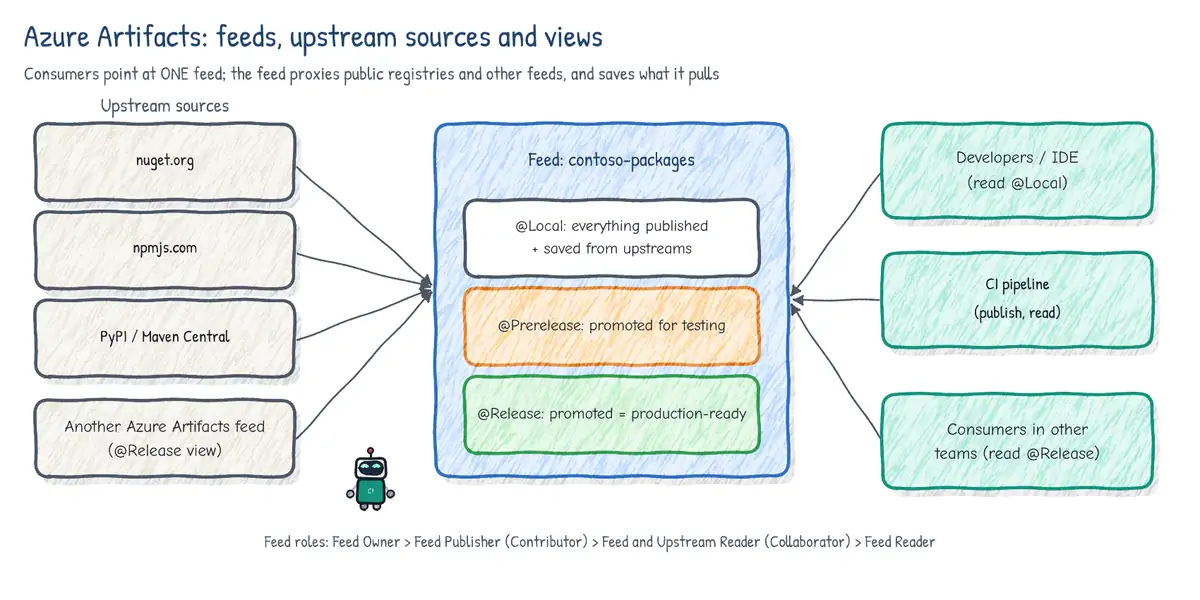
Azure Artifacts is the package service of Azure DevOps. It hosts NuGet, npm, Maven, Python (PyPI), Cargo (Rust) and Universal Packages in the same feed, and supports Gradle builds through the Maven protocol. Each organization gets 2 GiB of free storage; beyond that, storage is billed through the Azure subscription linked to the organization. Packages are immutable: once 1.4.0 is published you cannot republish different content as 1.4.0, even after deleting it (deleted versions sit in the feed Recycle Bin for 30 days and the version number stays reserved).
Feeds: project-scoped vs organization-scoped
A feed is a container for packages with its own permissions, views, upstream sources and retention settings. Feeds are created either inside a project or at organization level.
| Aspect | Project-scoped feed (recommended) | Organization-scoped feed |
|---|---|---|
| Visibility | Inherits the project's visibility | Always private to the organization |
| Default build identity | <Project> Build Service (org) | Project Collection Build Service |
| Lifecycle | Deleted together with the project | Independent of any project |
| Discoverability | Shown in that project's Artifacts hub | Shown in every project's feed list |
| Use when | Default for new feeds; team/product-owned | Legacy or truly org-wide feed |
Feed permissions (roles)
| Role | Can do |
|---|---|
| Feed Owner | Everything: settings, views, upstreams, permissions, delete feed |
| Feed Publisher (Contributor) | Publish, promote, deprecate/unlist, plus all reader rights |
| Feed and Upstream Reader (Collaborator) | Read packages AND save new versions from upstreams |
| Feed Reader | Read/download packages already in the feed only |
Pipelines authenticate as a build service identity: <Project> Build Service (<org>) when job authorization scope is limited to the current project (the default for new projects), or Project Collection Build Service (<org>) when the scope is the whole collection. To publish from a pipeline that identity needs Feed Publisher (Contributor). To restore a package that is not yet cached from an upstream it needs at least Feed and Upstream Reader (Collaborator) - a plain Feed Reader can only consume what is already saved.
Views: @Local, @Prerelease, @Release
A view is a read-only filter over a feed that shows only the package versions that have been promoted into it. Every feed starts with three views:
- @Local - the default view. Contains every version published directly to the feed and every version saved from upstream sources. Consumers that point at the bare feed URL use @Local.
- @Prerelease - versions that passed initial validation (for example integration tests).
- @Release - versions certified for general consumption.
Views let one feed serve both producers and consumers: the producing team publishes every CI build into @Local, then a later stage (or a person) promotes the version to @Prerelease and then @Release. Consumers outside the team reference feed@Release and never see unvalidated builds. Promotion does not copy bits; it marks the existing immutable version as visible in the view, so the same package flows forward. Views can be renamed, you can add your own, view permissions can be set separately from the feed, and a view can be used as an upstream source for another feed.
<!-- nuget.config: consume only released versions of the shared feed -->
<configuration>
  <packageSources>
    <clear />
    <add key="contoso-release" value="https://pkgs.dev.azure.com/contoso/
      Platform/_packaging/core-libs@Release/nuget/v3/index.json" />
    <!-- (URL wrapped for print; keep it on one line in the real file) -->
  </packageSources>
</configuration>
Promotion can be done in the web UI, or automated with the Azure Artifacts REST API (a PATCH on the package version that adds a view), typically as the last step of a stage that ran integration tests against the package.
# Promote a NuGet package version to @Release via REST (pipeline OAuth token)
$org='contoso'; $project='Platform'; $feed='core-libs'
$pkg='Contoso.Core'; $ver='2.3.0'
$uri = "https://pkgs.dev.azure.com/$org/$project/_apis/packaging/feeds/$feed" +
       "/nuget/packages/$pkg/versions/$($ver)?api-version=7.1-preview.1"
$body = '{"views":{"op":"add","path":"/views/-","value":"Release"}}'
Invoke-RestMethod -Uri $uri -Method Patch -Body $body `
  -ContentType 'application/json' `
  -Headers @{ Authorization = "Bearer $env:SYSTEM_ACCESSTOKEN" }
Upstream sources
An upstream source lets a feed transparently fetch packages it does not hold yet. When a client restores Newtonsoft.Json 13.0.3 from your feed and the feed does not have it, Azure Artifacts searches its upstreams in the configured order, returns the first match and saves a copy into the feed (@Local). From then on the package is served from your feed, even if it is later removed from nuget.org.
| Upstream type | Examples |
|---|---|
| Public registries | nuget.org, npmjs.com, PyPI, Maven Central, Google Maven, crates.io |
| More public registries | Gradle Plugins, PowerShell Gallery |
| Another Azure Artifacts feed | A feed or view (core-libs@Release); same org or same tenant |
| Not supported | Universal Packages cannot use public registries as upstreams |
- One feed per consuming team or product, upstreaming to shared feeds, gives a single URL in
nuget.config/.npmrc/pip.conf. Configuring several sources in every client defeats ordering and opens the door to dependency confusion. - Order matters. Put internal feeds and views first, public registries last.
- Allow externally-sourced versions. By default, once a package name has been published locally to your feed, versions of that same name are no longer pulled from public upstreams. The per-package 'Allow external versions' setting deliberately relaxes this. This is the built-in defence against dependency confusion.
- Saving from upstream requires the requesting identity to have Feed and Upstream Reader (Collaborator) or higher.
- Upstream-sourced packages land in @Local; you can still promote them to a view, which is a common way to publish a curated, approved list of open-source packages.
Retention policies and storage
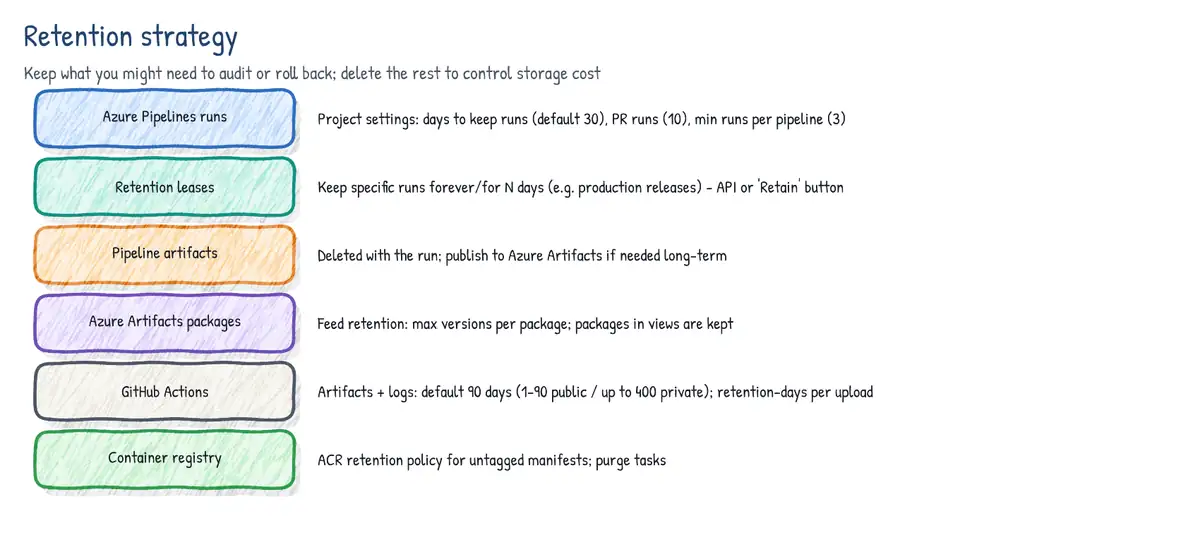
Feed settings expose two retention controls: maximum number of versions per package and days to keep recently downloaded packages. When a package exceeds the version limit, the oldest versions that have not been downloaded within the configured period are deleted. Versions promoted to a view are exempt from retention - another reason to promote real releases. Deleted versions go to the feed's Recycle Bin. Pipeline-run and pipeline-artifact retention is configured separately in project settings and is covered in the pipeline maintenance chapter.
Publishing and consuming from Azure Pipelines
Use the authenticate tasks (NuGetAuthenticate@1, npmAuthenticate@0, PipAuthenticate@1, TwineAuthenticate@1, MavenAuthenticate@0) so the native client picks up a short-lived token for the build identity, then run the native CLI. For a feed in another organization, give the authenticate task a service connection. Never commit PATs in config files.
# feedUrl = .../_packaging/core-libs/nuget/v3/index.json (set as a pipeline variable)
steps:
- task: NuGetAuthenticate@1
- script: dotnet restore src/Contoso.sln --configfile nuget.config
- script: >
    dotnet pack src/Contoso.Core -c Release
    -o $(Build.ArtifactStagingDirectory) -p:Version=$(packageVersion)
- script: >
    dotnet nuget push $(Build.ArtifactStagingDirectory)/*.nupkg
    --source $(feedUrl)
    --api-key AzureArtifacts
displayName: Push to core-libs (@Local)# npm: the repo's .npmrc points at the feed; npmAuthenticate injects credentials
steps:
- task: npmAuthenticate@0
inputs:
workingFile: .npmrc
- script: npm ci && npm run build && npm publish
displayName: Build and publish npm packageUniversal Packages
Universal Packages store any set of files (tools, binaries, ML models, zipped deployment bundles) as a named, versioned package. Names must be lowercase, versions must be SemVer (1.2.3, 1.2.3-beta.1), and a single package can be very large (up to 4 TiB). Content is deduplicated, so uploading a slightly changed multi-GB bundle is fast. Use the UniversalPackages@0 task or the Azure CLI with the azure-devops extension.
az artifacts universal publish --organization https://dev.azure.com/contoso \
  --project Platform --scope project --feed tools \
  --name terraform-modules --version 3.1.0 \
  --path ./modules --description "Approved TF modules"

az artifacts universal download --organization https://dev.azure.com/contoso \
  --project Platform --scope project --feed tools \
--name terraform-modules --version '3.*' --path ./modules- task: UniversalPackages@0
inputs:
command: publish
publishDirectory: $(Build.ArtifactStagingDirectory)/bundle
feedsToUsePublish: internal
vstsFeedPublish: Platform/tools
vstsFeedPackagePublish: web-bundle
versionOption: patch # auto-increment patch, or 'custom'
packagePublishDescription: Build $(Build.BuildNumber)GitHub Packages
GitHub Packages is GitHub's package registry. It supports the Container registry (ghcr.io), npm, Maven, Gradle, NuGet and RubyGems. Python (PyPI) is not a GitHub Packages registry type, and there is no generic 'universal' type. Packages belong to a user or organization and can be linked to a repository; the Container, npm, NuGet and RubyGems registries support granular permissions (inherit access from the linked repository or set it per package), while the Maven and Gradle registries use only repository-scoped permissions.
- Authentication in Actions: use
GITHUB_TOKENwithpermissions: packages: writeto publish packages linked to the workflow's repository. Use a PAT (classic) withwrite:packages/read:packagesonly when you must cross boundaries that granular permissions cannot grant. - Billing: public packages are free; private packages consume the plan's included storage and data transfer (transfer from Actions using GITHUB_TOKEN is free).
- No upstream proxying of public registries and no views/promotion: if you need a curated, cached proxy of nuget.org/npmjs with promotion stages, Azure Artifacts is the better fit.
- Container images:
ghcr.io/OWNER/IMAGE:tag; integrates with Dependabot, code scanning and build provenance attestations (actions/attest-build-provenance).
name: publish-npm
on:
  release:
    types: [published]
permissions:
  contents: read
  packages: write
jobs:
  publish:
    runs-on: ubuntu-latest
    steps:
      - uses: actions/checkout@v4
      - uses: actions/setup-node@v4
        with:
          node-version: 22
          registry-url: https://npm.pkg.github.com
          scope: '@contoso'
      - run: npm ci
      - run: npm publish
        env:
NODE_AUTH_TOKEN: ${{ secrets.GITHUB_TOKEN }} image:
runs-on: ubuntu-latest
permissions:
contents: read
packages: write
steps:
- uses: actions/checkout@v4
- uses: docker/login-action@v3
with:
registry: ghcr.io
username: ${{ github.actor }}
password: ${{ secrets.GITHUB_TOKEN }}
- uses: docker/build-push-action@v6
with:
push: true
tags: ghcr.io/contoso/orders-api:${{ github.sha }}Choosing a package management tool
| Requirement | Best fit |
|---|---|
| Proxy and cache nuget.org/npmjs/PyPI/Maven Central behind one URL | Azure Artifacts upstreams |
| Promotion stages (prerelease -> release) on one feed | Azure Artifacts views |
| Python packages in a private registry | Azure Artifacts (GitHub Packages has no PyPI) |
| Arbitrary large binaries / tool bundles with versions | Azure Artifacts Universal Packages |
| Code, packages and CI all in GitHub, GITHUB_TOKEN auth | GitHub Packages |
| OCI images for AKS/App Service, geo-replication, private link | Azure Container Registry |
| Container images next to GitHub source with simple auth | GitHub Container registry (ghcr.io) |
| Packages for anonymous public consumption | Public registry or public GitHub package |
Dependency versioning strategy
Semantic Versioning (SemVer 2.0)
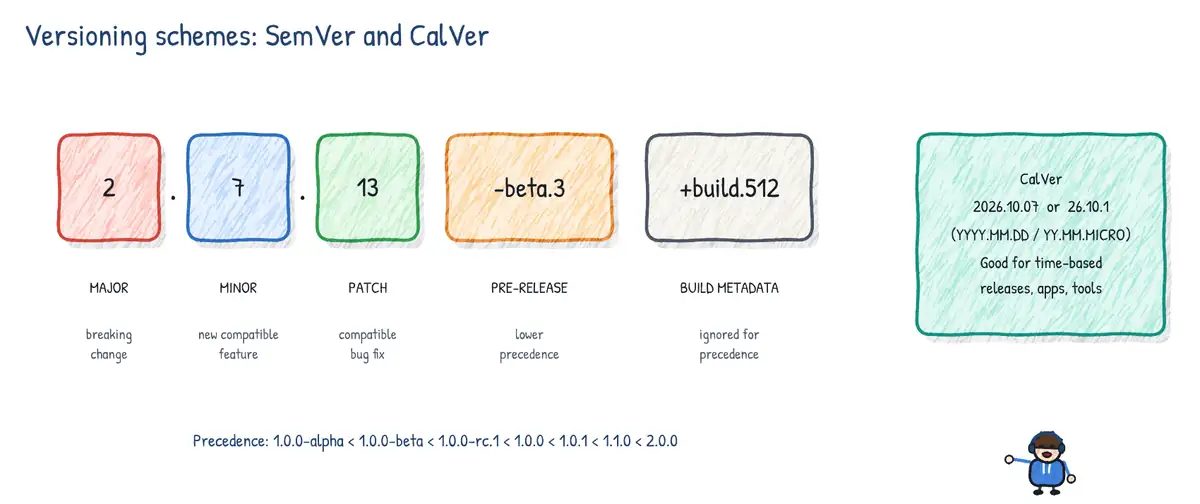
SemVer encodes compatibility in the number MAJOR.MINOR.PATCH[-PRERELEASE][+BUILD]:
- MAJOR - incompatible (breaking) API change. Resets minor and patch to 0.
- MINOR - backward-compatible new functionality. Resets patch to 0.
- PATCH - backward-compatible bug fix.
- Pre-release
-alpha.1,-beta.3,-rc.1- lower precedence than the release:2.0.0-rc.1 < 2.0.0. Identifiers compare left to right; numeric identifiers numerically (beta.2 < beta.11), alphanumeric ones lexically (alpha < beta < rc). - Build metadata
+20261007.sha.3f2a1c- ignored for precedence; two versions that differ only in metadata have equal precedence. - 0.y.z - initial development; anything may change at any time.
Consumers express acceptable ranges: npm ^1.4.0 (>=1.4.0 <2.0.0) and ~1.4.0 (>=1.4.0 <1.5.0); NuGet [1.4.0,2.0.0); pip ~=1.4. Lock files (package-lock.json, packages.lock.json with locked-mode restore, poetry.lock) pin the resolved graph so builds are reproducible, and Dependabot or Renovate propose controlled upgrades.
Calendar Versioning (CalVer)
CalVer derives the version from the release date, e.g. YYYY.MM.DD, YY.0M (Ubuntu 24.04), or YYYY.MM.MICRO. It suits products released on a schedule, applications and services (where 'breaking API' means little to end users), and content that ages (rule sets, data packages). It communicates age and support windows, not compatibility. Libraries consumed by other code should normally prefer SemVer because consumers need a compatibility signal.
| Aspect | SemVer | CalVer |
|---|---|---|
| Communicates | Compatibility / breaking changes | Release date / age |
| Typical users | Libraries, SDKs, APIs, NuGet/npm packages | Apps, OS releases, schedules |
| Example | 3.2.1, 4.0.0-rc.2 | 2026.10.0, 26.10.1 |
| Risk | Teams avoid bumping MAJOR ('0.x forever') | No signal about breaking changes |
Versioning pipeline artifacts
Run (build) numbers in Azure Pipelines
The run number (Build.BuildNumber) comes from the top-level name: property. Tokens such as $(Date:yyyyMMdd), $(Rev:r) (a counter that restarts at 1 whenever the rest of the formatted number changes), $(SourceBranchName), $(Build.DefinitionName) and your own variables can be combined. Without name: the default is $(Date:yyyyMMdd).$(Rev:r). For SemVer, build the number from variables plus a counter() expression, which keeps an independent, persistent counter per seed (prefix) value.
# Version 3.4.<patch>; patch auto-increments and restarts when major/minor change
variables:
  major: 3
  minor: 4
  patch: $[counter(format('{0}.{1}', variables['major'], variables['minor']), 0)]
  ${{ if eq(variables['Build.SourceBranch'], 'refs/heads/main') }}:
    packageVersion: $(major).$(minor).$(patch)
  ${{ else }}:
    packageVersion: $(major).$(minor).$(patch)-ci.$(Build.BuildId)

name: $(major).$(minor).$(patch)

steps:
- script: echo "##vso[build.updatebuildnumber]$(packageVersion)"
  displayName: Set run number to package version
##vso[build.updatebuildnumber] changes the run number at runtime; ##vso[build.addbuildtag]release tags the run, and tags can be used by pipeline-resource triggers and filters.
GitVersion
GitVersion calculates a SemVer version from Git history: tags (v2.3.0), branch names (release/2.4 -> 2.4.0-beta.N), merges and +semver: major|minor|patch|none commit-message bumps. It supports GitFlow, GitHub Flow and mainline (trunk-based) modes configured in GitVersion.yml. The GitTools extension provides gitversion/setup and gitversion/execute tasks for Azure Pipelines and equivalent GitHub actions. It needs the full history: set fetchDepth: 0 (Azure Pipelines) or fetch-depth: 0 (actions/checkout), because both default to shallow clones for new pipelines and workflows. Nerdbank.GitVersioning (version.json + commit height) is a popular alternative.
steps:
- checkout: self
  fetchDepth: 0               # GitVersion needs full history and tags
- task: gitversion/setup@3
  inputs:
    versionSpec: '6.x'
- task: gitversion/execute@3
  name: version
- script: dotnet pack -p:Version=$(version.SemVer) -o $(Build.ArtifactStagingDirectory)
- script: echo "##vso[build.updatebuildnumber]$(version.FullSemVer)"# GitHub Actions equivalent
- uses: actions/checkout@v4
with:
fetch-depth: 0
- uses: gittools/actions/gitversion/setup@v3
with:
versionSpec: '6.x'
- id: gv
uses: gittools/actions/gitversion/execute@v3
- run: echo "Version ${{ steps.gv.outputs.semVer }}"Pipeline artifacts vs build artifacts
| Aspect | Pipeline artifacts (recommended) | Build artifacts (older) |
|---|---|---|
| Tasks | PublishPipelineArtifact@1 / DownloadPipelineArtifact@2 | PublishBuildArtifacts@1 / DownloadBuildArtifacts@1 |
| YAML shortcut | - publish: and - download: steps | None |
| Performance | Dedup + parallel upload; much faster for big outputs | Slower |
| Storage | Azure DevOps, kept with the run | Azure DevOps or a UNC file share |
| Typical use | All new YAML pipelines | Existing classic pipelines, file-share drops |
stages:
- stage: Build
  jobs:
  - job: build
    steps:
    - script: dotnet publish src/Web -c Release -o $(Build.ArtifactStagingDirectory)/web
    - publish: $(Build.ArtifactStagingDirectory)/web
      artifact: web
- stage: Deploy
  dependsOn: Build
  jobs:
  - deployment: web
    environment: test
    strategy:
      runOnce:
        deploy:
          steps:
          # deployment jobs auto-download this run's pipeline artifacts into
          # $(Pipeline.Workspace)/<artifact>; use '- download: none' to opt out
- script: ls $(Pipeline.Workspace)/web- In GitHub Actions use
actions/upload-artifact@v4/actions/download-artifact@v4. In v4 artifacts are immutable and names must be unique within a run; default retention is 90 days (configurable at repo/org level and per upload withretention-days). - Version the artifact once, at build time, and promote the same artifact through every environment ('build once, deploy many'). Never rebuild per environment.
- Stamp the version into the binary (assembly version,
package.json, image labelorg.opencontainers.image.version) and tag the commit (git tag v3.4.17) so every artifact traces back to source. - Container images: use immutable tags (commit SHA or SemVer) for deployments, optionally a moving tag such as
stablefor humans; deploy by digest for maximum certainty.
Use case: 'The vanishing package'
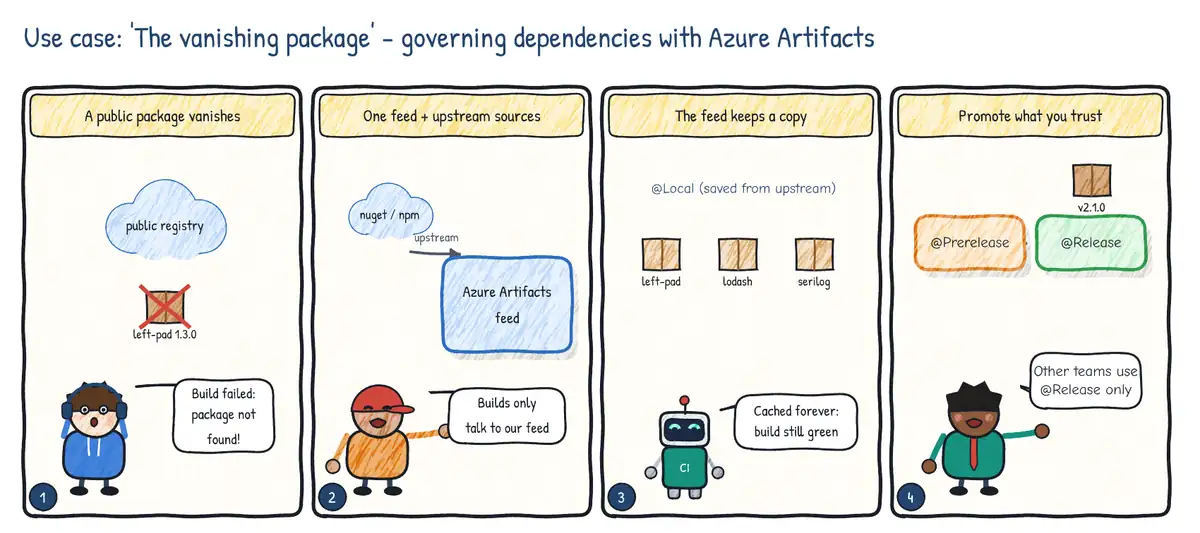
Situation. A small open-source package that dozens of services depend on is removed from the public registry. Every build fails within an hour, and nobody knows which versions were in use.
| Step | Practice | Feature used |
|---|---|---|
| 1 | Use one governed source for all packages | Azure Artifacts feed (or GitHub Packages) |
| 2 | Proxy the public registries | Upstream sources: nuget.org, npmjs, PyPI, Maven Central |
| 3 | Keep a copy of everything you consume | Packages saved to the feed on first use (@Local) |
| 4 | Share only validated versions | Promote to the @Prerelease / @Release views |