Infrastructure as Code and Configuration Management
What this chapter covers
- Recommend a configuration management technology for application infrastructure
- Implement a configuration management strategy for application infrastructure
- Define an infrastructure as code (IaC) strategy, including source control and automation of testing and deployment
- Design and implement desired state configuration for environments, including Azure Automation State Configuration, Azure Resource Manager, Bicep, and Azure Machine Configuration
- Design and implement Azure Deployment Environments for on-demand self-deployment
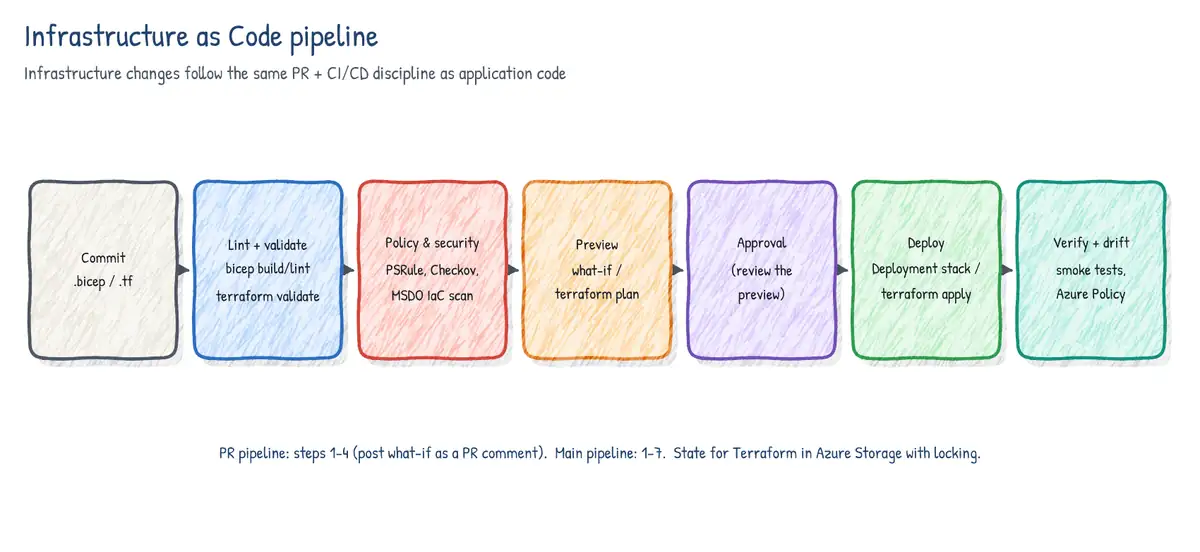
Infrastructure as code (IaC) means the environment - networks, compute, PaaS services, policies, role assignments - is described in files that live in source control and are deployed by a pipeline, exactly like application code. Configuration management extends the same idea inside the machines: OS settings, installed software, files, services and security baselines. Together they kill snowflake servers and configuration drift, make environments reproducible, and give you review, history and rollback for every infrastructure change.
Core concepts
Declarative versus imperative
| Declarative | Imperative | |
|---|---|---|
| You describe | The desired end state | The steps to get there |
| Examples | ARM, Bicep, Terraform, DSC, Machine Configuration | Azure CLI / PowerShell scripts, Chef recipes (partly) |
| Re-run behaviour | Engine computes the diff; idempotent by design | You must code existence checks yourself |
| Drift handling | Re-apply converges to the model | Script may fail or duplicate |
| Best for | Provisioning and baseline configuration | One-off tasks, glue, data ops |
Idempotency means applying the same definition many times always produces the same result and makes no change if the target already matches. It is what makes pipelines safely re-runnable and lets you correct drift by simply deploying again. Declarative tools are idempotent by design; imperative scripts must be written defensively (az group create is idempotent, but az vm create with a different size on an existing VM is not a resize).
Mutable versus immutable infrastructure
Mutable infrastructure is updated in place (patch the VM, change its config). Immutable infrastructure is never changed after deployment: you build a new image (Azure Image Builder, Packer, container image) and replace instances. Immutable avoids drift completely and pairs naturally with blue-green; mutable needs configuration management to keep machines converged.
IaC strategy checklist
- Source control - templates, parameter files and modules in Git with branch policies and PR review; infrastructure changes follow the same PR flow as code.
- Modularity - reusable Bicep modules / Terraform modules published to a private registry (Bicep: Azure Container Registry module registry or template specs; Azure Verified Modules as a starting point).
- Parameterization per environment -
.bicepparam/.tfvarsper environment; secrets referenced from Key Vault, never committed. - Automated validation - lint, build, policy checks and a what-if / plan on every pull request.
- Automated deployment - a pipeline with environments and approvals deploys the reviewed plan; humans do not change production in the portal (enforce with RBAC and, optionally, deny assignments from deployment stacks or Azure Policy).
- Drift detection - scheduled what-if /
terraform planruns, Azure Policy compliance, Machine Configuration audits. - Identity - pipelines authenticate with workload identity federation service connections or GitHub OIDC; least privilege per environment.
ARM templates
Azure Resource Manager (ARM) templates are JSON documents describing resources declaratively. Every Azure deployment - portal, CLI, Bicep, even many Terraform providers - ultimately goes through Resource Manager. Key sections: $schema, contentVersion, parameters, variables, functions, resources, outputs. Deployments can target a resource group, subscription, management group or tenant scope.
- Incremental mode (default) - adds/updates resources in the template, leaves others in the resource group untouched.
- Complete mode - deletes resources in the resource group that are not in the template (resource group scope only). Powerful but dangerous; deployment stacks are now the preferred way to manage deletion.
- Linked/nested templates and template specs (versioned templates stored as Azure resources, shareable via RBAC) provide reuse.
dependsOnorders resources;reference()/resourceId()create implicit dependencies;copyloops create multiple instances.
Bicep
Bicep is a domain-specific language that transpiles to ARM JSON. It has day-zero support for every resource type and API version, no state file (Azure is the state), automatic dependency inference from symbolic references, modules, loops, conditions, user-defined types and functions, and first-class tooling (VS Code extension, linter, bicep decompile to convert ARM JSON).
// main.bicep
targetScope = 'resourceGroup'

@allowed([ 'dev', 'test', 'prod' ])
param env string
param location string = resourceGroup().location
@secure()
param sqlAdminPassword string            // supplied from Key Vault in the .bicepparam

var appName = 'shop-${env}-${uniqueString(resourceGroup().id)}'

module plan 'modules/appServicePlan.bicep' = {
  name: 'plan'
  params: {
    name: 'asp-${appName}'
    location: location
    skuName: env == 'prod' ? 'P1v3' : 'S1'
  }
}

resource web 'Microsoft.Web/sites@2023-12-01' = {
  name: appName
  location: location
  identity: { type: 'SystemAssigned' }
  properties: {
    serverFarmId: plan.outputs.planId   // implicit dependency on the module
    httpsOnly: true
  }
}

resource staging 'Microsoft.Web/sites/slots@2023-12-01' = if (env == 'prod') {
  parent: web
  name: 'staging'
  location: location
  properties: { serverFarmId: plan.outputs.planId }
}

output webName string = web.name// prod.bicepparam
using './main.bicep'
param env = 'prod'
param sqlAdminPassword = az.getSecret('<sub-id>', 'rg-kv', 'kv-shop-prod', 'sqlAdminPassword')What-if, deployment and stacks
az bicep build --file main.bicep                 # compile + lint (warnings/errors)
az deployment group what-if -g rg-shop-prod -f main.bicep -p prod.bicepparam
az deployment group create  -g rg-shop-prod -f main.bicep -p prod.bicepparam \
   --name "shop-$(date +%Y%m%d%H%M)"

# Deployment stack: manage the set of resources as one unit, protect them, clean up removals
az stack group create --name shop-prod -g rg-shop-prod \
   --template-file main.bicep --parameters prod.bicepparam \
   --action-on-unmanage deleteResources \
   --deny-settings-mode denyWriteAndDelete \
--deny-settings-excluded-principals <pipeline-sp-object-id>- What-if previews changes (Create, Delete, Modify, NoChange, Ignore, Deploy) without making them - run it on pull requests and post the result for review.
- Deployment stacks (
Microsoft.Resources/deploymentStacks) track the resources a deployment manages.--action-on-unmanagedecides what happens to resources removed from the template (detachAll,deleteResources,deleteAll- the latter also deletes resource groups/management groups). Deny settings (denyDelete,denyWriteAndDelete) block changes outside the stack, preventing portal drift. Stacks replace complete mode and Azure Blueprints. - Modules from registries -
module x 'br:myacr.azurecr.io/bicep/storage:1.2.0', or Azure Verified Modules from the public registrybr/public:avm/res/....
Terraform
Terraform (HashiCorp, HCL language, BSL license; OpenTofu is the open-source fork) is declarative and multi-cloud. Unlike Bicep it keeps a state file mapping configuration to real resources, so state must be stored remotely, locked during operations and protected because it can contain secrets. On Azure the standard backend is an Azure Storage blob container (blob lease provides locking), authenticated with Entra ID / OIDC rather than storage keys.
terraform {
  required_providers {
    azurerm = { source = "hashicorp/azurerm", version = "~> 4.0" }
  }
  backend "azurerm" {
    resource_group_name  = "rg-tfstate"
    storage_account_name = "sttfstateshop"
    container_name       = "tfstate"
    key                  = "shop/prod.tfstate"
    use_oidc             = true          # workload identity federation, no secrets
    use_azuread_auth     = true          # data-plane RBAC instead of access keys
  }
}
provider "azurerm" {
  features {}
  use_oidc = true
}
resource "azurerm_resource_group" "rg" {
  name     = "rg-shop-prod"
  location = "westeurope"
}
terraform init- download providers/modules, configure the backend.terraform fmt -checkandterraform validate- style and syntax.terraform plan -out=tfplan- compute the diff against state and real resources; publish the plan file as an artifact for review.- Approval on the production environment.
terraform apply tfplan- apply exactly the reviewed plan.
- In Azure Pipelines use the Terraform marketplace extension tasks (
TerraformInstaller,TerraformTask/TerraformTaskV4) or plain script steps withARM_USE_OIDC; in GitHub Actionshashicorp/setup-terraformplusazure/loginwith OIDC. - Use separate state files (keys or workspaces) per environment; enable soft delete and versioning on the state container; restrict access to it.
terraform import/importblocks bring existing resources under management;terraform plan -detailed-exitcode(exit code 2 = changes) is useful for scheduled drift detection.
| Criterion | ARM JSON | Bicep | Terraform |
|---|---|---|---|
| Language | JSON (verbose) | Concise DSL | HCL |
| Clouds | Azure only | Azure only | Multi-cloud + SaaS providers |
| State | None (Azure is state) | None (Azure is state) | State file to manage |
| New Azure features | Day zero | Day zero | When provider adds them (azapi helps) |
| Preview | what-if | what-if | plan |
| Deletion of removed resources | Complete mode / stacks | Deployment stacks | Automatic (in state) |
Azure CLI and Azure PowerShell
CLI and PowerShell are imperative. They are ideal for orchestration around declarative deployments (create a resource group, call az deployment, swap slots, purge a CDN), for data-plane operations, and for quick automation. For long-lived infrastructure, prefer templates - a script that creates resources is hard to make idempotent and does not detect drift. In pipelines run them with AzureCLI@2 or AzurePowerShell@5 so they inherit the service connection's identity.
# PowerShell equivalent of a what-if and deployment
New-AzResourceGroupDeployment -ResourceGroupName rg-shop-prod `
  -TemplateFile ./main.bicep -TemplateParameterFile ./prod.bicepparam -WhatIf
New-AzResourceGroupDeployment -ResourceGroupName rg-shop-prod `
  -TemplateFile ./main.bicep -TemplateParameterFile ./prod.bicepparam
Configuration management tools
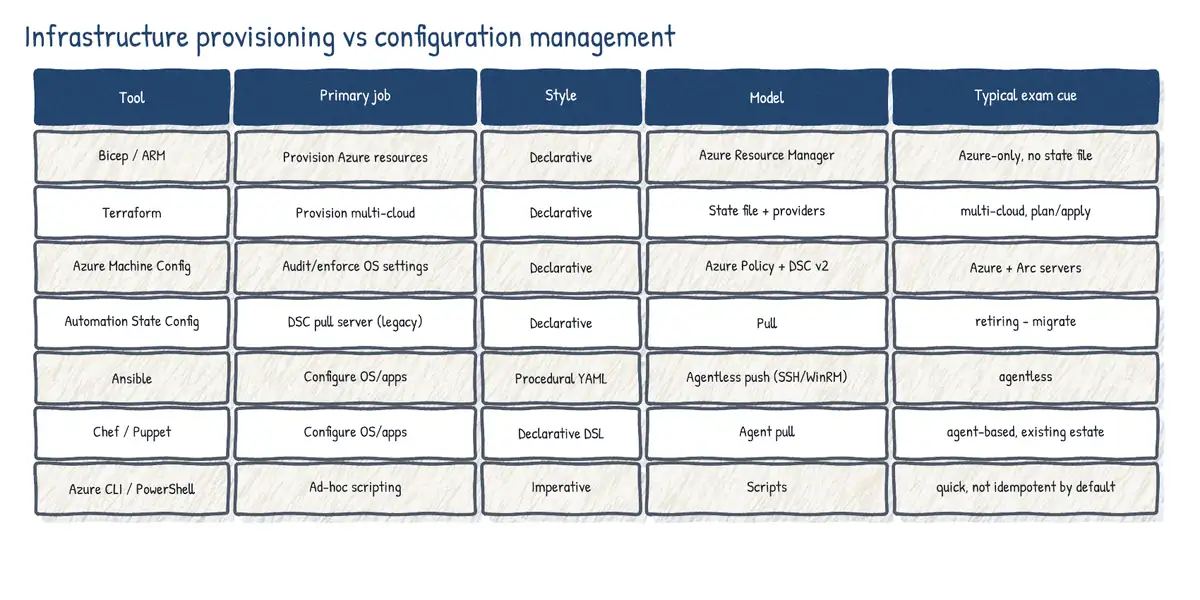
Provisioning tools create the VM; configuration management tools decide what is inside it and keep it that way. The exam expects you to recommend a tool from requirements such as agentless operation, language, push/pull model, Windows vs Linux, and whether the organization already has skills in it.
| Tool | Model | Agent | Language | Notes |
|---|---|---|---|---|
| Ansible | Push (control node) | Agentless (SSH/WinRM) | YAML playbooks | Simple start; Red Hat; Azure collection |
| Chef | Pull (Infra Server) | Agent (chef-client) | Ruby DSL (recipes, cookbooks) | Developer-centric; Progress |
| Puppet | Pull (Puppet server) | Agent | Puppet DSL (manifests) | Strong reporting, large estates |
| PowerShell DSC | Push or pull | LCM built into Windows | PowerShell configs | Windows-first; basis of Machine Config |
| Azure Machine Configuration | Pull via Azure Policy | Extension + identity | DSC (PowerShell 7) | Azure + Arc; audit or enforce |
| Azure Automation State Config | Pull server | DSC LCM | PowerShell DSC | Retiring 30 Sep 2027 |
| Terraform/Bicep/ARM | Push | None | HCL / Bicep / JSON | Provisioning, not in-guest config |
- Need agentless, push-based, Linux-heavy with SSH? -> Ansible.
- Want Azure-native audit and enforcement of OS settings at scale, including hybrid servers through Azure Arc, reported in Azure Policy compliance? -> Azure Machine Configuration.
- Existing large Chef/Puppet estate? -> keep it; both integrate with Azure (VM extensions, marketplace images) and pipelines.
- One-time bootstrap at VM creation -> cloud-init (Linux) or the Custom Script Extension; not continuous enforcement.
PowerShell DSC
Desired State Configuration is a declarative PowerShell platform. A configuration block lists resources (WindowsFeature, File, Service, Registry, Package...) with properties. Compiling it produces a MOF file per node. The Local Configuration Manager (LCM) on each node applies the MOF and, depending on ConfigurationMode, only applies once (ApplyOnly), applies then reports drift (ApplyAndMonitor) or applies and repairs drift (ApplyAndAutoCorrect). RefreshMode is Push (Start-DscConfiguration) or Pull (from a pull server such as Azure Automation).
Configuration WebServer {
    Import-DscResource -ModuleName PSDesiredStateConfiguration

    Node 'localhost' {
        WindowsFeature IIS {
            Ensure = 'Present'
            Name   = 'Web-Server'
        }
        WindowsFeature AspNet45 {
            Ensure    = 'Present'
            Name      = 'Web-Asp-Net45'
            DependsOn = '[WindowsFeature]IIS'
        }
        File WebContent {
            Ensure          = 'Present'
            Type            = 'Directory'
            DestinationPath = 'C:\inetpub\shop'
        }
        Service W3SVC {
            Name        = 'W3SVC'
            State       = 'Running'
            StartupType = 'Automatic'
            DependsOn   = '[WindowsFeature]IIS'
        }
    }
}
WebServer -OutputPath C:\dsc # produces C:\dsc\localhost.mof[DscLocalConfigurationManager()]
Configuration LcmSettings {
Node 'localhost' {
Settings {
ConfigurationMode = 'ApplyAndAutoCorrect'
ConfigurationModeFrequencyMins = 15
RefreshMode = 'Push'
RebootNodeIfNeeded = $true
}
}
}Azure Automation State Configuration (retiring)
Azure Automation State Configuration is a managed DSC pull server: you upload and compile configurations in an Automation account, onboard nodes (the VM's LCM registers with the account), assign node configurations, and view compliance reports. It is being retired on 30 September 2027; Automation DSC for Linux already retired in September 2023 and the portal's Add, Compose configuration and Gallery entry points were removed in 2025. Microsoft directs customers to Azure Machine Configuration.
- Create an Automation account; import required DSC modules into it.
- Import the configuration script (
Import-AzAutomationDscConfiguration) and compile it (Start-AzAutomationDscCompilationJob), optionally with ConfigurationData. - Register nodes (
Register-AzAutomationDscNode) specifying the node configuration name and LCM settings such asConfigurationMode ApplyAndAutoCorrect. - Monitor node compliance; forward reports to Log Analytics for alerting.
Azure Machine Configuration
Azure Machine Configuration (formerly Azure Policy Guest Configuration) audits and configures settings inside machines - Azure VMs and Azure Arc-enabled servers on-premises or in other clouds. It is driven by Azure Policy, so compliance appears in the same dashboard as resource-level policy and is managed at management group or subscription scale.
- Prerequisites - the Machine Configuration extension (
AzurePolicyforWindows/AzurePolicyforLinux) and a system-assigned managed identity on Azure VMs (Arc servers have the agent built in). A built-in initiative Deploy prerequisites to enable Guest Configuration policies on virtual machines sets both up. - Content - a configuration package (zip) containing a compiled DSC configuration (MOF) and the required modules, built with the
GuestConfigurationPowerShell module (New-GuestConfigurationPackage) on PowerShell 7 and stored in a storage account or other reachable URI. - Assignment - a
Microsoft.GuestConfiguration/guestConfigurationAssignmentsresource, normally created by a policy (New-GuestConfigurationPolicy, effectauditIfNotExistsfor audit ordeployIfNotExiststo create the assignment). - assignmentType -
Audit(report only),ApplyAndMonitor(apply once, then report drift without fixing it) orApplyAndAutoCorrect(apply and re-apply whenever drift is detected). Built-in policies are mostly audit; custom packages can be created with-Type AuditAndSetand policies with-Mode ApplyAndAutoCorrect. - Evaluation - the agent checks roughly every 15 minutes and reports compliance; Azure Policy shows per-setting reasons.
# Package an existing DSC configuration and publish it as a policy (PowerShell 7)
Install-Module GuestConfiguration, PSDesiredStateConfiguration -Force
. ./WebServer.ps1 ; WebServer -OutputPath ./out           # compile MOF

New-GuestConfigurationPackage -Name WebServerBaseline `
  -Configuration ./out/localhost.mof -Type AuditAndSet -Force   # Audit or AuditAndSet

$ctx = (Get-AzStorageAccount -ResourceGroupName rg-mc -Name stmcpkgs).Context
Set-AzStorageBlobContent -File ./WebServerBaseline.zip -Container packages -Context $ctx
$uri = '<blob-url-with-SAS-or-use-managed-identity>'

New-GuestConfigurationPolicy -PolicyId (New-Guid) `
  -ContentUri $uri -DisplayName 'Web server baseline' `
  -Description 'IIS installed and W3SVC running' `
  -Path ./policies -Platform Windows -PolicyVersion 1.0.0 `
  -Mode ApplyAndAutoCorrect                                  # Audit | ApplyAndMonitor | ...
New-AzPolicyDefinition -Name webserver-baseline `
-Policy ./policies/WebServerBaseline_DeployIfNotExists.json| Need | Choose |
|---|---|
| Report whether password policy is compliant, never change it | Audit |
| Configure once at onboarding, report later drift but let admins change it | ApplyAndMonitor |
| Continuously enforce IIS installed and service running | ApplyAndAutoCorrect |
| Remediate existing non-compliant VMs after assigning a DINE policy | Create a remediation task |
Desired state with ARM and Bicep
ARM and Bicep are themselves desired-state tools at the resource level: redeploying the same template converges resource properties back to the declared values. Combine them with Azure Policy (deny, modify, deployIfNotExists) to guarantee settings regardless of who deploys, with deployment stacks deny settings to block out-of-band changes, and with Machine Configuration for in-guest settings. VM extensions (DSC extension, Custom Script Extension) can bootstrap in-guest configuration from a template, but the legacy DSC extension is also superseded by Machine Configuration.
Testing infrastructure as code
| Layer | Tool / technique | Catches |
|---|---|---|
| Lint / static | Bicep linter (bicepconfig.json), terraform validate, tflint | Syntax, bad practice, hard-coded locations |
| Best practice | ARM-TTK (Test-AzTemplate), PSRule for Azure | WAF rules, secure params, API versions |
| Security scan | Checkov, Trivy, Microsoft Security DevOps (template analyzer) | Open storage, missing TLS/encryption |
| Policy as code | Azure Policy definitions in Git, OPA/Conftest, Sentinel | Org rules: SKUs, regions, tags |
| Pre-deployment | what-if / terraform plan | Unexpected deletes/changes |
| Integration | Terratest (Go), Pester, deploy to ephemeral env and probe | Resources actually work together |
| Post-deployment | Azure Policy compliance, smoke tests, drift jobs | Drift and runtime misconfig |
# bicepconfig.json (excerpt) - make some linter rules fail the build
{
  "analyzers": {
    "core": {
      "enabled": true,
      "rules": {
        "no-hardcoded-location": { "level": "error" },
        "secure-parameter-default": { "level": "error" },
        "outputs-should-not-contain-secrets": { "level": "error" },
        "use-recent-api-versions": { "level": "warning" }
      }
    }
  }
}stages:
- stage: Validate
jobs:
- job: Lint
pool: { vmImage: ubuntu-latest }
steps:
- script: az bicep build --file infra/main.bicep # linter errors fail the step
- task: ps-rule-assert@2 # PSRule for Azure extension
inputs:
modules: PSRule.Rules.Azure
inputPath: infra/
outputFormat: Sarif
outputPath: reports/ps-rule.sarif
- task: AzureCLI@2
displayName: What-if
inputs:
azureSubscription: sc-test-wif
scriptType: bash
scriptLocation: inlineScript
inlineScript: >
az deployment group what-if -g rg-shop-test
-f infra/main.bicep -p infra/test.bicepparam
- stage: DeployProd
dependsOn: Validate
condition: and(succeeded(), eq(variables['Build.SourceBranch'], 'refs/heads/main'))
jobs:
- deployment: Bicep
environment: prod-infra # approval + exclusive lock configured here
strategy:
runOnce:
deploy:
steps:
- checkout: self
- task: AzureCLI@2
inputs:
azureSubscription: sc-prod-wif
scriptType: bash
scriptLocation: inlineScript
inlineScript: >
az deployment group create -g rg-shop-prod
-f infra/main.bicep -p infra/prod.bicepparamAzure Deployment Environments
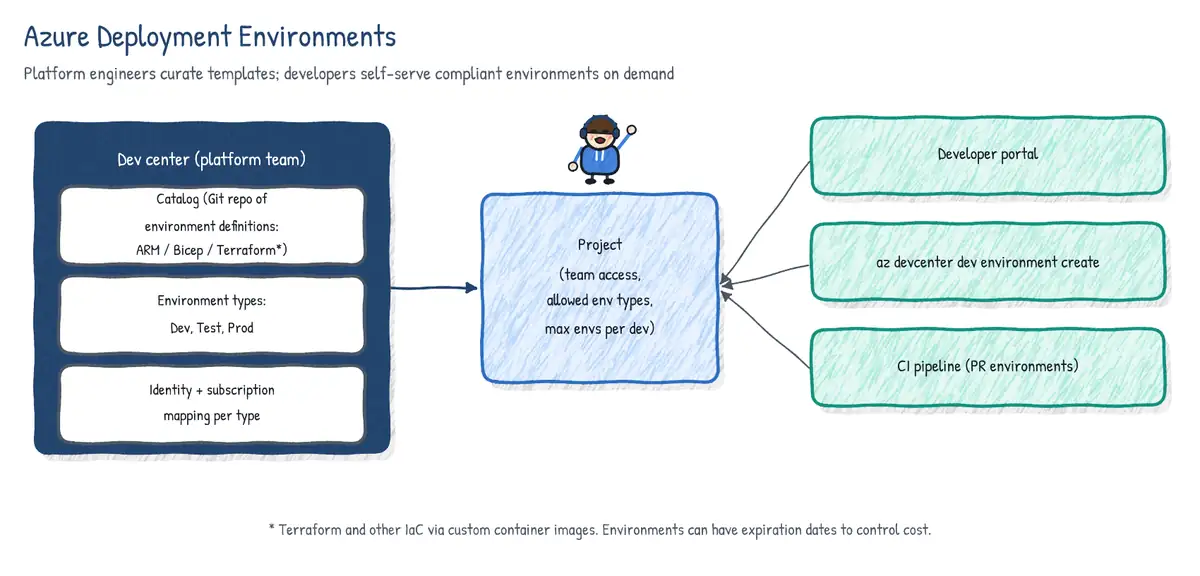
Azure Deployment Environments (ADE) gives developers self-service, on-demand environments built from platform-approved IaC templates, while platform engineers keep control over where they land, what they cost and who can create them. It is part of the dev center family together with Microsoft Dev Box.
| Concept | Owned by | What it is |
|---|---|---|
| Dev center | Platform team | Top-level container: catalogs, environment types, identity |
| Catalog | Platform team | Git repo (GitHub or Azure Repos) holding environment definitions |
| Environment definition | Platform team | Folder with environment.yaml + IaC (ARM/Bicep; Terraform etc. via custom image) |
| Environment type | Platform team | Dev, Test, Prod... defined at the dev center |
| Project | Platform team / team lead | Per team; enables env types, maps each to a subscription + identity + roles |
| Environment | Developer | A deployed instance in its own resource group |
# environment.yaml inside the catalog folder Environments/WebApp
name: WebApp
version: 1.0.0
summary: App Service + SQL for feature testing
description: Deploys an App Service plan, web app and Azure SQL database
runner: Bicep                    # ARM, Bicep, or a custom container image (e.g. Terraform)
templatePath: main.bicep
parameters:
- id: sku
  name: App Service SKU
  type: string
  allowed: [ B1, S1 ]
default: B1- The project's environment type configuration names the target subscription, the deployment identity (managed identity) used to create resources, and the role the creator gets on the environment's resource group - developers do not need rights on the subscription itself.
- Developers create environments from the developer portal, the Azure CLI
devcenterextension (az devcenter dev environment create), or from a pipeline / GitHub Actions workflow (e.g. one environment per pull request, deleted on merge). - Expiration dates / scheduled deletion and per-project limits on environments per developer control cost; catalogs sync from Git so template changes go through PR review.
- Azure Developer CLI (
azd) can target ADE so the same template works locally and self-service.
az extension add --name devcenter
az devcenter dev environment create --dev-center-name dc-contoso --project-name shop \
   --name pr-482 --environment-type Dev --catalog-name platform-templates \
   --environment-definition-name WebApp --parameters '{"sku":"B1"}' \
--expiration-date 2026-10-14T18:00:00ZUse case: 'Works in test, broken in prod'
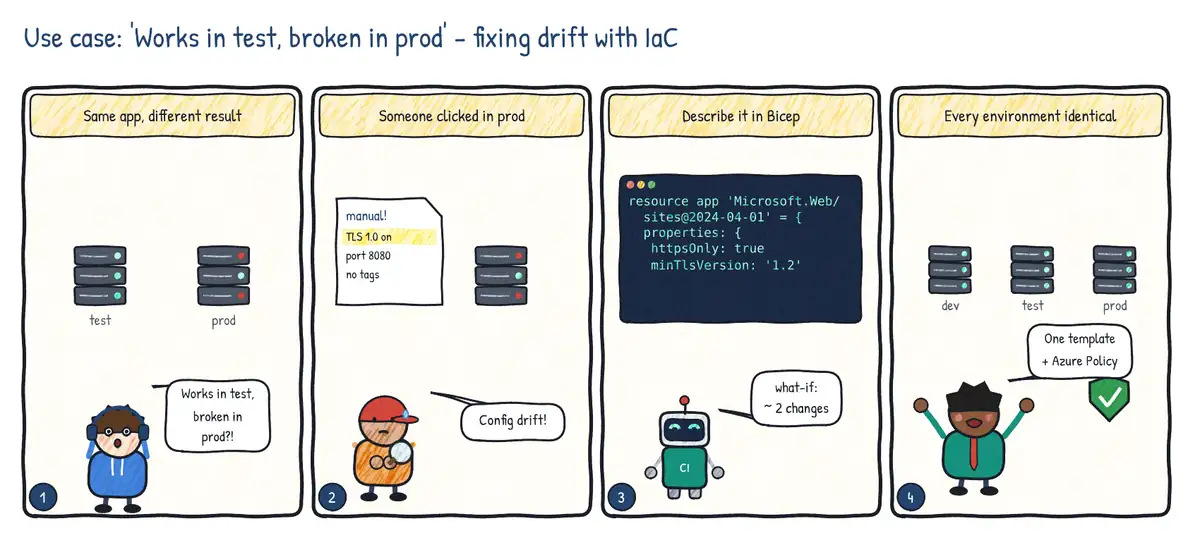
Situation. The same release behaves differently in test and production. Investigation shows that someone changed production settings by hand months ago: configuration drift.
| Step | Practice | Feature used |
|---|---|---|
| 1 | Find the drift | Azure Policy compliance, what-if, Machine Configuration audit |
| 2 | Declare the desired state | Bicep / ARM templates in source control |
| 3 | Preview before applying | az deployment group what-if in the PR pipeline |
| 4 | Keep it that way | Deploy every environment from the same template; deny manual changes (deployment stacks deny settings, Azure Policy) |