Security and Compliance Scanning
What this chapter covers
- Design and implement a strategy for scanning dependencies, code, secrets and licensing
- Configure Microsoft Defender for Cloud DevOps Security
- Configure GitHub Advanced Security for both GitHub and Azure DevOps
- Integrate GitHub Advanced Security with Microsoft Defender for Cloud
- Automate container scanning, including scanning container images and configuring an action to run CodeQL analysis in a container
- Automate analysis of licensing, vulnerabilities and versioning of open-source components by using Dependabot alerts
Shift-left security means finding problems while they are cheap to fix: in the IDE, at push time, in the pull request, and in the build - not after deployment. This chapter designs a scanning strategy and maps each scan type to the Microsoft and GitHub tooling that the exam expects you to know.
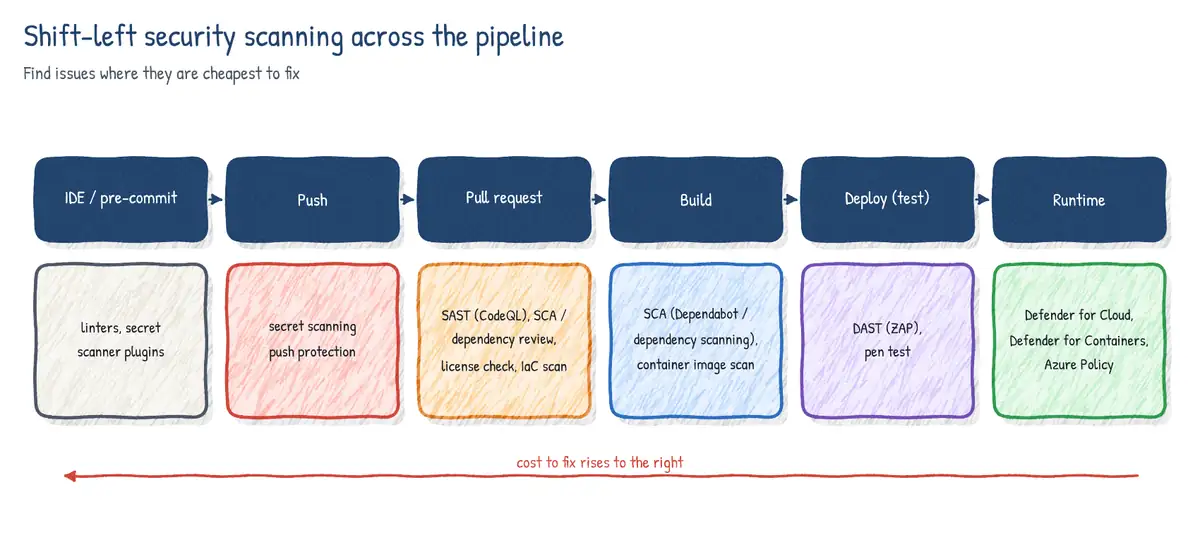
1. A layered scanning strategy
| Scan type | Finds | Example tools | Where it runs |
|---|---|---|---|
| SAST | Flaws in your source (injection, XSS) | CodeQL, Bandit, ESLint, SonarQube | PR + main |
| SCA / dependency | Known CVEs in open-source packages | Dependabot, dependency scanning, Mend | PR + continuous |
| Secret scanning | Credentials in code and history | GitHub secret scanning, push protection | Push + history |
| License scanning | Disallowed or unknown licenses | Dependency review, Mend, Black Duck, FOSSA | PR |
| IaC scanning | Misconfigurations in Bicep/ARM/Terraform | Checkov, Template Analyzer, Terrascan | PR |
| Container scanning | Vulnerable OS/app packages in images | Trivy, Defender for Containers | Build + registry |
| DAST | Runtime vulnerabilities in a running app | OWASP ZAP, Burp | Test env |
- Block on what the developer introduced (new high/critical alerts, new secrets, denied licenses) via PR checks; report on legacy debt via dashboards.
- Run fast scans (secrets, dependency review) on every PR; run heavy scans (full CodeQL queries, DAST) on main and on a schedule.
- Upload results in SARIF so GitHub code scanning, Azure DevOps Advanced Security and Defender for Cloud can aggregate them.
- Re-scan continuously: a dependency that was clean yesterday can have a CVE today. Registry and runtime scanning cover images that are not rebuilt.
2. Microsoft Defender for Cloud - DevOps security
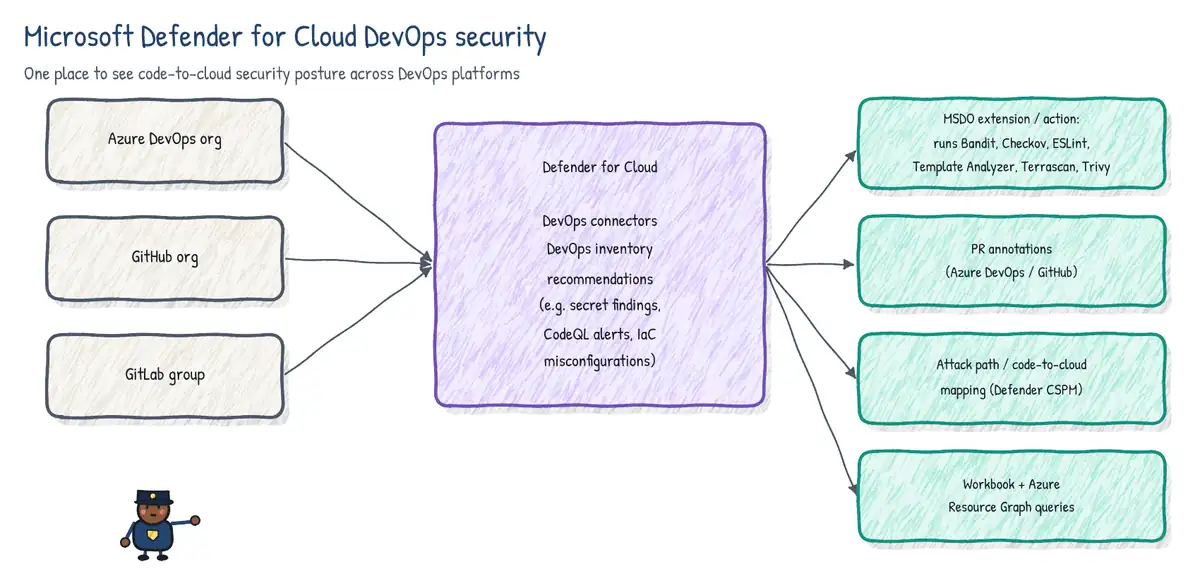
Defender for Cloud DevOps security gives security teams one place to see the security posture of code and pipelines across Azure DevOps, GitHub and GitLab. You add a DevOps connector under Environment settings, authorize it to the organizations/groups, and Defender builds a DevOps inventory of repositories.
| Capability | Foundational CSPM (free) | Defender CSPM (paid) |
|---|---|---|
| DevOps inventory and posture recommendations | Yes | Yes |
| Findings from GHAS / Advanced Security / MSDO | Yes | Yes |
| Pull request annotations | No | Yes |
| Code-to-cloud mapping, attack path analysis | No | Yes |
| Cloud security explorer queries over DevOps | No | Yes |
- Posture recommendations include: repos should have secret scanning / code scanning / dependency scanning enabled, branch protection, pipelines should not have secrets in variables, and similar DevOps environment posture checks.
- PR annotations surface IaC and other findings as comments on Azure DevOps or GitHub pull requests (Defender CSPM required).
- Microsoft Security DevOps (MSDO) is a CLI that runs open-source analyzers (Bandit, BinSkim, Checkov, ESLint, Template Analyzer, Terrascan, Trivy) and emits SARIF. It is delivered as the
MicrosoftSecurityDevOps@1Azure DevOps task and themicrosoft/security-devops-actionGitHub action. - MSDO's old CredScan secret scanner is deprecated; use GitHub secret scanning or Advanced Security for Azure DevOps instead.
# Azure Pipelines - MSDO, results flow to Defender for Cloud
steps:
- task: MicrosoftSecurityDevOps@1
  inputs:
    categories: 'IaC,containers'
    break: false
artifactName: CodeAnalysisLogs # name Defender looks for# GitHub Actions - MSDO + upload to code scanning
permissions:
contents: read
security-events: write
jobs:
msdo:
runs-on: ubuntu-latest
steps:
- uses: actions/checkout@v4
- uses: microsoft/security-devops-action@v1
id: msdo
with:
categories: IaC
- uses: github/codeql-action/upload-sarif@v3
with:
sarif_file: ${{ steps.msdo.outputs.sarifFile }}3. GitHub Advanced Security on GitHub
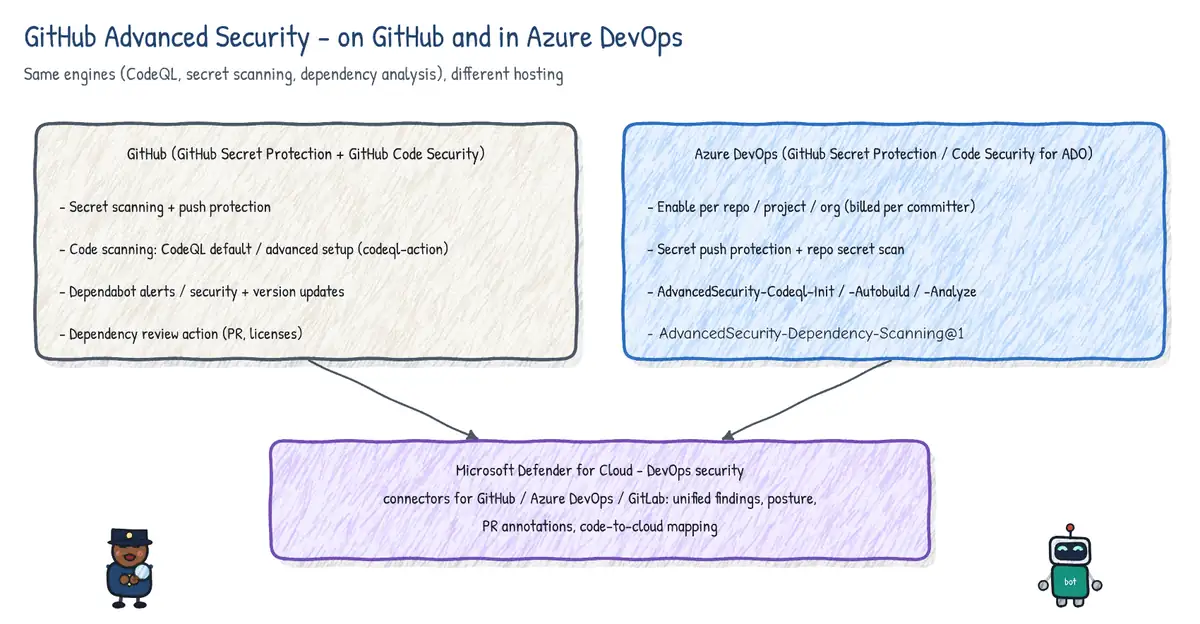
Since 2025 GitHub sells Advanced Security as two products: GitHub Secret Protection (secret scanning, push protection, custom patterns, AI-detected generic secrets, security overview) and GitHub Code Security (CodeQL code scanning, Copilot Autofix, dependency review, security campaigns, security overview). Both are free on public repositories. Dependabot alerts and security updates are free for all repos.
Code scanning with CodeQL
- Default setup: one click; GitHub picks languages, query suite and triggers (push, PR, weekly schedule).
- Advanced setup: a committed
.github/workflows/codeql.ymlyou customize (query packs likesecurity-extended, build commands, matrix of languages, paths). - CodeQL builds a database from the code, then runs queries. Compiled languages need a build (
autobuildor manual commands, orbuild-mode: nonewhere supported). - Third-party tools can upload SARIF to code scanning with
upload-sarif. - Required check via rulesets/branch protection: Require code scanning results.
name: codeql
on:
  pull_request:
    branches: [main]
  schedule:
    - cron: '30 2 * * 1'
permissions:
  contents: read
  security-events: write
jobs:
  analyze:
    runs-on: ubuntu-latest
    strategy:
      matrix:
        language: [csharp, javascript-typescript]
    steps:
      - uses: actions/checkout@v4
      - uses: github/codeql-action/init@v3
        with:
          languages: ${{ matrix.language }}
          queries: security-extended
      - uses: github/codeql-action/autobuild@v3
      - uses: github/codeql-action/analyze@v3
        with:
          category: /language:${{ matrix.language }}
Secret scanning and push protection
- Secret scanning checks the full Git history, issues, PRs and wikis for partner patterns and custom regex patterns, and notifies partners (e.g. a leaked Azure key) so they can revoke it.
- Push protection blocks a push containing a supported secret before it reaches the repository. Users can bypass with a reason (false positive, used in tests, will fix later), and orgs can enable delegated bypass so a reviewer must approve.
- Push protection for users protects pushes to any public repo on GitHub.
Dependency graph, dependency review and Dependabot
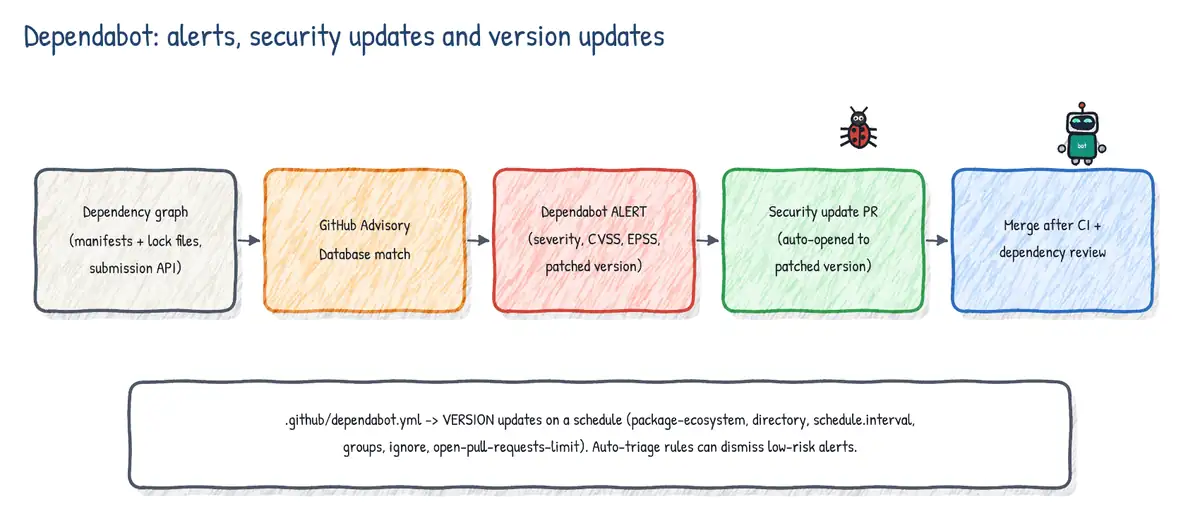
| Feature | What it does | Trigger |
|---|---|---|
| Dependency graph | Inventory of manifest/lock-file dependencies | Push |
| Dependabot alerts | Alerts when a dependency matches a GitHub Advisory | New advisory or new dependency |
| Dependabot security updates | Auto-PR bumping to the minimum patched version | An alert |
| Dependabot version updates | Scheduled PRs to keep deps current | dependabot.yml schedule |
| Dependency review | Shows dependency changes + vulns/licenses in a PR | pull_request |
# .github/dependabot.yml
version: 2
updates:
  - package-ecosystem: nuget
    directory: "/"
    schedule:
      interval: weekly
    groups:
      microsoft:
        patterns: ["Microsoft.*"]
    open-pull-requests-limit: 5
  - package-ecosystem: github-actions
    directory: "/"
    schedule:
      interval: monthly
  - package-ecosystem: docker
    directory: "/src/api"
    schedule:
interval: weekly# Dependency review with vulnerability and license gate
on: pull_request
permissions:
contents: read
pull-requests: write
jobs:
review:
runs-on: ubuntu-latest
steps:
- uses: actions/checkout@v4
- uses: actions/dependency-review-action@v4
with:
fail-on-severity: high
deny-licenses: GPL-3.0, AGPL-3.0
comment-summary-in-pr: always4. GitHub Advanced Security for Azure DevOps
The same engines are available natively in Azure Repos, now sold as GitHub Secret Protection for Azure DevOps and GitHub Code Security for Azure DevOps (previously one bundle, GitHub Advanced Security for Azure DevOps). They are billed per active committer and enabled per repository, per project or for the whole organization. Results appear in the repo's Advanced Security tab.
| Product | Features | How it runs |
|---|---|---|
| Secret Protection | Push protection, secret scanning alerts (incl. history) | Server side; no pipeline needed |
| Code Security | Dependency scanning | AdvancedSecurity-Dependency-Scanning@1 |
| Code Security | CodeQL code scanning | Init/Autobuild/Analyze tasks or default setup |
| Code Security | Third-party SARIF results | AdvancedSecurity-Publish@1 |
trigger:
  branches:
    include: [main]
pool:
  vmImage: ubuntu-latest
steps:
- task: AdvancedSecurity-Codeql-Init@1
  inputs:
    languages: csharp
    querysuite: security-extended
- task: AdvancedSecurity-Codeql-Autobuild@1
- task: AdvancedSecurity-Dependency-Scanning@1
- task: AdvancedSecurity-Codeql-Analyze@1- Enabling requires Project Collection Administrator or the Advanced Security: manage settings permission. Viewing alerts needs Contributor-level repo access; dismissing alerts needs elevated permissions.
- Push protection and repository secret scanning start automatically when Secret Protection is enabled; push protection only evaluates pushes made after enablement, while the history scan finds older secrets.
- PR gating uses status checks such as
AdvancedSecurity/NewHighAndCriticaltogether with a build validation policy that runs the scanning tasks. - Code scanning default setup (supported languages, weekly schedule) avoids editing every pipeline.
- Self-hosted agents need the CodeQL bundle (or
enableAutomaticCodeQLInstall: true) and outbound access to the Advanced Security endpoints. - Works only for Azure Repos Git repositories. For GitHub-hosted code use GHAS on GitHub, even if Azure Pipelines builds it.
5. Integrating GHAS with Defender for Cloud
- When a GitHub or Azure DevOps connector is added, Defender for Cloud ingests code scanning, secret scanning and dependency (Dependabot / dependency scanning) findings and shows them as DevOps recommendations per repository.
- Security teams triage centrally in Defender while developers fix in GitHub/Azure Repos, where alerts originate.
- With Defender CSPM, findings are correlated with deployed cloud resources (code-to-cloud mapping), so a vulnerable container image is traced back to the repo and Dockerfile that produced it, and runtime exposure helps prioritize.
6. Container scanning
- Build time: scan the image in the pipeline before pushing (Trivy via MSDO,
aquasecurity/trivy-action, or another scanner) and fail on critical findings. - Registry: Microsoft Defender for Containers (and Defender CSPM) performs agentless vulnerability assessment of images in Azure Container Registry on push and periodically re-scans recently pulled images, powered by Microsoft Defender Vulnerability Management.
- Runtime: Defender for Containers maps vulnerable images to running AKS workloads and provides threat detection; admission policies (Azure Policy for AKS) can block unscanned or vulnerable images.
- Reduce surface first: minimal/distroless base images, multi-stage builds, pinned digests, Dependabot
dockerecosystem to keep base images current.
- name: Build image
  run: docker build -t acrshop.azurecr.io/api:${{ github.sha }} .
- name: Scan image with Trivy
  uses: aquasecurity/trivy-action@master
  with:
    image-ref: acrshop.azurecr.io/api:${{ github.sha }}
    format: sarif
    output: trivy.sarif
    severity: CRITICAL,HIGH
- uses: github/codeql-action/upload-sarif@v3
  with:
    sarif_file: trivy.sarif
    category: container
Running CodeQL in a container
When the build needs a specific toolchain, run the whole job in a container with the container: key. The CodeQL action works inside it as long as the image contains the build tools and Git (and the job is on a Linux runner). The same approach works with the CodeQL CLI on any CI system.
jobs:
  analyze:
    runs-on: ubuntu-latest
    container:
      image: mcr.microsoft.com/dotnet/sdk:8.0
    permissions:
      contents: read
      security-events: write
    steps:
      - uses: actions/checkout@v4
      - uses: github/codeql-action/init@v3
        with:
          languages: csharp
      - run: dotnet build src/Shop.sln -c Release
- uses: github/codeql-action/analyze@v37. Open-source license compliance
- Define a license policy: allowed (MIT, Apache-2.0, BSD), review-required (LGPL, MPL), denied (AGPL, GPL for distributed proprietary code).
- GitHub:
dependency-review-actionwithallow-licensesordeny-licenses; the dependency graph shows licenses; export an SBOM (SPDX) from the dependency graph. - Azure DevOps / any CI: commercial SCA tools such as Mend (formerly WhiteSource; Mend Bolt extension), Black Duck, FOSSA or Snyk produce license and vulnerability reports and policy gates.
- Generate SBOMs during builds (Microsoft
sbom-tool) and store them with the artifact for audit.
8. Compliance and governance
- Azure Policy enforces and audits resource configuration (allowed locations, Key Vault purge protection, ACR vulnerability findings resolved). Policy-as-code: store definitions in Git and deploy with pipelines; use
what-ifand policy compliance scans as release gates. - Azure DevOps auditing records security-relevant events (permission changes, PAT policy changes, pipeline modifications). Logs are kept for 90 days in the portal; use audit streaming to Azure Monitor Log Analytics, Splunk or Azure Event Grid for long-term retention and alerting.
- GitHub audit log (org/enterprise) with audit log streaming (Enterprise Cloud) to Azure Event Hubs, Azure Blob Storage, Splunk, Datadog and others.
- Regulatory compliance dashboards in Defender for Cloud map controls (e.g. Microsoft Cloud Security Benchmark) to recommendations, including DevOps recommendations.
- Release gates: the Query Azure Monitor alerts and Invoke REST API checks can block deployment when compliance or security signals are red.
// Log Analytics: who changed permissions in Azure DevOps in the last 7 days
AzureDevOpsAuditing
| where TimeGenerated > ago(7d)
| where Area == "Permissions"
| project TimeGenerated, ActorDisplayName, OperationName, Details
| order by TimeGenerated descUse case: 'Push protection saves the day'
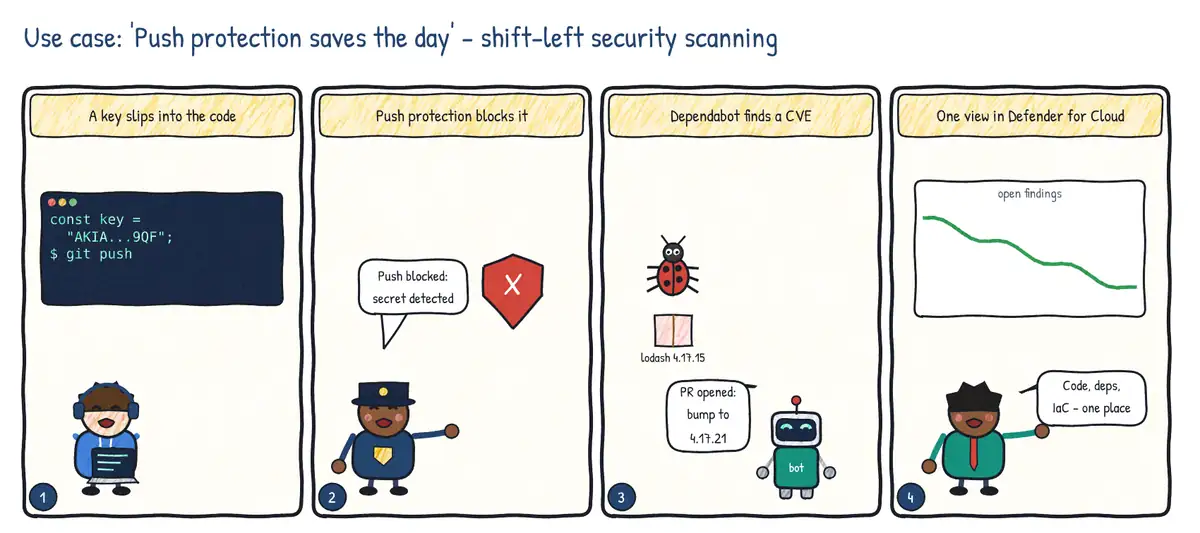
Situation. A developer hard-codes a cloud access key while debugging and tries to push. The same week a critical vulnerability is announced in a widely used library.
| Step | Practice | Feature used |
|---|---|---|
| 1 | Stop secrets before they reach the server | Secret scanning push protection |
| 2 | Find vulnerable dependencies | Dependabot alerts / dependency scanning |
| 3 | Fix them automatically | Dependabot security update pull requests |
| 4 | One security view across platforms | Microsoft Defender for Cloud DevOps security |