Identity, Access and Secrets
What this chapter covers
- Choose between service principals and managed identities, including system-assigned and user-assigned identities
- Implement and manage GitHub authentication, including GitHub Apps, GITHUB_TOKEN and personal access tokens
- Implement and manage Azure DevOps service connections and personal access tokens
- Design and implement permissions and roles in GitHub
- Design and implement permissions and security groups in Azure DevOps
- Recommend appropriate access levels, including Stakeholder access in Azure DevOps and outside collaborators in GitHub
- Configure projects and teams in Azure DevOps
- Implement and manage secrets, keys and certificates by using Azure Key Vault
- Implement and manage secrets in GitHub Actions and Azure Pipelines
- Design and implement a strategy for managing sensitive files during deployment
- Design pipelines to prevent leakage of sensitive information
Domain 4 is worth 10-15% of the exam, but its ideas leak into almost every other domain: a pipeline question about deploying to Azure is often really a question about which identity the pipeline uses, where the secret lives, or who is allowed to approve. This chapter covers authentication and authorization for both Azure DevOps and GitHub, then the secret-management toolset: Azure Key Vault, pipeline secrets, workload identity federation (OIDC), secure files, and the habits that stop secrets leaking into logs.
1. Workload identities in Microsoft Entra ID
A pipeline that deploys to Azure needs a non-human identity. Microsoft Entra ID offers two families: service principals that you create from an app registration, and managed identities, which are a special kind of service principal whose credentials Azure manages for you.
Service principals (app registrations)
- An app registration is the global definition of an application (application/client ID). The service principal (enterprise application) is its local instance in a tenant; RBAC roles are assigned to the service principal.
- Credentials can be a client secret (password with an expiry), a certificate, or a federated identity credential (no secret at all - trust an external OIDC issuer).
- Works from anywhere: GitHub-hosted runners, Microsoft-hosted agents, on-premises, other clouds. This is why most CI/CD identities are app registrations.
- You own the lifecycle: secret rotation, expiry monitoring, deletion when unused.
Managed identities
- System-assigned: enabled on an Azure resource (VM, App Service, Function, AKS node pool, VM scale set...). Exactly one per resource, created and deleted with the resource; cannot be shared.
- User-assigned: a standalone Azure resource (
Microsoft.ManagedIdentity/userAssignedIdentities). It can be attached to many resources, survives their deletion and can be pre-provisioned and granted RBAC before the compute exists. - No credentials to store or rotate. Code obtains tokens from the local Azure Instance Metadata Service (IMDS) endpoint, which only exists inside Azure compute.
- A user-assigned managed identity can also hold federated identity credentials, so a GitHub workflow or Azure DevOps service connection can sign in as that identity without any secret - useful when app registrations are locked down by policy.
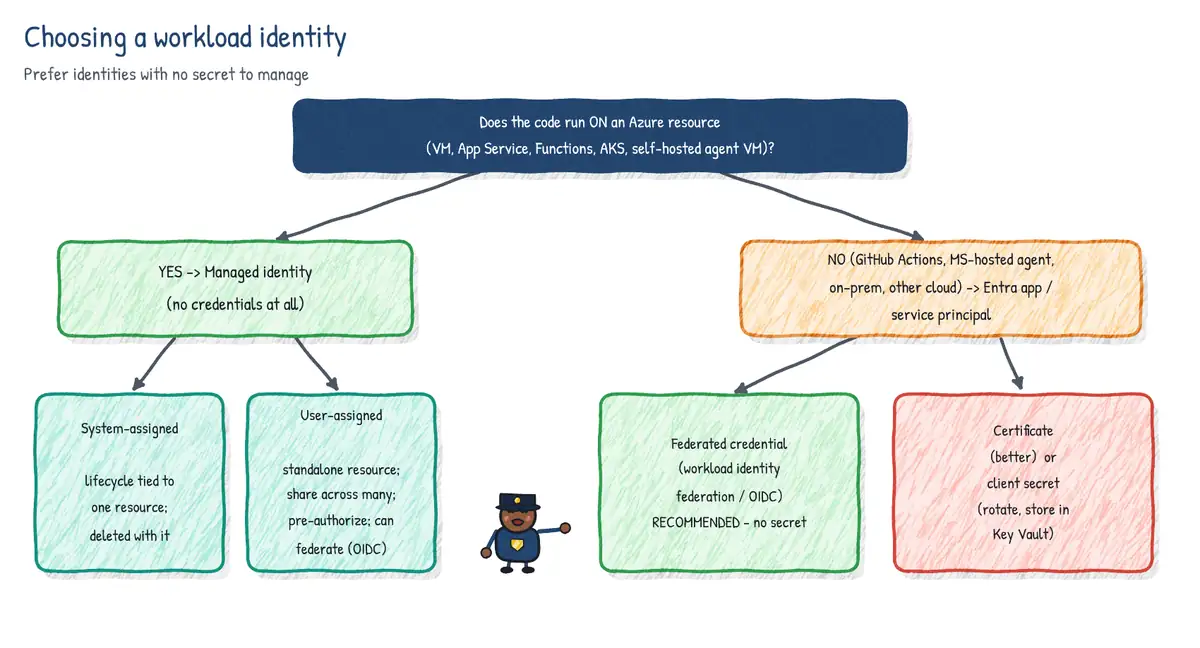
| Requirement | Best choice |
|---|---|
| Code running on an Azure VM / App Service needs to read Key Vault | System-assigned managed identity |
| Many VMs in a scale set or several apps share the same permissions | User-assigned managed identity |
| Identity must exist (with RBAC) before the resource is deployed | User-assigned managed identity |
| Self-hosted agents on Azure VMs deploy to Azure, no secrets | Managed identity on the agent VM (service connection type MI) |
| GitHub-hosted runner or Microsoft-hosted agent deploys to Azure | App registration or user-assigned MI + federated credential (OIDC) |
| Tool outside Azure that cannot do OIDC | Service principal with certificate |
| Identity tied to the lifetime of one resource | System-assigned managed identity |
2. Azure DevOps service connections
A service connection stores the information a pipeline needs to talk to an external system: Azure Resource Manager, Docker registries, Kubernetes, GitHub, generic HTTP, SSH, NuGet/npm feeds and more. Pipelines reference it by name (azureSubscription: 'prod-arm'), so the secret never appears in YAML.
Azure Resource Manager authentication options
| Option | How it authenticates | Notes |
|---|---|---|
| Workload identity federation (automatic) | Azure DevOps issues an OIDC token; Entra trusts it | Recommended; no secret to expire |
| Workload identity federation (manual) | You create app/MI and add federated credential | When you lack rights to create apps |
| Service principal (secret or certificate) | Stored client secret/cert | Legacy; rotate before expiry; convertible to WIF |
| Managed identity | Identity of the self-hosted agent VM or a user-assigned MI | No secret |
| Publish profile | App Service publish profile | Single web app only |
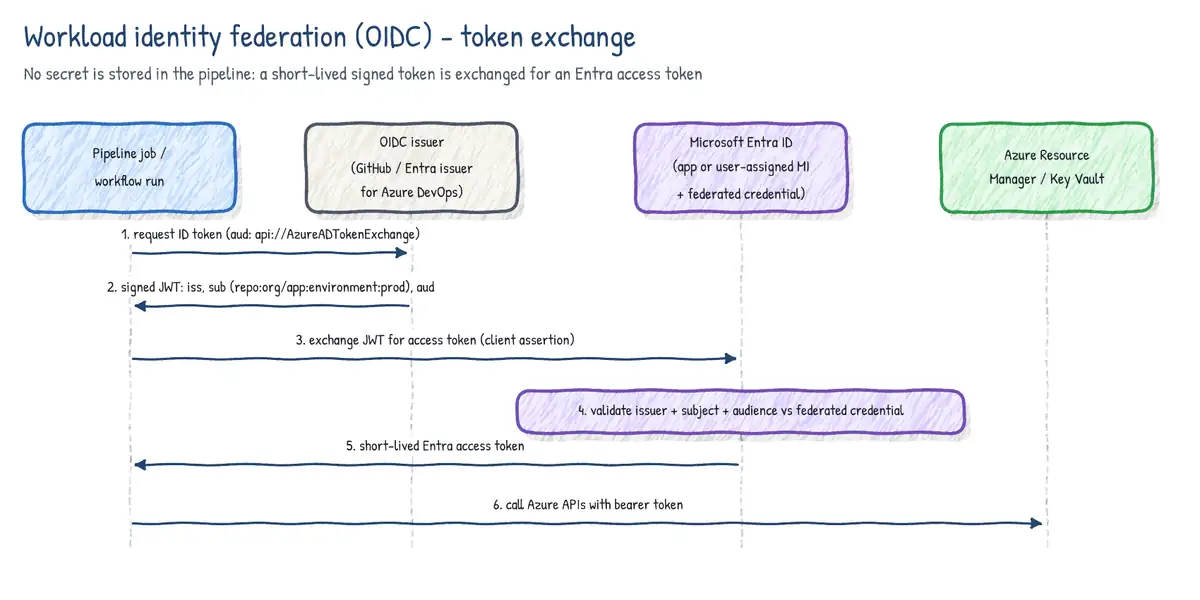
With workload identity federation, Entra exchanges a short-lived token issued for the pipeline job for an Entra access token; the audience is api://AzureADTokenExchange. 2026 change: new connections use the Microsoft Entra issuer (https://login.microsoftonline.com/<tenant-id>/v2.0) with an immutable, Microsoft Entra-generated subject identifier (format <entra-prefix>/sc/<org-id>/<service-connection-id>) that you copy from the connection. The older Azure DevOps issuer (https://vstoken.dev.azure.com/<organization-id> with subject sc://<organization>/<project>/<service-connection-name>) was deprecated on 1 July 2026 and reaches end of life on 1 July 2027 - use the Update button on each flagged connection to move it. Secret-based connections can also be converted in place to workload identity federation.
Scope and least privilege
- Scope levels for ARM connections: management group, subscription, resource group, and Machine Learning workspace.
- Automatic creation assigns a role at the chosen scope. Prefer a resource-group scope and a narrow role over subscription-wide Contributor.
- Use separate service connections per environment (dev/test/prod), each with its own identity, so a compromised dev pipeline cannot touch production.
Securing the connection itself
- Security roles on each connection: User (can use it in pipelines), Administrator (manage it and its security), and at project level Creator.
- Pipeline permissions: by default each new pipeline must be authorized the first time it uses the connection. Avoid ticking Grant access permission to all pipelines for production connections.
- Approvals and checks apply to service connections (as to environments, agent pools, variable groups, secure files and repositories): manual approval, branch control, business hours, required template, invoke Azure Function / REST API, query Azure Monitor alerts, exclusive lock.
- Project-level connections can be shared with other projects; each share is a new connection object with its own permissions.
# Azure DevOps CLI: create a WIF-based ARM service connection from a JSON file
az devops service-endpoint create \
  --service-endpoint-configuration ./arm-wif.json \
  --org https://dev.azure.com/contoso --project Shop

# Then add the federated credential on the Entra app or user-assigned MI
az identity federated-credential create \
  --name ado-shop-prod --identity-name id-shop-deploy \
  --resource-group rg-identity \
  --issuer https://login.microsoftonline.com/<tenant-id>/v2.0 \
  --subject '<subject identifier shown on the service connection>' \
--audiences api://AzureADTokenExchange3. Azure DevOps personal access tokens (PATs)
A PAT is an alternate password for a user that works with Git, the REST API, the Azure CLI extension, and agent registration. It inherits the user's permissions, further limited by its scopes (for example Code (Read), Build (Read & execute), Packaging (Read), Agent Pools (Read & manage)).
- Always choose custom defined scopes rather than Full access.
- Set the shortest workable expiration; the UI maximum is one year.
- Scope a PAT to a single organization instead of All accessible organizations (global PATs are being retired: all existing global PATs stop working on 1 December 2026).
- Prefer Microsoft Entra tokens (for example
az account get-access-tokenwith the Azure DevOps resource ID) or service principals/managed identities, which Azure DevOps supports as first-class identities, over PATs for automation.
| Policy | Level / who sets it | Effect |
|---|---|---|
| Restrict global PAT creation | Tenant / Azure DevOps Administrator | No PATs valid in all orgs |
| Restrict full-scoped PAT creation | Tenant / Azure DevOps Administrator | PATs must use custom scopes |
| Enforce maximum PAT lifespan | Tenant / Azure DevOps Administrator | Caps expiry in days |
| Automatically revoke leaked PATs | Tenant (on by default) | Revokes PATs found in public GitHub repos |
| Restrict PAT creation (allow list) | Organization / Project Collection Admin | Only listed users/groups can create PATs |
4. GitHub authentication options
| Mechanism | Acts as | Best for |
|---|---|---|
| GitHub App | Itself (installation) or on behalf of a user | Org integrations, bots, cross-repo automation |
| OAuth app | The signed-in user | Third-party apps acting for a user |
| Fine-grained PAT | A user, limited to one owner and chosen repos | Personal scripts needing narrow access |
| Classic PAT | A user, all repos they can reach | Legacy; avoid when possible |
| GITHUB_TOKEN | Installation token of the Actions app for that repo | Anything inside the same repo's workflow |
| Deploy key | SSH key on one repo | Read (or write) Git access to one repo |
GitHub Apps
- Fine-grained permissions chosen per app (for example Contents: read, Pull requests: write); installed on an org or user and on selected repositories.
- Authenticate with a private key to mint a JWT, exchange it for an installation access token that expires after one hour.
- Not tied to a person leaving the company, does not consume a seat, and gets higher API rate limits that scale with the org.
- In Actions,
actions/create-github-app-tokenmints a token so a workflow can act on other repositories or trigger downstream workflows.
Personal access tokens
- Fine-grained PAT: a single resource owner (user or organization), selected repositories, granular permissions, expiry (no-expiry allowed unless a lifetime policy blocks it); organizations can require approval of fine-grained PATs and can block classic PATs.
- Classic PAT: coarse scopes such as
repo,workflow,admin:org; access to every repo the user can access. Organizations using SAML SSO must authorize the token.
GITHUB_TOKEN
Each workflow job automatically gets a GITHUB_TOKEN scoped to the repository that contains the workflow. It expires when the job finishes (or after 24 hours at most). Default permissions are set at enterprise/org/repo level: permissive (read/write) or restricted (read for contents and packages). Always declare a permissions: block; any permission you do not list becomes none.
permissions:
  contents: read          # checkout
  pull-requests: write    # comment on the PR
  id-token: write         # request an OIDC token (azure/login)
security-events: write # upload SARIF to code scanning5. GitHub roles and permissions
Organization level
- Owner: full administrative control of the organization; keep at least two.
- Member: default role; gets the organization's base permission (none, read, write or admin) on every repository.
- Billing manager: manages billing only; no repository access by role.
- Security manager (organization role): read on all repos plus the ability to manage security alerts and settings.
- Moderator: can block users and moderate discussions.
- Outside collaborator: not an org member; granted access to specific repositories only. Ideal for contractors. Does not consume an org membership but does use a paid seat in private repos.
Repository roles
| Role | Typical capabilities | Typical user |
|---|---|---|
| Read | Clone, view, open issues and comment | Non-code contributors |
| Triage | Manage issues/PRs (labels, assign, close) without write | Project managers |
| Write | Push to branches, merge PRs (subject to rules) | Developers |
| Maintain | Manage repo settings except sensitive/destructive ones | Tech leads, release managers |
| Admin | Full control incl. security, rulesets, delete, transfer | Repo owners |
- Teams grant roles to groups; teams can be nested (child inherits parent's access) and synchronized with Entra ID groups via team sync (Enterprise Cloud).
- Custom repository roles (Enterprise Cloud) start from a base role and add specific permissions, e.g. Write + manage webhooks.
- Effective permission is the highest of all grants (base permission, team, direct). GitHub has no explicit deny.
6. Azure DevOps security model
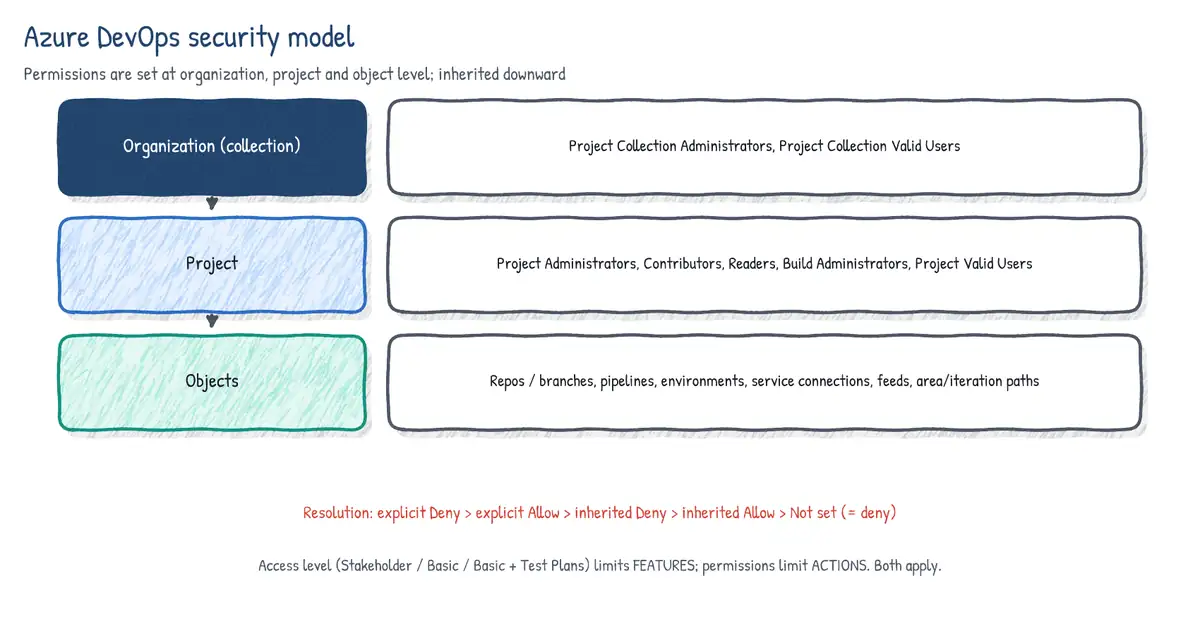
Azure DevOps permissions exist at three levels: organization (collection), project, and object (repo, branch, pipeline, area path, iteration, feed, service connection, environment...). Permissions are granted to security groups or users; best practice is to add Microsoft Entra groups to Azure DevOps groups so joiner/mover/leaver handling happens in Entra.
| Group | Scope | Purpose |
|---|---|---|
| Project Collection Administrators | Organization | Full control of the org |
| Project Collection Valid Users | Organization | Everyone in the org (system group) |
| Project Administrators | Project | Full control of one project |
| Contributors | Project | Read/write code, work items, run pipelines |
| Readers | Project | View only |
| Build Administrators | Project | Manage pipelines and build resources |
| Project Valid Users | Project | All members of the project (system group) |
Permission states and inheritance
- Not set = implicit deny unless allowed elsewhere.
- Allow and Deny can be set explicitly or inherited from a parent object or a group.
- An explicit Deny wins over an Allow coming from group membership at the same level.
- An explicit permission on a child object overrides what is inherited from its parent; inheritance can be switched off per object.
- Members of Project Collection Administrators are effectively always allowed for most operations - you cannot lock out a collection admin with a Deny.
Pipeline identities
Pipelines run as a build service identity: either Project Collection Build Service (org) or <Project> Build Service (org). Turning on Limit job authorization scope to current project (for release and non-release pipelines) and Protect access to repositories in YAML pipelines shrinks what System.AccessToken can reach.
7. Access levels, licensing and visibility
Access levels decide which features a user can use; security groups decide what they can do with them. Both must allow an action.
| Access level | What it unlocks | Cost |
|---|---|---|
| Stakeholder | Work items and boards (limited), view/approve pipelines; no code | Free, unlimited |
| Basic | Repos, full Boards, Pipelines, Artifacts, basic test execution | First 5 users free |
| Basic + Test Plans | Basic plus Azure Test Plans (manual/exploratory testing) | Paid |
| Visual Studio subscriber | Basic or Basic + Test Plans depending on subscription | Via VS subscription |
| GitHub Enterprise user | Basic (entitlement detected on sign-in) | Via GitHub Enterprise |
- Use Stakeholder for business owners and approvers who create and track work items and approve deployments but never touch code.
- Use group rules to assign access levels and project membership automatically to Entra groups.
- Public projects let anonymous users read code, work items and pipelines; organization policy can disallow public projects.
8. Projects and teams
- A project is a security and process boundary (repos, pipelines, boards, process template). Prefer few, larger projects; use many projects only for strong isolation.
- A team is a group of people with its own backlog, board, dashboards and notifications. Each team selects area paths (which work items it owns) and iterations (which sprints it plans in).
- Creating a team creates a team security group and optionally a matching area path. Team administrators configure team settings without being project admins.
- Area path permissions (e.g. Edit work items in this node) restrict who can edit work under that node.
9. Azure Key Vault
Key Vault stores three object types: secrets (any string up to 25 KB: passwords, connection strings), keys (RSA/EC keys for encryption and signing; HSM-protected in Premium or Managed HSM; the private key never leaves the vault), and certificates (X.509 with lifecycle management and auto-renewal from integrated CAs; each certificate also exposes an addressable key and secret).
Authorization: Azure RBAC vs access policies
| Aspect | Azure RBAC (recommended) | Vault access policy (legacy) |
|---|---|---|
| Granularity | Vault, or individual secret/key/cert | Whole vault |
| Management | Same as other Azure resources; PIM-able | Per-vault list |
| Typical pipeline role | Key Vault Secrets User | Get, List on secrets |
| Who can grant | Owner / User Access Administrator | Anyone with Contributor on the vault |
- Key Vault Secrets User: read secret values. Key Vault Secrets Officer: manage secrets. Key Vault Reader: read metadata only - cannot read secret values.
- Key Vault Administrator: all data-plane operations. Control-plane roles such as Contributor do not grant data access under the RBAC model.
Recovery protection
- Soft delete is on for every vault and cannot be turned off. Deleted vaults and objects are retained for 7-90 days (default 90) and can be recovered.
- Purge protection (optional, irreversible once enabled) blocks permanent deletion until the retention period ends - even for administrators. Required by many compliance regimes and by services using customer-managed keys.
- A soft-deleted vault name stays reserved, so redeploying IaC with the same name fails until you recover or purge it.
resource kv 'Microsoft.KeyVault/vaults@2023-07-01' = {
  name: 'kv-shop-prod'
  location: location
  properties: {
    tenantId: subscription().tenantId
    sku: { family: 'A', name: 'standard' }
    enableRbacAuthorization: true
    enableSoftDelete: true
    softDeleteRetentionInDays: 90
    enablePurgeProtection: true
    publicNetworkAccess: 'Disabled'
  }
}
10. Using Key Vault from Azure Pipelines
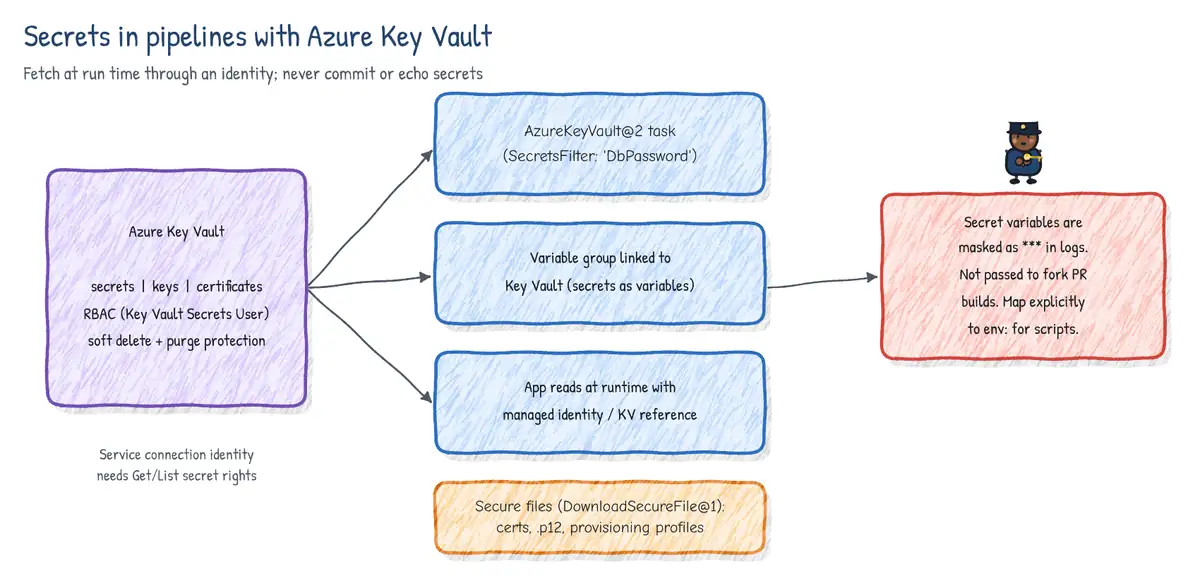
Two patterns bring vault secrets into a pipeline. The AzureKeyVault@2 task downloads secrets at run time as secret variables. A variable group linked to Key Vault maps chosen secret names into a Library variable group; values are fetched fresh each run. Either way the service connection's identity needs Get and List on secrets (or the Key Vault Secrets User role).
steps:
- task: AzureKeyVault@2
  inputs:
    azureSubscription: prod-arm-wif   # service connection
    KeyVaultName: kv-shop-prod
    SecretsFilter: 'SqlPassword,ApiKey'  # '*' = all secrets
    RunAsPreJob: true                     # make secrets available to all steps
- script: ./deploy.sh
  env:
SQL_PASSWORD: $(SqlPassword) # secrets must be mapped explicitlyvariables:
- group: kv-shop-prod-secrets # Library group linked to Key Vault
steps:
- task: AzureCLI@2
inputs:
azureSubscription: prod-arm-wif
scriptType: bash
scriptLocation: inlineScript
inlineScript: ./migrate.sh "$DB_PWD"
env:
DB_PWD: $(SqlPassword)- Secret names with dashes (
sql-password) become variables with the same name, referenced as$(sql-password). - If the vault uses a firewall, Microsoft-hosted agents need network access - use a self-hosted agent in the VNet, a Managed DevOps Pool, or allow trusted services.
- Linked variable groups map only secret names; adding a new secret to the vault requires adding it to the group.
- Protect the variable group with pipeline permissions and approvals/checks.
11. Secrets in GitHub Actions
| Level | Scope | Notes |
|---|---|---|
| Repository | All workflows in the repo | Readable by anyone who can edit workflows |
| Environment | Jobs that reference environment: | Released only after protection rules pass |
| Organization | All, private, or selected repos | Central rotation |
- Precedence when names collide: environment > repository > organization.
- Secrets are encrypted client-side (libsodium sealed box) and redacted in logs.
- Secrets are not passed to workflows triggered by
pull_requestfrom a fork;GITHUB_TOKENis read-only there.pull_request_targetruns with secrets in the base repo context - never check out and run untrusted PR code in it. - Dependabot-triggered workflows read Dependabot secrets, not Actions secrets.
- Use
::add-mask::to mask a value generated at run time.
12. Secretless authentication with OIDC (workload identity federation)
OIDC removes long-lived cloud secrets from CI/CD. The runner asks its platform for a signed JWT describing who it is (repo, branch, environment, service connection). Entra ID validates the token against a federated identity credential on an app registration or user-assigned managed identity, checks issuer, subject and audience, and returns a short-lived Azure access token.
| Claim | GitHub Actions | Azure Pipelines |
|---|---|---|
| Issuer | https://token.actions.githubusercontent.com | login.microsoftonline.com/<tenant>/v2.0 (legacy: vstoken) |
| Subject (examples) | repo:org/app:environment:prod | Entra-generated ID (legacy: sc://org/project/conn) |
| Subject (branch) | repo:org/app:ref:refs/heads/main | n/a |
| Subject (PRs) | repo:org/app:pull_request | n/a |
| Audience | api://AzureADTokenExchange | api://AzureADTokenExchange |
name: deploy
on:
  push:
    branches: [main]
permissions:
  id-token: write   # required to request the OIDC JWT
  contents: read
jobs:
  deploy:
    runs-on: ubuntu-latest
    environment: prod   # subject = repo:contoso/shop:environment:prod
    steps:
      - uses: actions/checkout@v4
      - uses: azure/login@v2
        with:
          client-id: ${{ vars.AZURE_CLIENT_ID }}
          tenant-id: ${{ vars.AZURE_TENANT_ID }}
          subscription-id: ${{ vars.AZURE_SUBSCRIPTION_ID }}
- run: az webapp deploy -g rg-shop -n app-shop --src-path app.zipaz ad app federated-credential create --id $APP_ID --parameters '{
"name": "gh-shop-prod",
"issuer": "https://token.actions.githubusercontent.com",
"subject": "repo:contoso/shop:environment:prod",
"audiences": ["api://AzureADTokenExchange"]
}'13. Secure files
Binary sensitive files - signing certificates (.pfx), Apple provisioning profiles, SSH keys, license files - go into Pipelines > Library > Secure files (up to 10 MB each). They are encrypted at rest, cannot be downloaded from the UI after upload, and are made available to a job with DownloadSecureFile@1, which places the file in the agent temp directory and deletes it when the job ends.
- task: DownloadSecureFile@1
  name: signingCert
  inputs:
    secureFile: contoso-codesign.pfx
- pwsh: |
    signtool sign /f "$(signingCert.secureFilePath)" /p $env:CERT_PWD app.exe
  env:
CERT_PWD: $(CodeSignPassword)- Secure files have their own security roles (Reader, User, Administrator), pipeline permissions and approvals and checks.
- In GitHub Actions the equivalent is a base64-encoded secret decoded at run time, or better, retrieving the certificate from Key Vault after OIDC login.
- Prefer Key Vault certificates (or Azure Trusted Signing) for code signing where possible, so the private key never leaves a managed service.
14. Preventing leakage of sensitive information
- Mark secrets as secret: secret variables are encrypted and masked as
***. Set dynamically with##vso[task.setvariable variable=token;issecret=true]value. - Map explicitly: secret variables are not exposed as environment variables automatically; pass them with
env:instead of putting them on the command line, where process listings may expose them. - Never echo or transform a secret (base64, substring, JSON-wrapping) - masking only recognizes the exact value.
- Fork builds: in Azure Pipelines, builds of PRs from forks get no secrets by default; keep Make secrets available to builds of forks off and require a team member's comment before building fork PRs.
- Restrict queue-time variables: enable Limit variables that can be set at queue time so users cannot override variables to inject commands.
- Limit job authorization scope and protect access to repositories to shrink the blast radius of
System.AccessToken. - Disable creation of classic build and release pipelines; YAML is reviewable code.
- Use templates with
extendsand the required template check so every production pipeline runs mandatory security steps. - Scan for secrets before they land (push protection) and rotate anything that leaks - deleting the commit does not un-leak it.
# Azure Pipelines - set a run-time secret safely
- bash: |
    TOKEN=$(curl -s https://sts.example.com/token)
    echo "##vso[task.setvariable variable=apiToken;issecret=true]$TOKEN"
- bash: ./call-api.sh
  env:
API_TOKEN: $(apiToken)Use case: 'The secret in the wiki'
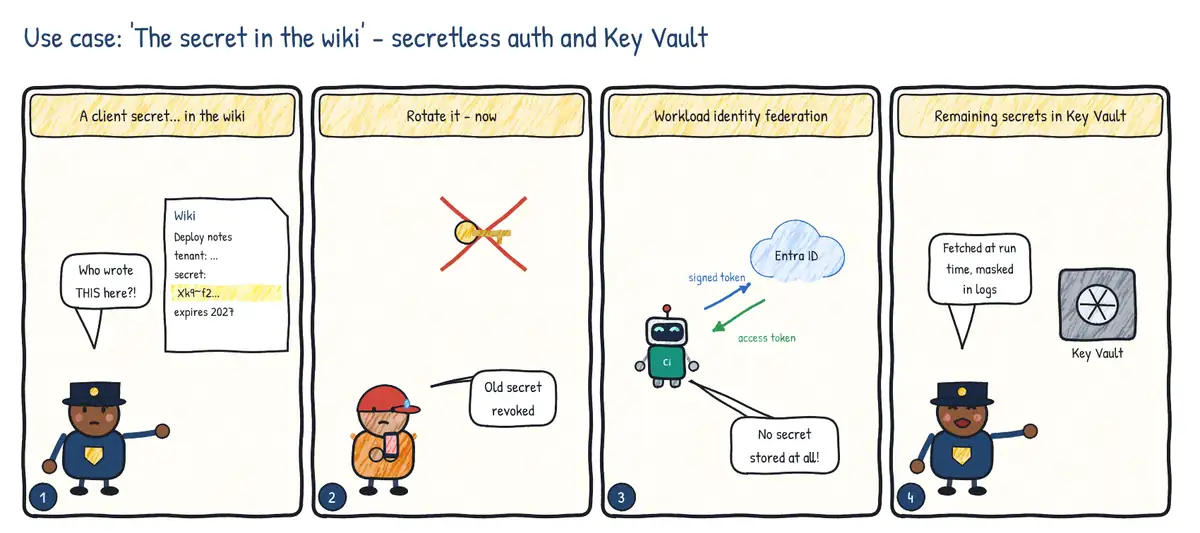
Situation. A security review finds a service principal client secret pasted into a wiki page so that 'anyone can fix the pipeline'. It has owner rights on the production subscription.
| Step | Practice | Feature used |
|---|---|---|
| 1 | Contain the leak | Rotate / delete the secret immediately; review sign-in logs |
| 2 | Remove the need for a secret | Workload identity federation service connection (or OIDC in GitHub Actions) |
| 3 | Least privilege | Resource-group scope, narrow role, separate connection per environment |
| 4 | Store the remaining secrets properly | Azure Key Vault + Key Vault-linked variable group, secret variables masked in logs |